blog
How to Build a PostgreSQL CI/CD Pipeline with GitOps and Kubernetes
Application teams have been living in Git-driven, immutable-deployment land for years. Databases lagged for good reason:
a bad kubectl apply on a stateless web pod costs you a rolling restart; a bad one on your primary database costs you data.
That gap has closed considerably now that Kubernetes operators understand PostgreSQL well enough to manage replication, failover, and storage declaratively. What’s still missing in a lot of pipelines is the operational layer that sits on top of “it deployed”, like backups, drift detection, credential rotation, log triage at 2 a.m.
This post walks through building that pipeline end-to-end, and where a platform like ClusterControl replaces the pile of glue scripts most teams end up writing.
GitOps and Containerization
GitOps applies three ideas to infrastructure that application teams already take for granted:
- Declarative configuration: You describe the desired end state (a PostgreSQL cluster with N replicas, a given postgresql.conf, a given storage class) rather than scripting the steps to get there.
- Version-controlled deployments: That desired state lives in Git. Every change is a commit, every commit is reviewable, and git log is your change history for the database.
- Immutable containers: Instead of patching a running instance, you build a new image, roll it out, and replace the old one. Rollback is actually “redeploy the previous image.”
For PostgreSQL specifically, containerizing the database buys you a few concrete things: every environment (dev, staging, prod) runs from the same image, so “works on my machine” stops being a database-version problem; upgrades and config changes become a new container roll-out instead of an in-place apt upgrade on a snowflake VM; and rollback is a redeploy to the previous tag, not a manual downgrade.
It doesn’t remove the hard parts. PostgreSQL is stateful. The container is disposable; the data isn’t. Whatever platform you build on has to treat storage, replication topology, and backup state as first-class, persistent facts that survive the container’s lifecycle. That’s exactly the gap Kubernetes StatefulSets alone don’t close, and why database-specific operators exist.
What the Pipeline Actually Looks Like
A tempting first sketch of the pipeline is a straight line: Git -> CI/CD -> Container Registry -> Kubernetes -> ClusterControl. It’s a reasonable mental model for the build side, but it doesn’t reflect how the deploy side works once you bring in an operator and a GitOps controller. Here’s a more accurate version:
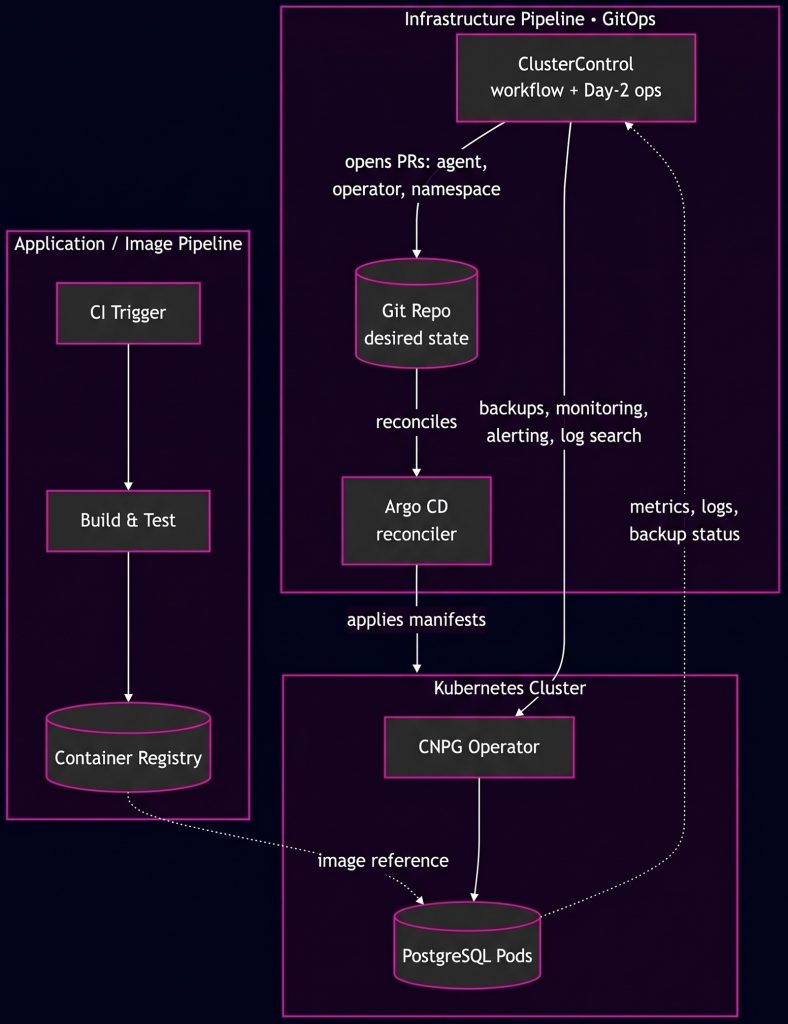
Two pipelines are running side by side here, and they’re easy to conflate:
- The application/image pipeline: Your usual CI. Build the app and any custom Postgres image, push to a registry, tag by commit SHA.
- Git is the source of truth for the desired state of the operator and cluster config; Argo CD is what pulls that state and applies it to the cluster. We’ve covered the broader GitOps model across infrastructure, Kubernetes, and database operators separately; here, the focus is the PostgreSQL deployment pipeline itself. ClusterControl’s Kubernetes workflow sits upstream of Argo CD rather than downstream of Kubernetes: it generates manifests and pull requests, while also providing the operational layer over the running database.
IaC tools do the layer underneath both of these. Terraform typically provisions the Kubernetes cluster itself (node pools, VPCs, storage classes), while Ansible is a good fit for host-level bootstrapping; ClusterControl in fact ships an Ansible role for its own installation, which is handy if you’re already standardizing VM/hybrid-node provisioning with Ansible playbooks.
Manual Scripts vs. ClusterControl
Manual approach:
- Pros: Full control over every step, no third-party dependency in the pipeline, nothing to license or learn.
- Cons: You own monitoring, failover detection, backup verification, and config-drift checking as separate scripts, each with its own failure modes. When the on-call engineer isn’t the one who wrote the failover script, incident response gets slower. None of it is centrally auditable unless you build that too.
Using ClusterControl:
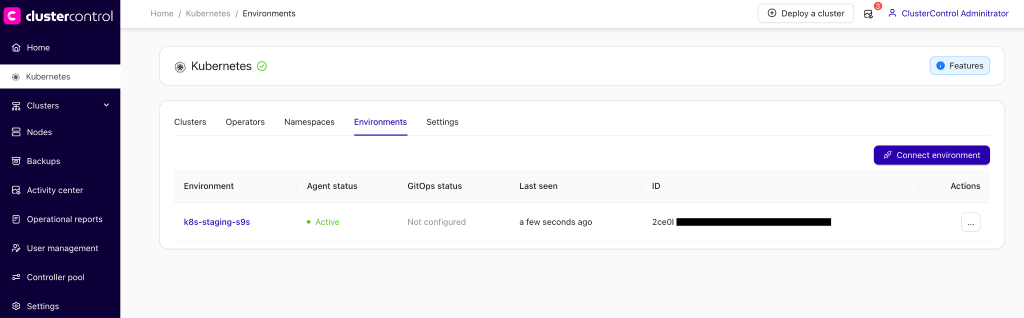
- Pros: One control plane for both VM-based and Kubernetes-based PostgreSQL, so you’re not maintaining a separate toolchain for the “old” and “cloud-native” halves of your estate. On the Kubernetes side specifically, ClusterControl deploys and manages the CloudNativePG (CNPG) operator, drives operator and namespace changes through GitHub pull requests reconciled by Argo CD, applies configuration/resource templates so clusters don’t drift from your standard, schedules backups to S3-compatible storage with retention policies, and gives you searchable, filterable logs per instance and container.
- Cons: It’s another tool to onboard and validate in your pipeline; you’re wiring in a GitHub connection and an Argo CD instance (or letting ClusterControl install one) alongside whatever CI you already run.
Containerizing PostgreSQL
A few habits keep a custom PostgreSQL image sane in a pipeline:
- build from the official image rather than from scratch,
- keep secrets out of the image entirely,
- and let Kubernetes handle the runtime identity and credentials instead of baking them in.
This first Dockerfile applies to a raw Deployment/StatefulSet you manage yourself, not to CNPG. That distinction matters and gets addressed below.
# Dockerfile
FROM postgres:18-alpine

LABEL maintainer="[email protected]"

# Any extensions not in postgres-contrib need to be added at build time
# on the Alpine variant
RUN apk add --no-cache curl

# Idempotent init scripts, run once against a fresh PGDATA on first boot
COPY init/*.sql /docker-entrypoint-initdb.d/

# Tuned config, mounted at runtime rather than hardcoded
COPY postgresql.conf /etc/postgresql/postgresql.conf

ENV POSTGRES_DB=appdb

EXPOSE 5432

HEALTHCHECK --interval=10s --timeout=5s --retries=5 \
  CMD pg_isready -U "${POSTGRES_USER:-postgres}" -d "${POSTGRES_DB}" || exit 1

CMD ["postgres", "-c", "config_file=/etc/postgresql/postgresql.conf"]
Notice there’s no USER directive forcing a fixed UID. The official image already supports running as an arbitrary non-root user via –user (or, in Kubernetes, securityContext.runAsUser combined with fsGroup so the mounted volume is writable by that UID); baking a specific USER into the Dockerfile fights against that flexibility rather than adding to it.
N.B. Never put POSTGRES_PASSWORD in the image; inject it from a Kubernetes Secret.
One more thing to flag if you’re on the current major version: starting with PostgreSQL 18, the image’s default PGDATA and volume path became version-qualified (e.g. /var/lib/postgresql/18/docker), which simplifies pg_upgrade –link between major versions but is a change to check for if you’re carrying over a Dockerfile written for Postgres 16 or earlier.
If you’re deploying through CNPG rather than a raw Deployment/StatefulSet, none of the Dockerfile above applies as written. CNPG overrides the container’s entrypoint and command with its own instance manager, so your custom CMD, HEALTHCHECK, init scripts, and copied postgresql.conf are never executed.
CNPG also expects the postgres user to run as UID 26, not the UID 70 used by the Alpine-based image above or the UID 999 used by the Debian-based variants of the official image. Its own operand images are also built independently from Debian slim base images, not from the official postgres image at all. In practice, this means using CNPG’s own images directly, or building FROM one of them if you need extra extensions:
FROM ghcr.io/cloudnative-pg/postgresql:18.4-minimal-trixie
USER root
RUN apt-get update && apt-get install -y --no-install-recommends postgresql-18-pgvector \
    && rm -rf /var/lib/apt/lists/*
USER 26
The Cluster manifest then references that image instead of a custom build off the official PostgreSQL image:
apiVersion: postgresql.cnpg.io/v1
kind: Cluster
metadata:
  name: app-postgres
spec:
  instances: 3
  imageName: ghcr.io/cloudnative-pg/postgresql:18.4-minimal-trixie
  storage:
    size: 20Gi
    storageClass: fast-ssd
  bootstrap:
    initdb:
      database: appdb
      owner: appuser
That manifest, or the equivalent ClusterControl generates when you deploy a cluster through its UI on top of the operator, is what actually lands in Kubernetes; the Dockerfile above just produces the image it references.
Schema Migrations in the Pipeline
Container immutability solves the binary; it doesn’t solve the schema. Flyway or Liquibase remain the right tools for that, run as a CI/CD step (or a Kubernetes Job/init container) ahead of the application rollout:
- Version-controlled migration files live in the same repo as the application (or a dedicated migrations repo), tagged and reviewed the same way as code.
- CI runs migrations against a throwaway or staging database as a gate before the image is promoted.
- The migration job runs against production as a discrete pipeline step, not baked into the application container’s entrypoint, so you can retry or roll it forward independently of the app rollout.
For zero-downtime changes specifically, the constraints are PostgreSQL’s, not the pipeline’s. Adding a column with a non-volatile default is a fast metadata-only change since PostgreSQL 11, but adding a NOT NULL constraint or a foreign key still needs a validation pass that briefly takes a lock; use NOT VALID plus a separate VALIDATE CONSTRAINT, or CREATE INDEX CONCURRENTLY for indexes, to avoid blocking writes. None of that is Kubernetes- or GitOps-specific, but it’s exactly what your migration step in CI/CD needs to enforce, since a green pipeline that ships a table-locking migration to production isn’t actually a win.
Observability and Rollbacks
Once the operator is running the cluster, ClusterControl’s monitoring gives you Postgres-specific dashboards (replication lag, query performance, connection saturation), plus alerting and per-instance/per-container log search, useful precisely because Kubernetes’ own kubectl logs doesn’t give you cross-node correlation during an incident.
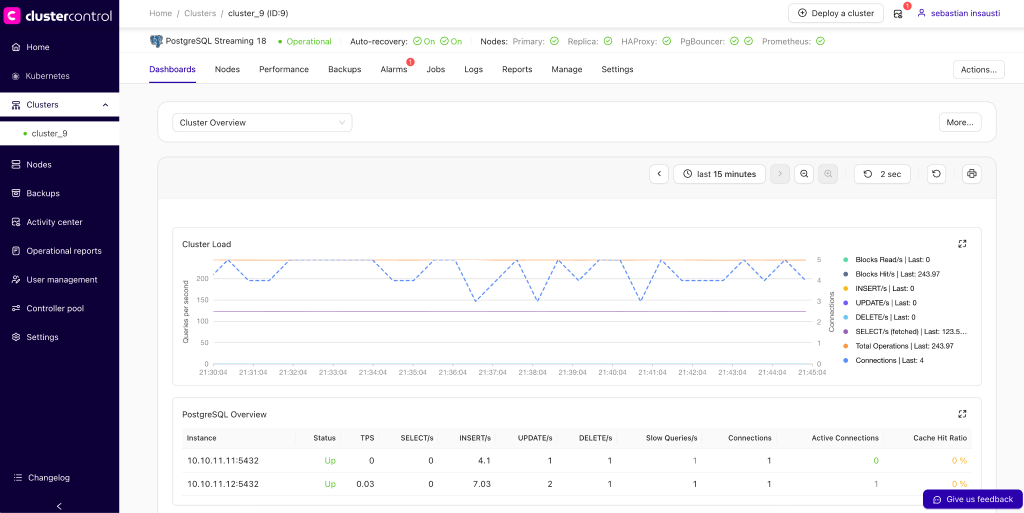
Rollback is where it’s worth separating two different failure classes, because “revert the commit” only cleanly covers one of them:
- Infrastructure/config rollback: A bad operator version, a misconfigured resource template, a namespace change. Because ClusterControl drives these through Git and Argo CD, the rollback path is exactly what you’d expect from GitOps: revert the commit, merge the PR, let Argo CD reconcile the previous state back into the cluster.
- Data-level rollback: A bad migration that already committed transactions, or corrupted data from an application bug. A git revert doesn’t undo rows that were already written; you need PostgreSQL’s own recovery tools: WAL-based point-in-time recovery, or restoring from a scheduled backup. This is where ClusterControl’s backup orchestration (scheduled, retained, S3-compatible) and its restore tooling do the actual work; GitOps gives you a clean audit trail of what changed and when, which speeds up figuring out which backup or PITR target to restore to, but it doesn’t replace the restore itself.
Conflating those two in a runbook is a good way to have someone confidently git revert their way through what’s actually a data-recovery incident.
Conclusion
Containerize PostgreSQL with the same discipline you’d apply to any other stateful image (official base, non-root at runtime, secrets injected not baked in), let an operator like CloudNativePG own the replication and failover logic Kubernetes doesn’t provide natively, and use Git plus a reconciler like Argo CD as the source of truth for that operator’s lifecycle.
ClusterControl represents the workflow layer that turns operator and namespace changes into reviewable PRs, and the Day-2 layer that gives you backups, monitoring, and log search across both your Kubernetes and traditional environments from one place (check out the ClusterControl Kubernetes User Guide to see how to quickly implement the workflow).
For further reading on the security side of this stack, the CIS Docker Benchmark and the OWASP Kubernetes Security Cheat Sheet are the standard references for hardening the container and cluster layers this pipeline runs on top of.