
blog
GitOps for Kubernetes Databases: From Infrastructure to Database Operators

Most platform teams already use GitOps for their Kubernetes apps. The config lives in Git, Argo CD applies it, and deployments are predictable. But look one layer down and things get messy.
Infrastructure setup is often still done by hand, running Terraform locally or through scattered scripts. Database operations, especially for databases running through Kubernetes operators, are handled through a different set of tools and dashboards.
So you end up with one layer that’s fully GitOps, and everything under it or beside it is still manual. Every environment turns into its own special case, and when something breaks, you’re checking three or four different systems just to figure out what changed.
This post walks through a simple way to fix that, using three layers that work together:
- GitOps for infrastructure, using Terraform or OpenTofu.
- GitOps for Kubernetes, using Argo CD.
- A consistent way to run day-to-day database operations for operator-managed databases, using ClusterControl.
The point isn’t to add another tool just to have one. It’s to end up with fewer parts of your stack running on manual steps and tribal knowledge.
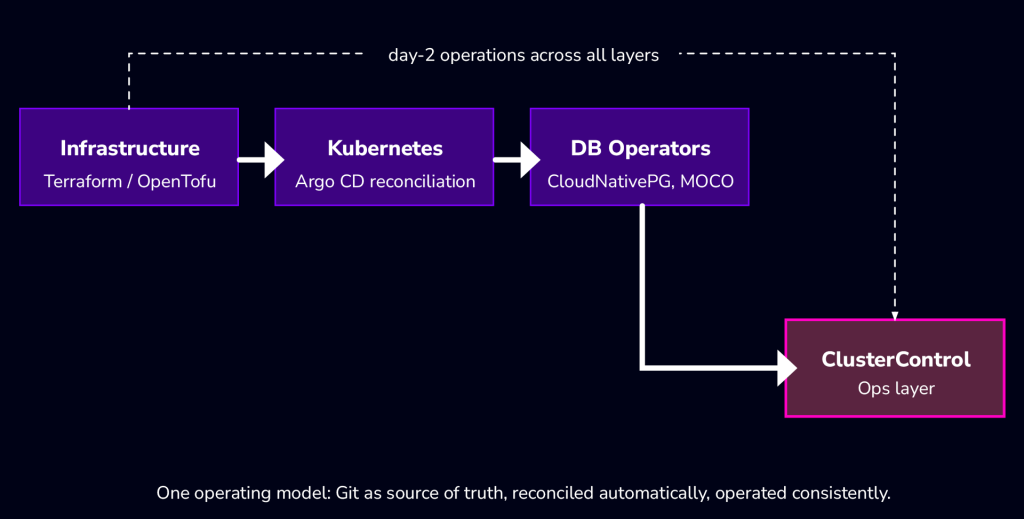
The GitOps model: what stays the same across layers
No matter which layer you’re looking at, GitOps comes down to three things:
- Git holds the desired state.
- Config is declarative, not a list of commands to run in order.
- Something keeps checking the real state against Git and fixes drift automatically.
Where the layers differ is how that fixing happens. Terraform works in plan-then-apply steps: you generate a plan, someone reviews it, then it’s applied. Argo CD works as a loop: it keeps comparing live state to Git and corrects drift on its own, without anyone pressing a button.
Both are valid. The problem shows up when teams assume they work the same way, or when they stop doing GitOps once they get past the Kubernetes layer.
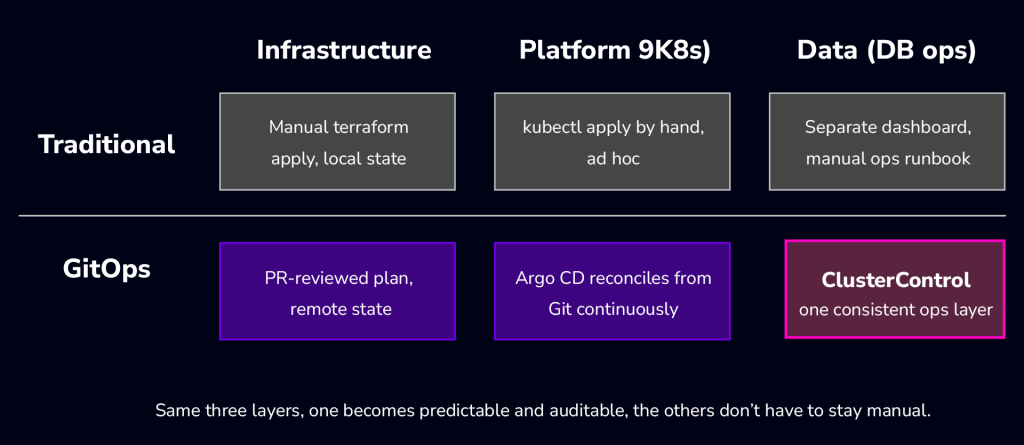
Layer 1: GitOps for infrastructure
This is usually the first layer teams try to automate, and the one where picking the right tool matters most.
Atlantis vs Flux tf-controller vs CI
Atlantis is a good fit if you want every infra change reviewed like a pull request: someone opens a PR, Atlantis posts the terraform plan as a comment, and apply only runs after approval. Good for teams that want the same review habits for infra as they have for app code. Downside: it’s one more service you have to run.
Flux’s tf-controller fits teams already living in Kubernetes. Terraform state becomes a custom resource inside the cluster, reconciled the same way as everything else. You skip running a separate CI runner for infra, but your Terraform workflow is now tied to Kubernetes.
A plain CI pipeline, like GitLab CI, is the simplest choice if you already have CI running and don’t want a new tool. The catch is you build plan/apply logic, locking, and approvals yourself instead of getting them for free.
| Atlantis | Flux tf-controller | CI pipeline | |
| Best for | Teams that want PR review on infra | Kubernetes-native teams | Teams already standardized on CI |
| How it runs | Plan/apply via PR comments | Reconciliation loop via CRDs | Plan/apply as pipeline steps |
| Extra thing to run | Atlantis itself | Nothing extra (runs in-cluster) | Nothing extra (reuses CI) |
| Who approves changes | PR approval | RBAC + CRD review | Pipeline approval gate |
A repo layout that doesn’t fall apart later
Keep environments separate from shared modules, so a change to one module gets reviewed once instead of copy-pasted into three places:
infra/
   modules/
 	network/
 	compute/
 	database/
   environments/
 	dev/
 	staging/
 	prod/
State and secrets: the part everyone forgets
Once more than one person or pipeline touches the same infra, local Terraform state isn’t good enough. You need a remote backend. An S3-compatible one works the same whether you’re on AWS, MinIO, or another provider:
terraform {
   backend "s3" {
 	bucket   = "example-tfstate"
 	key      = "prod/network/terraform.tfstate"
 	region   = "us-east-1"
 	endpoint = "https://s3.example-provider.com"
   }
 }
The other half is secrets. Plan output often gets posted straight into a PR comment or CI log, so anything not marked sensitive can leak.
variable "db_password" {
   type      = string
   sensitive = true
 }
N.B. Don’t post secrets in plan output. Check how your plan output actually renders in Atlantis or CI before you wire up any automation that posts it.
Layer 2: GitOps for Kubernetes
How Argo CD reconciliation works
Argo CD watches a Git repo and keeps the cluster matching it. For database workloads, Kubernetes adds another layer of state, storage, and lifecycle management that application GitOps doesn’t address. There’s no separate “apply” step like Terraform. Drift gets caught and fixed automatically, based on your sync policy.
apiVersion: argoproj.io/v1alpha1
 kind: Application
 metadata:
   name: platform-apps
 spec:
   source:
 	repoURL: https://github.com/example-org/platform-gitops
 	path: apps/production
 	targetRevision: main
   destination:
 	server: https://kubernetes.default.svc
 	namespace: platform
   syncPolicy:
 	automated:
   	prune: true
   	selfHeal: true
Where teams get stuck
The problem usually isn’t Argo CD, it’s that Argo CD ends up as one island among several: Terraform running its own way, database operators managed through a separate dashboard, and nothing tells you the full picture of what changed across all of it.
Layer 3: Running operator-managed databases without the mess
Operators deploy. They don’t operate.
Kubernetes operators are good at one job: turning a config into a running database. That’s deployment. It says nothing about whether backups are actually restorable, who’s watching replication lag, or what happens during an incident.
Deploying a database and running a database are two different jobs.
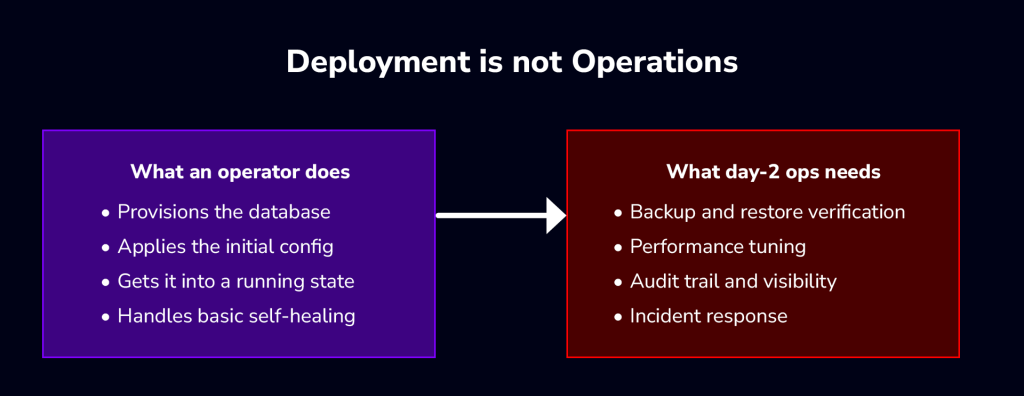
ClusterControl as the operations layer
There are two ways to run databases on Kubernetes through ClusterControl: manage them directly through the UI, or run them through GitOps. GitOps is optional, not required.
When GitOps is enabled, the split looks like this: Git holds the truth, Argo CD keeps the cluster matching it, and ClusterControl gives you the workflow interface and day-to-day operations on top of whatever operator is running. Cluster deployments, backup schedule changes, and add-on changes all go through a Git pull request that you review and merge before they take effect, not applied straight to the cluster.
In practice, setting up the GitOps path is four steps:
- Connect ClusterControl to the Kubernetes cluster.
- Connect the Git repo holding operator config.
- Connect or install Argo CD.
- Deploy and manage the operator through ClusterControl.

What ClusterControl actually supports right now
• Supported operators: CloudNativePG and MOCO.
• Deploy and manage operator lifecycle from the ClusterControl UI.
• Change operator settings through the UI or YAML.
• Run MySQL and PostgreSQL operations through a GitOps-based workflow.
• Set backup retention policies against S3-compatible storage.
| VM database ops | Kubernetes operator database ops | |
| Deployment | ClusterControl deploy wizard | Operator + ClusterControl lifecycle management |
| Config | ClusterControl UI | UI or YAML |
| Backups | ClusterControl scheduling | Retention policy, S3-compatible storage |
| Day-2 visibility | ClusterControl dashboard | ClusterControl dashboard |
What GitOps covers once it’s turned on
To be precise about scope, once GitOps is enabled on an environment:
- Database cluster deployments are proposed as a pull request, not applied directly.
- Backup schedule changes follow the same pull-request flow.
- Add-on changes made in the deployment wizard are also proposed through Git.
- Secrets referenced by the generated manifests are handled through the Git workflow, with cluster configuration and certificates stored as Kubernetes Secrets rather than local config files.
- You can trigger an on-demand sync from Git at any time, instead of waiting for the next automatic reconciliation.
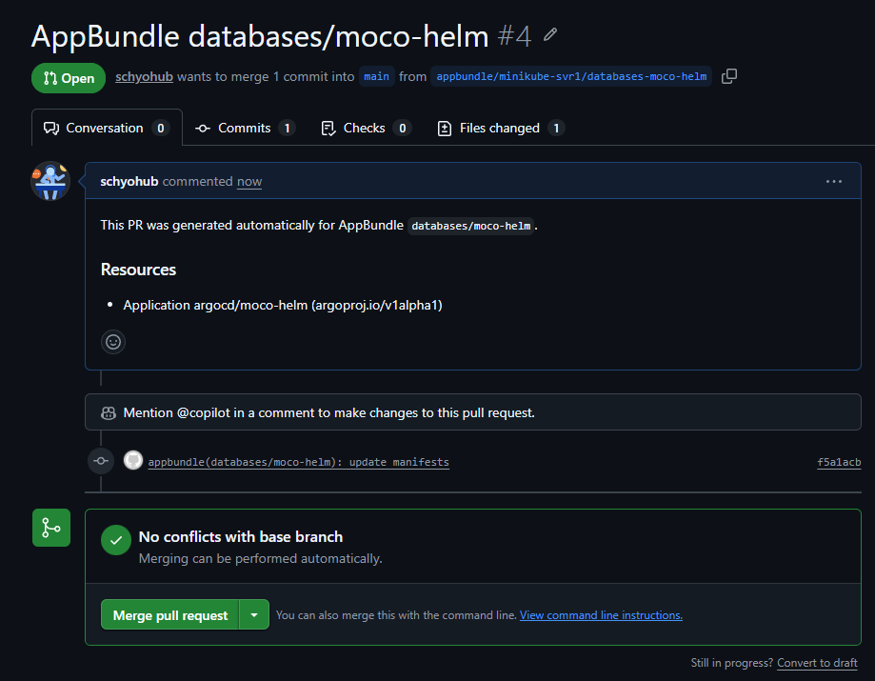
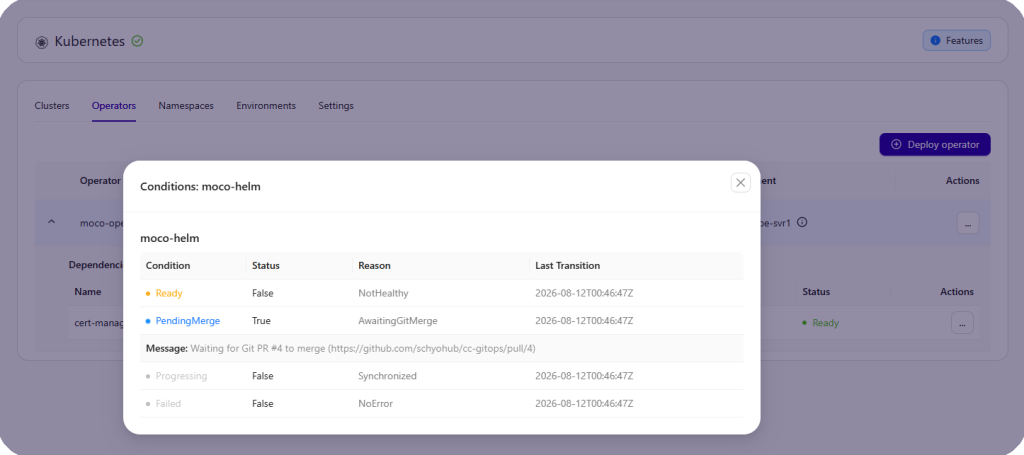
Deploying an operator through the UI generated a pull request automatically, and the operator’s status stayed Pending with a condition reading PendingMerge: AwaitingGitMerge, along with a direct link to the PR still waiting on review. After merging, Argo CD picked up the change and moved the status to Ready: Healthy.
Screenshot 1: the pull request generated automatically for the AppBundle deployment.
Screenshot 2: status held at PendingMerge, reason AwaitingGitMerge, with a direct link to the open PR.
Screenshot 3: status after the PR is merged and Argo CD syncs, now Ready and Healthy.
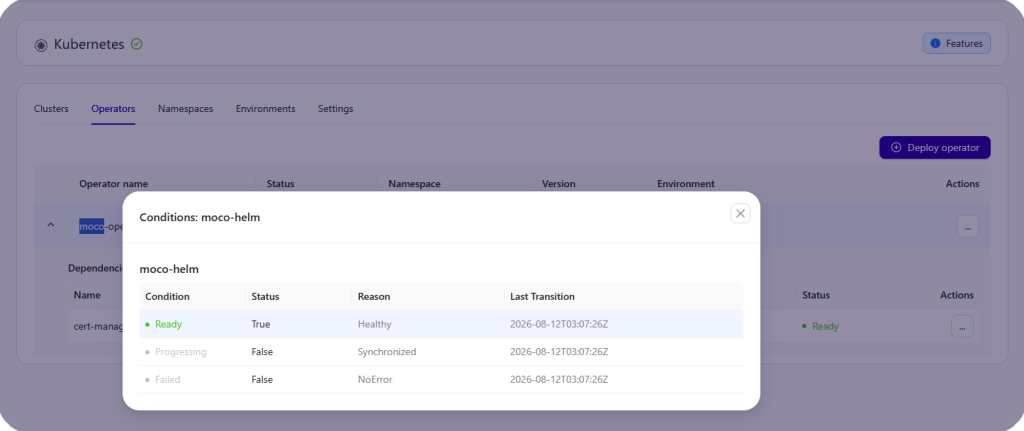
This matches what the documentation describes: the deployment is proposed as a pull request, and only takes effect once it’s reviewed and merged.
Putting it all together
The reference setup
- Infrastructure provisioned through Terraform GitOps.
- Kubernetes kept in sync through Argo CD.
- Operator lifecycle and database ops run through ClusterControl.
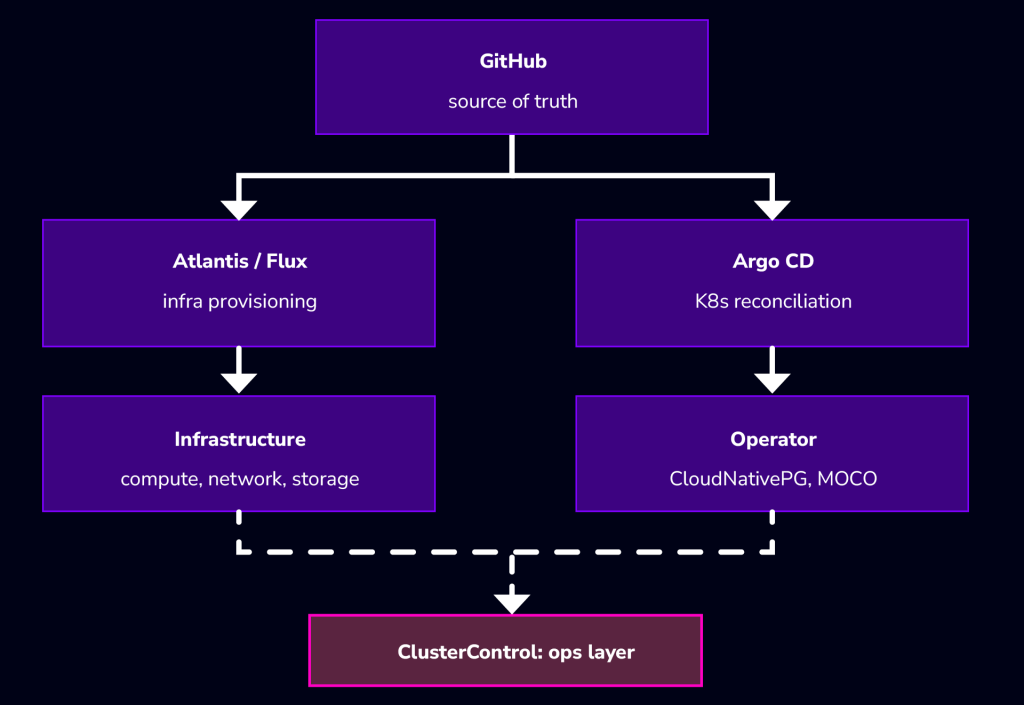
One change, start to finish: someone opens a PR to add a new database cluster. That triggers a Terraform plan for anything infra needs, gets reviewed, and applies. Argo CD picks up the manifest changes and syncs the operator config into the cluster. ClusterControl picks up the resulting operator and cluster, and the team gets visibility, backups, and monitoring without setting any of that up by hand.
A repo layout that matches this
infra/      # Terraform: networking, compute, storage
 platform/  # Argo CD applications, namespaces, policies
 data/   	 # Operator configs, managed through ClusterControl's Git integration
The data/ row above is the general idea. In practice, if you point ClusterControl’s GitOps integration at an empty repository, it doesn’t ask you to design a folder structure at all. The agent lays one out itself, with a fixed convention starting from the repo root:
severalnines/
   kuber-agent/
     <environment-name>/
   	apps/
         platform/base/
           namespaces/
             <namespace>/
               namespace.yaml
           operators/argo/
             <operator-name>.application.yaml
Each operator and dependency gets its own Argo CD Application manifest under operators/argo/, and each database namespace gets its own folder under namespaces/. This is generated and maintained by the agent, not something you nest under your own data/ folder by hand. If you’re using the same repository for infra and platform GitOps too, plan for ClusterControl to own its own subtree rather than trying to fit it into a layout you designed yourself.
A rollout checklist
| Phase | What to do | Who owns it |
| 1 | Infrastructure GitOps basics: remote state, secrets, PR workflow | Platform |
| 2 | Argo CD reconciliation baseline | SRE |
| 3 | Operator lifecycle and day-2 ops with ClusterControl | DBA |
Start with phase 1 even if phases 2 and 3 are still months out. A clean state and secrets setup is what the other two phases depend on.
Conclusion
GitOps isn’t a tool you install once. It’s a way of working, and it only pays off when you apply it consistently across infrastructure, Kubernetes, and database operations, rather than stopping at the app layer.
If you haven’t already, start with infra and Kubernetes. Then bring your operator-managed databases into the same model, using ClusterControl to handle lifecycle and day-to-day ops instead of adding one more disconnected dashboard.
See a private walkthrough or try ClusterControl free for 30 days to see this running on your own stack.
Install ClusterControl and try its Kubernetes management panel free for 30 days
Script Installation Instructions
The installer script is the simplest way to get ClusterControl up and running. Run it on your chosen host, and it will take care of installing all required packages and dependencies.
Offline environments are supported as well. See the Offline Installation guide for more details.
On the ClusterControl server, run the following commands:
wget https://severalnines.com/downloads/cmon/install-cc
chmod +x install-cc
sudo ./install-cc     # omit sudo if you run as root
After the installation is complete, open a web browser, navigate to https://<ClusterControl_host>/, and create the first admin user by entering a username (note that “admin” is reserved) and a password on the welcome page. Once you’re in, you can deploy a new database cluster or import an existing one.
The installer script supports a range of environment variables for advanced setup. You can define them using export or by prefixing the install command.
See the list of supported variables and example use cases to tailor your installation.
FAQ
Do I need Argo CD already? No. The infra layer and the ClusterControl ops layer are useful on their own. Argo CD matters once you have Kubernetes workloads you want automatically kept in sync with Git.
Which operators are supported today? CloudNativePG and MOCO, through ClusterControl’s Kubernetes Database Operator Management.
Can I deploy a database cluster through GitOps? Yes, once GitOps is enabled on the environment. The deployment is proposed as a Git pull request, and it only takes effect after you review and merge it, the same way backup schedule and add-on changes work.
How do I stop secrets leaking into plan output? Mark sensitive variables and outputs with sensitive = true, and check how your plan output actually renders in PR comments or CI logs before automating anything.
Where should Terraform state live? In a remote, S3-compatible backend. This works the same in cloud, on-prem, or hybrid setups.