
blog
PostgreSQL Infrastructure as Code: Consistent Deployment and Operations

Every team running PostgreSQL eventually runs into the same problem: someone tunes a database by hand on a Tuesday afternoon, and six months later nobody can reproduce it. A new environment gets spun up “close enough” to production, a config setting drifts, a role never gets created, and a five minute incident turns into a two hour one because nobody’s quite sure what’s actually different between the two boxes.
That’s not a Postgres problem, but a consistency one, and it’s the reason DevOps teams lean on Infrastructure as Code (IaC) in the first place. Once infrastructure is defined as code, checked into Git, and applied the same way every time, two benefits fall into place almost automatically, thereby stopping the kind of mistake that’s easy to make by hand, e.g. a missing pg_hba.conf line, a shared_buffers value that’s different in DR, etc.,
- infrastructure changes get versioned and reviewed like application code,
- environments across staging, DR, and production share a consistent baseline, with intentional differences defined as inputs instead of drifting apart
However, Postgres does complicate the picture in a couple of specific ways. The first is state. You can blow away and recreate a stateless app server without thinking twice about it, but you can’t do that to a primary node holding production data. IaC for Postgres has to draw a hard line between what’s safe to recreate (nodes, configs, extensions) and what absolutely has to be preserved and migrated instead. The second is schema migrations: application code and table structure evolve together, but terraform apply has no idea how to run an ALTER TABLE, so that has to be handled by something else layered on top of the infrastructure layer rather than baked into it.
This post walks through how to apply IaC to Postgres specifically, where tools like Ansible, Helm, Puppet, Terraform, and Chef fit, and how ClusterControl can sit on top of it all as a single orchestrator for the operational parts (failover, backups, scaling) that scripting alone tends to handle badly.
IaC Tools Overview
As with everything, there isn’t a single correct answer for which tool to use; it depends on the size of the environment, what your team already knows, and what your existing pipeline looks like.
Tool | Ideal Use Case | Key Considerations |
| Ansible | Managing configuration on existing infrastructure; handles software installation, postgresql.conf tuning, and user role creation. | Since it is agentless and push-based, it excels at automating the repetitive, day-to-day administrative tasks that DBAs typically script first. |
| Helm | Orchestrating Postgres deployments within Kubernetes via StatefulSets, secrets, and operators like CloudNativePG or Zalando. | A natural choice for K8s-native stacks, but remember it manages the cluster objects; you still need an operator or external tool for database internals like HA and backups. |
| Puppet | Maintaining a strict configuration state across massive, long-lived database fleets spanning several years. | Declarative and agent-based with robust drift detection via the puppetlabs-postgresql module, though the master/agent architecture adds its own maintenance overhead. |
| Terraform | Deploying the foundational cloud layer: virtual machines, network topology, and persistent storage volumes. | Powerful HCL-driven provisioning with a vast provider network, but lacks native logic for executing SQL or monitoring replication lag. |
| Chef | Environments that have already standardized on its ecosystem for general configuration management. | Capable of handling the job, though it is rarely the primary choice for new greenfield Postgres deployments in the current landscape. |
Most Postgres pipelines end up combining at least two of these: Terraform (or Chef) to stand up the compute and networking, Ansible or Puppet to configure PostgreSQL once the nodes exist, or Helm if the whole stack already runs on Kubernetes. Team size tends to decide the split more than any technical superiority. A two person platform team doesn’t need another moving part, while a larger org with dedicated infra engineers and multiple environments can usually afford the extra tooling surface.
Manual IaC vs. ClusterControl
Once a toolchain is picked, there’s a second decision hiding beneath it: how much of the database-specific operational work, e.g. failover, backup scheduling, replication setup, performance checks, do you script yourself, versus hand off to something built for purpose?
Manual IaC
Scripting everything yourself gives you direct customization since every step is exactly what your team wrote, reviewed, and understands, and it keeps dependencies minimal because the pipeline only needs the IaC tools themselves, nothing else to install or license.
The trade-off shows up on the harder tasks: automated failover, backup verification, and performance checks all need custom logic that has to be maintained and tested like any other piece of software, and that’s usually where edge cases quietly slip through, a replica falling too far behind, a backup that silently failed, a split brain scenario during failover. Not because of anyone’s carelessness, but because scripting comprehensively for every failure mode is genuinely hard and easy to keep deprioritizing.
Using ClusterControl
ClusterControl gives you full lifecycle database management instead, with provisioning, replication, backups, and monitoring all exposed through a REST API and the s9s CLI. So, rather than reimplementing HA logic, your IaC scripts just call an interface someone else already built and tested. Across more than a handful of clusters, having one control plane instead of five different scripts starts to matter a lot.
The trade-off is that you still have to integrate it: ClusterControl calls need to be wired into your existing IaC code, since it’s an orchestration layer and not a Terraform or Ansible replacement, and there’s a real initial learning curve around the API/CLI and around deciding what you hand fully to ClusterControl versus what stays in your own scripts.
Neither option is “correct” on its own. Most teams working with us land somewhere in the middle: Terraform and Ansible (or Puppet, or Helm) for what they’re already good at, provisioning and configuration at the OS or package level, and ClusterControl for the database lifecycle work that would otherwise mean reinventing HA and backup logic from scratch.
Scripting Routine DBA Tasks
A lot of daily DBA work is repetitive enough that it’s worth templating once: provisioning new nodes with a consistent OS baseline and storage layout, applying a tuning profile per workload type (OLTP looks nothing like an analytics box), and creating roles and databases the same way every time instead of through a single psql session someone will forget the details of later.
Here’s what that looks like as a reusable Ansible task for role creation:
- name: Ensure application role exists
  postgresql_user:
    name: "{{ app_role }}"
    password: "{{ app_role_password }}"
    role_attr_flags: "NOSUPERUSER,NOCREATEDB"
    state: present
  become: true
  become_user: postgres
  no_log: true

- name: Grant privileges on application database
  postgresql_privs:
    login_db: "{{ app_db }}"
    role: "{{ app_role }}"
    privs: "SELECT,INSERT,UPDATE,DELETE"
    type: table
    objs: ALL_IN_SCHEMA
    schema: public
  become: true
  become_user: postgres
Wrap that in a shared Ansible role, parameterized per environment, and “create the standard app role” stops being a runbook step someone follows from memory and becomes something that behaves the same way everywhere it’s applied.
If your team runs Puppet instead, the same role and table-privilege logic can be written as a class on top of the puppetlabs-postgresql module, with the nice side effect that the Puppet agent keeps reapplying it, so drift gets corrected on its own instead of only getting fixed the next time someone deploys:
class profile::postgresql::app_role (
  String $app_role,
  String $app_db,
  Sensitive[String] $app_role_password,
) {

  postgresql::server::role { $app_role:
    password_hash => postgresql_password($app_role, $app_role_password.unwrap),
    superuser     => false,
    createdb      => false,
  }

  # SELECT, INSERT, UPDATE, DELETE on all tables in the public schema.
  ['SELECT', 'INSERT', 'UPDATE', 'DELETE'].each |$priv| {
    postgresql::server::grant { "${app_role}_${priv}_public_tables":
      privilege   => $priv,
      object_type => 'ALL TABLES IN SCHEMA',
      object_name => 'public',
      db          => $app_db,
      role        => $app_role,
      require     => Postgresql::Server::Role[$app_role],
    }
  }

  # Enforce a standard tuning baseline; the agent corrects drift
  # on its next run if someone edits postgresql.conf by hand.
  postgresql::server::config_entry { 'shared_buffers':
    value => '4GB',
  }
}
Either way, the goal is the same: turn a one-off task into a reusable module that gets applied consistently across every environment, not just the one someone happened to be looking at that day.
CI/CD for Database Changes
Provisioning consistency only solves half the problem. The other half is making sure schema changes go through the same rigor as everything else in the pipeline, and that’s where tools like Flyway and Liquibase come in. Both treat schema changes as scripts under version control, run in order, with a tracked history of what’s already been applied where.
The pattern that tends to hold up:
- A schema change gets committed alongside the application code it belongs to.
- CI spins up an ephemeral PostgreSQL environment (a throwaway instance or container) for that commit or PR.
- Flyway or Liquibase applies the migration against it as part of the test run, so a breaking change shows up before it ever reaches staging.
- Only once that passes does the same migration script get applied anywhere shared.
That’s really the whole point. Infrastructure as code and schema as code end up versioned and tested the same way, and neither one depends on somebody remembering to do a manual step at 4pm on a Friday.
ClusterControl as an Orchestrator
Put the last few sections together and the division of labor is pretty natural: IaC tools provision the servers, and ClusterControl turns those servers into an actual managed PostgreSQL cluster.
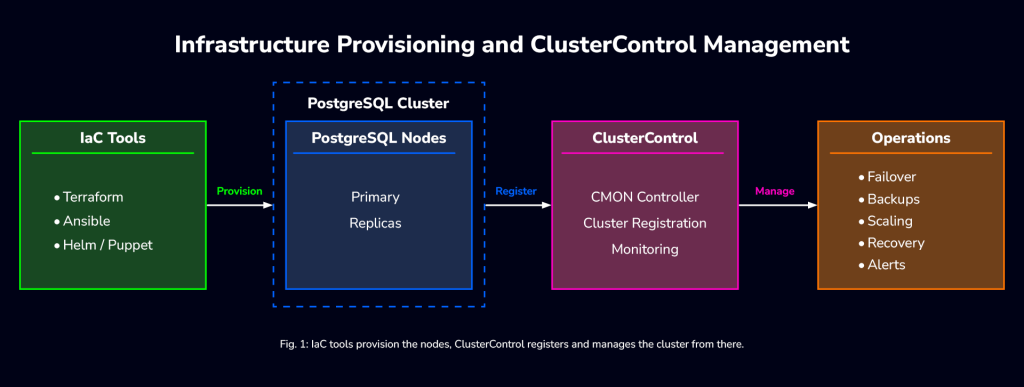
For Terraform-based workflows, start by evaluating the native ClusterControl provider. It lets you express supported database-cluster resources directly in Terraform, rather than representing the handoff only as a shell command.
The CLI and API remain useful for other automation systems and custom workflows, but those integrations should explicitly handle existing clusters, job completion, and failures. The handoff from “provisioned VM” to “managed cluster” is usually a single API or CLI call that has ClusterControl deploy PostgreSQL on the nodes once they exist. A simplified version, triggered from Terraform:
resource "null_resource" "deploy_postgresql_cluster" {
  depends_on = [aws_instance.pg_node]

  provisioner "local-exec" {
    command = <<-EOT
      s9s cluster --create \
        --cluster-type=postgresql \
        --nodes="${join(";", aws_instance.pg_node[*].private_ip)}" \
        --provider-version=16 \
        --cluster-name="prod-pg-cluster" \
        --db-admin=postgres \
        --db-admin-passwd="${var.pg_admin_password}"
    EOT
  }
}
Or the same step from an Ansible playbook, calling the ClusterControl REST API directly:
- name: Authenticate to the ClusterControl CMON API
  uri:
    url: "https://cc-controller.internal:9501/v2/auth"
    method: POST
    validate_certs: true
    # For an internal CA, point at its certificate instead of disabling validation:
    # ca_path: /etc/pki/tls/certs/internal-ca.pem
    body_format: json
    body:
      operation: "authenticateWithPassword"
      user_name: "{{ cc_user }}"
      password: "{{ cc_password }}"
  register: cc_auth
  no_log: true

- name: Deploy PostgreSQL on provisioned nodes
  uri:
    url: "https://cc-controller.internal:9501/v2/jobs/"
    method: POST
    validate_certs: true
    headers:
      Cookie: "{{ cc_auth.cookies_string }}"
    body_format: json
    body:
      operation: "createJobInstance"
      job:
        class_name: "CmonJobInstance"
        job_spec:
          command: "create_cluster"
          job_data:
            cluster_type: "postgresql_single"
            type: "postgresql"
            vendor: "postgres"
            version: "16"
            cluster_name: "prod-pg-cluster"
            nodes:
              - class_name: "CmonHost"
                hostname: "10.0.0.1"
              - class_name: "CmonHost"
                hostname: "10.0.0.2"
            postgre_user: "postgres"
            postgre_password: "{{ pg_admin_password }}"
            ssh_user: "root"
            install_software: true
  no_log: true
Both API tasks keep certificate validation on (validate_certs: true), so the ClusterControl controller needs to present a certificate the Ansible control node trusts. If you use an internal certificate authority, add its CA certificate to the control node’s trust store, or reference it with ca_path, rather than disabling validation. no_log: true keeps the passwords and the session cookie out of Ansible’s output and logs. For the same reason, avoid debug tasks that print cc_auth or the job request body.
Note: Once ClusterControl has deployed and is managing the cluster, don’t run failover or backup logic in two places at once. If ClusterControl owns failover and backups, pull that responsibility out of any custom scripts.
You don’t want two systems making conflicting decisions in the middle of an incident. From here, tasks such as promoting a replica, scheduling backups with pgBackRest or pg_basebackup, and adding replicas can all be managed through the same API or CLI your pipeline already calls. One interface, instead of a different script for every operational task.
Conclusion
DevOps best practices and Infrastructure as Code give PostgreSQL the same versioning and consistency that application teams have relied on for years, but Postgres’s stateful nature means provisioning code alone doesn’t cover everything. That’s the gap ClusterControl fills. Terraform, Ansible, Helm, Puppet, or Chef handle the repeatable provisioning and configuration work, and ClusterControl takes on the harder database lifecycle problems, e.g. failover, backups, scaling, monitoring, through an API and CLI your scripts can already call. Together, they cut down both the friction of managing Postgres across environments and the risk of an inconsistent one causing an outage nobody can explain.
The same pattern extends further for teams operating at a larger scale. A few places to go deeper on that:
- Deploy and Failover to a Secondary Cluster, for cross-region DR setups.
- ClusterControl Ops-C, for a centralized view when a single ClusterControl instance isn’t enough to manage a large or multi-region fleet.
- Terraform Provider for ClusterControl, for teams who want the cluster deployment step itself expressed natively in Terraform rather than through a local-exec provisioner.
- ClusterControl Kubernetes Integration, for Postgres clusters that live alongside the rest of a Kubernetes-native stack.
If you’re just getting started, don’t try to script everything at once. Pick one routine task, node provisioning, role creation, or cluster deployment, and let that be the template the rest of the pipeline grows from.
PostgreSQL infrastructure as code FAQ
What should infrastructure as code manage in a PostgreSQL deployment?
Infrastructure as code should define repeatable resources and settings, such as compute, networking, storage configuration, and supported database-cluster resources. Keep ownership explicit: decide which tool controls each resource or setting, and handle persistent data and application schema changes through appropriate migration and recovery procedures. ClusterControl’s Terraform provider supports defining database-cluster resources alongside the surrounding infrastructure.
How can teams reduce PostgreSQL configuration drift?
Keep a shared configuration baseline in version control, with reviewed inputs for intentional differences between environments. Regularly compare the running configuration with that baseline and reconcile unexpected changes. Configuration-management tools can enforce declared settings, but teams should avoid having multiple tools independently manage the same setting.
Does infrastructure as code replace database migration tools?
No. Infrastructure provisioning and application schema evolution are separate responsibilities. Tools such as Flyway and Liquibase track and apply versioned schema changes, while the deployment pipeline tests those changes before release. A successful infrastructure deployment does not, by itself, demonstrate that an application migration is safe.