blog
PostgreSQL + ClickHouse Recovery: Test the Whole Data Service
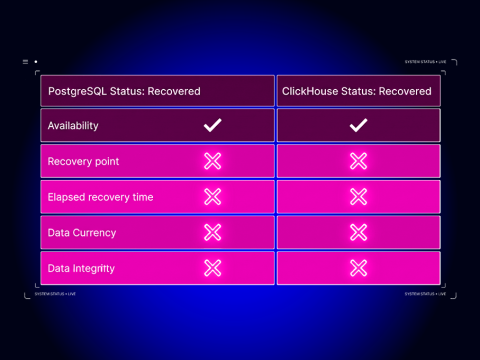
A restore job finishes green. PostgreSQL is taking orders, ClickHouse is answering queries, and the revenue dashboard loads without errors. Then someone from finance asks why January 15 shows 12,750 in revenue when the order system says 12,350.
Nothing is down and no alert has fired. The numbers are simply wrong.
This post walks through a recovery exercise for one specific architecture. PostgreSQL is the system of record for a fictional order service. Debezium captures its changes (change data capture, or CDC) and streams them through Apache Kafka, and ClickHouse serves the revenue dashboards. In the scenario, the ClickHouse tier is lost while PostgreSQL keeps accepting writes, and the question is what evidence you need before telling the business that the analytics service is back.
Not every PostgreSQL + ClickHouse deployment fails like this, and this post doesn’t try to cover every pattern. For the broader catalog, read PostgreSQL + ClickHouse architectural patterns. This post is narrower: it builds a recovery test that fails when the data is wrong.
Define what “recovered” means before you break anything
“Recovered” covers at least five different claims, and each has its own evidence:
| Dimension | Question it answers | Evidence in this walkthrough |
| Availability | Do the databases accept connections and queries? | ClickHouse responds after the restore job; PostgreSQL never stopped |
| Recovery point | What is the newest state the restored copy contains? | Highest Kafka offset present in the restored ClickHouse table |
| Elapsed recovery time | How long from failure to accepted service? | Timestamps T3 to T10 in the recovery timeline, not T3 to “restore finished” (T7) |
| Freshness | Has the analytical tier caught up with the source at an agreed boundary? | Writer paused, topic end offset stable, consumer lag zero |
| Correctness | Do users see the right answer? | Key-level diff and the business query match an independent expected-results file |
Most recovery runbooks stop at availability. Some add a row count. The failure this walkthrough looks for sits further down the table, where both databases are available and the counts can even look plausible, but an update or delete never made it across.
Agree on authority before you start. In this walkthrough:
- Current orders: PostgreSQL is authoritative. If ClickHouse and PostgreSQL disagree about an order that still exists in PostgreSQL, PostgreSQL wins.
- Historical orders: here PostgreSQL keeps every row, so it is authoritative for history too. Many production deployments purge PostgreSQL after a retention window and keep the long tail only in ClickHouse. That changes what a recovery can bring back, as covered later in this post.
- Expected results: a file generated from the dataset specification, not exported from either database. If you derive “expected” from one of the systems under test, you lose the ability to detect that the system itself is wrong.
The acceptance query is the one the dashboard runs: daily order count and revenue by order date. The application owner, not the DBA, signs off that its output matches the expected file. The DBA can prove that the databases work. Only the application owner can confirm the numbers are what the business expects.
Map backup and CDC dependencies
Before writing a runbook, list every place that holds state the recovery depends on. In this architecture there are more of them than “two databases.”
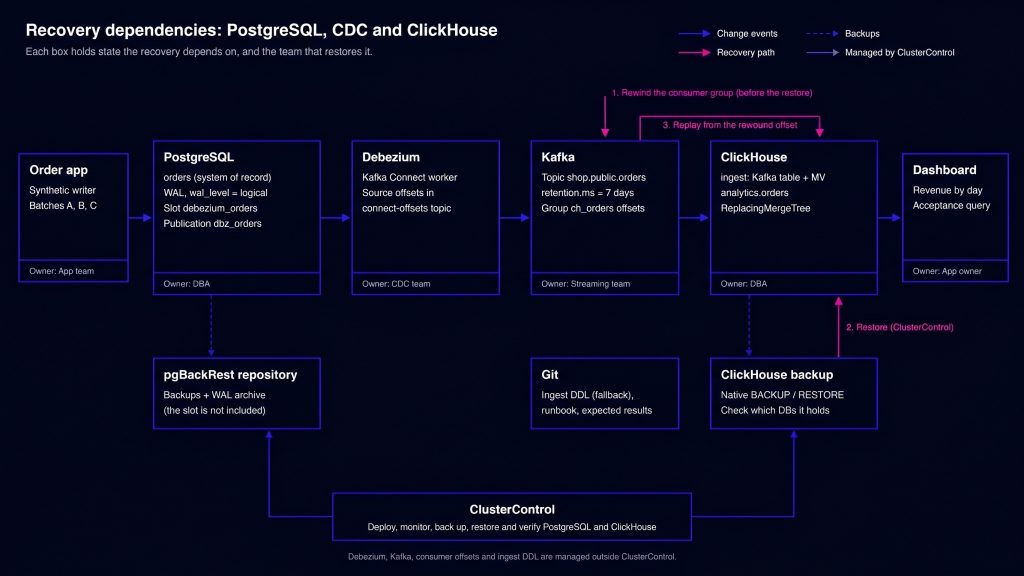
Figure 1. Recovery dependencies across PostgreSQL, CDC state and ClickHouse history. Solid arrows carry change events, dashed arrows carry backups, and the numbered arrows show the recovery steps in order.
| State | Where it lives | Retention | Credentials | Owner / restored by | Network path |
| PostgreSQL data and write-ahead log (WAL) archive | pgBackRest repository | Backup policy in ClusterControl | Repo access on DB nodes | DBA, using ClusterControl | Controller → PostgreSQL (SSH); PostgreSQL → repo |
Logical replication slot debezium_orders | PostgreSQL primary | Until consumed; capped by max_slot_wal_keep_size | Replication role | DBA with CDC team; not in physical backups | Kafka Connect → PostgreSQL 5432 |
| Debezium source offsets | Kafka Connect connect-offsets topic | Compacted topic | Connect worker | CDC team | Kafka Connect → Kafka |
Change events shop.public.orders | Kafka | retention.ms (seven days here) | Kafka ACLs | Streaming team | ClickHouse → Kafka 9092 |
ClickHouse consumer offsets ch_orders | Kafka __consumer_offsets | Broker offsets.retention.minutes | Kafka ACLs | Streaming team, on request from analytics | Admin host → Kafka |
ClickHouse analytics database | ClickHouse native backup on the node’s backups disk or S3-compatible storage | Backup policy in ClusterControl | ClusterControl-managed | DBA, using ClusterControl | Controller → ClickHouse (SSH); node → object store |
| Ingest DDL (Kafka engine table, materialized view) | Git | Versioned | Repo access | Analytics engineering | Admin host → ClickHouse |
| Acceptance query and expected results | Git | Versioned | Repo access | Application owner | n/a |
Two rows in that table cause most of the surprises.
First, the replication slot isn’t something you get back from a backup. A physical backup or point-in-time recovery of PostgreSQL brings back the data, but a logical slot on the restored server isn’t a continuation of the one Debezium was reading. Restoring PostgreSQL means re-establishing CDC, usually with a new snapshot. That’s a separate scenario from the one covered here. See the PostgreSQL 17 continuous archiving and PITR documentation and the Debezium PostgreSQL connector documentation for the details. Pin both to the versions you actually run.
Second, the ClickHouse consumer’s position lives in Kafka, not in ClickHouse. If you restore ClickHouse from a backup taken an hour ago, Kafka still remembers that the consumer group read everything up to the moment of failure. If you restart ingestion without dealing with that, ClickHouse resumes from the current position and silently skips the hour between the backup and the failure. Most of this walkthrough is about handling that gap.
What ClusterControl does and doesn’t do here. ClusterControl deploys, monitors, backs up and restores PostgreSQL and ClickHouse (ClickHouse 24.8 and 25.3, standalone or replicated; see supported databases). ClickHouse backups use ClickHouse’s native BACKUP/RESTORE, full or incremental, with optional upload to S3-compatible storage and backup verification on a separate host. ClickHouse backups are snapshot-based, with no point-in-time recovery. ClusterControl doesn’t manage Debezium, Kafka Connect, Kafka topics or consumer offsets. In this exercise those steps are manual and belong to the CDC and streaming owners. |
In a restricted or air-gapped network, add two more rows: where the backup repository physically lives, and where packages come from if a node has to be rebuilt. A restore that needs to pull a ClickHouse package from the internet isn’t a restore plan for a disconnected site. Keep an S3-compatible store and package mirrors inside the boundary.
Build a deterministic test dataset
A recovery test only means something if you know the right answer in advance. Copying some production data and comparing doesn’t give you that. Use a dataset small enough to reason about by hand, where every change is identifiable.
The exercise uses a single orders table with three batches of synthetic data.
| Batch | When | Change | Order dates |
| A | Before the backup | Insert order IDs 1–100, amount = id × 10.00, customer_id = (id mod 10) + 1 | IDs 1–50: 2026-01-15; IDs 51–100: 2026-01-16 |
| B | After the backup, before the failure | Update ID 10 to 150.00; update ID 20 to 50.00; physically delete ID 30 | unchanged |
| C | While ClickHouse is down | Insert order IDs 101–110, amount = id × 10.00 | 2026-01-17 |
Deletes are physical DELETE statements in PostgreSQL. On the ClickHouse side they arrive as Debezium delete events and are stored as a row version with is_deleted = 1. The schema sets REPLICA IDENTITY FULL on orders so delete events carry the whole old row, not just the primary key. Without it, the non-key columns of a delete event arrive empty, and ClickHouse either rejects the row or stores defaults.
-- PostgreSQL: schema (database "shop")
CREATE TABLE orders (
    order_id    bigint PRIMARY KEY,
    customer_id integer       NOT NULL,
    amount      numeric(12,2) NOT NULL,
    status      text          NOT NULL,
    order_date  date          NOT NULL
);
ALTER TABLE orders REPLICA IDENTITY FULL;
CREATE PUBLICATION dbz_orders FOR TABLE orders;

-- Batch A
INSERT INTO orders
SELECT g, (g % 10) + 1, g * 10.00, 'paid',
       CASE WHEN g <= 50 THEN DATE '2026-01-15' ELSE DATE '2026-01-16' END
FROM generate_series(1, 100) AS g;

-- Batch B
BEGIN;
UPDATE orders SET amount = 150.00 WHERE order_id = 10;
UPDATE orders SET amount = 50.00  WHERE order_id = 20;
DELETE FROM orders WHERE order_id = 30;
COMMIT;

-- Batch C (run while ClickHouse is unavailable)
INSERT INTO orders
SELECT g, (g % 10) + 1, g * 10.00, 'paid', DATE '2026-01-17'
FROM generate_series(101, 110) AS g;
The expected-results file is generated from the specification by a separate script that never touches either database:
awk 'BEGIN{
  for (i = 1; i <= 110; i++) {
    if (i == 30) continue                      # deleted in batch B
    amt = i * 10
    if (i == 10) amt = 150                     # updated in batch B
    if (i == 20) amt = 50                      # updated in batch B
    d = (i <= 50) ? "2026-01-15" : ((i <= 100) ? "2026-01-16" : "2026-01-17")
    printf "%d\t%d\t%.2f\tpaid\t%s\n", i, (i % 10) + 1, amt, d
  }}' > expected_orders.tsv
That produces 109 rows. The expected business result after all three batches:
| order_date | orders | revenue |
| 2026-01-15 | 49 | 12350.00 |
| 2026-01-16 | 50 | 37750.00 |
| 2026-01-17 | 10 | 10550.00 |
| Total | 109 | 60650.00 |
Agree on a comparison boundary
Comparing two databases while data is still flowing produces noise. A row inserted a moment ago exists in PostgreSQL and not yet in ClickHouse, and that looks exactly like a lost row. Analysts end up either chasing phantom differences or learning to ignore real ones.
This walkthrough uses a quiesced boundary, defined by conditions that must all hold:
- The synthetic writer is stopped and batch C is committed. Record pg_current_wal_lsn() right after the commit.
- The source side has published batch C: the replication slot’s confirmed_flush_lsn has reached the LSN recorded in step 1, and the topic’s end offset equals the known event count (100 snapshot events + 3 from batch B + 10 from batch C = 113), with order 110 as the last event.
- The end offset of shop.public.orders doesn’t change across two checks 30 seconds apart.
- Consumer group ch_orders reports a lag of zero on that partition.
Conditions 3 and 4 on their own aren’t enough. A stalled connector also leaves the topic quiet, and zero lag only means the consumer has caught up with what Kafka holds. Condition 2 ties the boundary to the source. Because this dataset is deterministic, the known event count is a practical way to do that; a production system that can’t stop writing needs a watermark instead, such as a marker table whose rows travel through the same pipeline. Either way, the key and value reconciliation that follows is the correctness check.
Run the failure and recovery sequence
The commands and sample output below come from a working run of this exercise. Hostnames are replaced with placeholders such as <PG_PRIMARY>.
Environment
| Component | Version | Managed by |
| ClusterControl | 2.5.0 | n/a |
| PostgreSQL | 17.11, standalone | ClusterControl |
| ClickHouse | 24.8.14.39, standalone, TLS on port 9440 | ClusterControl |
| Kafka (KRaft, one broker) + Kafka Connect | 3.9.2 | Manual (streaming team) |
Debezium PostgreSQL connector, pgoutput | 3.6.3.Final on OpenJDK 21 | Manual (CDC team) |
Prerequisites: On PostgreSQL, set wal_level = logical and leave enough max_replication_slots and max_wal_senders for the connector. With ClusterControl, change the setting and restart the node:
s9s node --change-config --cluster-id=<PG_CLUSTER_ID> \
  --nodes=<PG_PRIMARY>:5432 --opt-name=wal_level --opt-value=logical --log

s9s node --restart --cluster-id=<PG_CLUSTER_ID> \
  --nodes=<PG_PRIMARY>:5432 --wait --log
wal_level only takes effect after the restart, so run SHOW wal_level afterwards to confirm it reads logical.
Set max_slot_wal_keep_size deliberately. Without a cap, a stalled connector can fill the primary’s disk. With a cap, a long outage invalidates the slot and forces a re-snapshot. Choose which failure you prefer and write it down.
Create a replication role for Debezium with SELECT on orders, and add a pg_hba.conf rule that lets it reach the shop database from the Kafka Connect host. Logical replication connections match the database name, not the replication keyword. Use the cluster’s existing authentication method. This example uses md5; prefer scram-sha-256 where the cluster supports it:
host shop cdc_user <CONNECT_HOST>/32 md5Then pre-create the topic with an explicit retention:
kafka-topics.sh --bootstrap-server <KAFKA_HOST>:9092 --create \
  --topic shop.public.orders --partitions 1 --replication-factor 1 \
  --config retention.ms=604800000
Test your exact Kafka and ClickHouse versions together. In this exercise, the Kafka engine in ClickHouse 24.8.14.39 connected to a Kafka 4.1.2 broker, but every read failed with Local: Required feature not supported by broker, and no rows reached the table. The same setup worked with Kafka 3.9.2. Other version pairs weren’t tested, so check yours before upgrading either side. |
The connector unwraps Debezium’s envelope into flat rows, adds the log sequence number (LSN) of each change, and rewrites deletes into rows with __deleted = "true":
{
  "name": "orders-cdc",
  "config": {
    "connector.class": "io.debezium.connector.postgresql.PostgresConnector",
    "database.hostname": "<PG_PRIMARY>",
    "database.port": "5432",
    "database.user": "<CDC_USER>",
    "database.password": "<CDC_PASSWORD>",
    "database.dbname": "shop",
    "topic.prefix": "shop",
    "plugin.name": "pgoutput",
    "slot.name": "debezium_orders",
    "publication.name": "dbz_orders",
    "publication.autocreate.mode": "disabled",
    "table.include.list": "public.orders",
    "snapshot.mode": "initial",
    "decimal.handling.mode": "string",
    "heartbeat.interval.ms": "10000",
    "transforms": "unwrap",
    "transforms.unwrap.type": "io.debezium.transforms.ExtractNewRecordState",
    "transforms.unwrap.add.fields": "op,lsn",
    "transforms.unwrap.delete.tombstone.handling.mode": "rewrite",
    "key.converter": "org.apache.kafka.connect.json.JsonConverter",
    "key.converter.schemas.enable": "false",
    "value.converter": "org.apache.kafka.connect.json.JsonConverter",
    "value.converter.schemas.enable": "false"
  }
}
A snapshot message on the topic looks like this:
{"order_id":1,"customer_id":2,"amount":"10.00","status":"paid","order_date":20468,"__deleted":"false","__op":"r","__lsn":766930280}order_date arrives as days since 1970-01-01 (20468 is 2026-01-15), which is why the materialized view below converts it with addDays.
On ClickHouse, keep the data and the consumer in separate databases. analytics holds the data you back up. ingest holds the Kafka consumer, which is recreated from Git. A restored Kafka engine table starts consuming immediately, from whatever offset Kafka remembers, before you have a chance to rewind. In this walkthrough the ClusterControl backup includes ingest, so the recovery rewinds the consumer group before restoring. Keeping ingest.sql in Git still matters: it’s how you rebuild the consumer if you restore analytics on its own.
-- analytics.sql (backed up)
CREATE DATABASE analytics;
CREATE TABLE analytics.orders
(
    order_id        UInt64,
    customer_id     UInt32,
    amount          Decimal(18, 2),
    status          LowCardinality(String),
    order_date      Date,
    lsn             UInt64,
    is_deleted      UInt8,
    kafka_partition UInt32,
    kafka_offset    UInt64
)
ENGINE = ReplacingMergeTree(lsn, is_deleted)
ORDER BY order_id;

-- ingest.sql (also kept in Git)
CREATE DATABASE ingest;
CREATE TABLE ingest.orders_queue
(
    order_id UInt64, customer_id UInt32, amount String, status String,
    order_date Int32, __op String, __lsn UInt64, __deleted String
)
ENGINE = Kafka
SETTINGS kafka_broker_list = '<KAFKA_HOST>:9092',
         kafka_topic_list  = 'shop.public.orders',
         kafka_group_name  = 'ch_orders',
         kafka_format      = 'JSONEachRow',
         kafka_num_consumers = 1;

CREATE MATERIALIZED VIEW ingest.orders_mv TO analytics.orders AS
SELECT order_id, customer_id,
       toDecimal64(amount, 2)                      AS amount,
       status,
       addDays(toDate('1970-01-01'), order_date)   AS order_date,
       __lsn                                       AS lsn,
       toUInt8(__deleted = 'true')                 AS is_deleted,
       _partition                                  AS kafka_partition,
       _offset                                     AS kafka_offset
FROM ingest.orders_queue;
Storing _partition and _offset next to every row is what makes a precise rewind possible later, at the cost of two extra columns.
The sequence
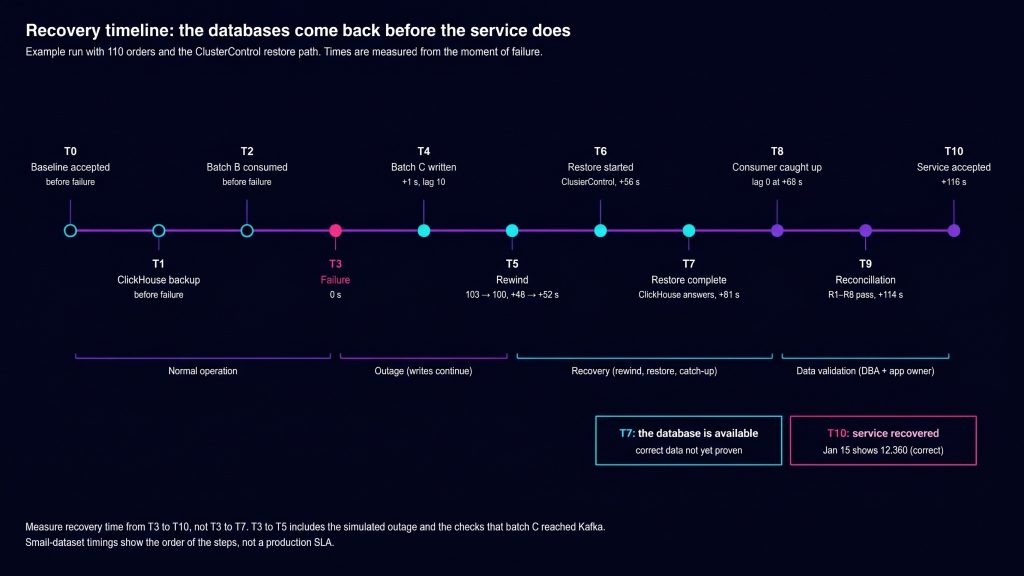
Figure 2. Recovery stages from failure to accepted service, using the ClusterControl restore path. The database is available at T7; the service is accepted at T10.
T0: Baseline. Load batch A, register the connector, create both ClickHouse databases, and wait for the snapshot to land. Run the acceptance query and confirm 2026-01-15 = 50 orders / 12750.00 and 2026-01-16 = 50 orders / 37750.00, with consumer lag zero. Then record the slot’s position. restart_lsn marks the oldest WAL the slot still holds on the primary, and confirmed_flush_lsn marks how far Debezium has confirmed, so report both:
SELECT slot_name, active, restart_lsn, confirmed_flush_lsn,
       pg_size_pretty(pg_wal_lsn_diff(pg_current_wal_lsn(), restart_lsn))         AS retained_wal,
       pg_size_pretty(pg_wal_lsn_diff(pg_current_wal_lsn(), confirmed_flush_lsn)) AS unconfirmed_wal
FROM pg_replication_slots
WHERE slot_name = 'debezium_orders';


    slot_name    | active | restart_lsn | confirmed_flush_lsn | retained_wal | unconfirmed_wal
-----------------+--------+-------------+---------------------+--------------+-----------------
 debezium_orders | t      | 0/2DB66D30  | 0/2DB66D68          | 152 bytes    | 96 bytes
T1: Back up ClickHouse. Take a native backup through ClusterControl, then confirm you can find it with the credentials the on-call engineer will actually have:
s9s backup --create \
  --cluster-id=<CH_CLUSTER_ID> \
  --nodes="<CH_NODE>:9440" \
  --backup-method=clickhouse-native \
  --wait --log

s9s backup --list --cluster-id=<CH_CLUSTER_ID> --long
ID PI CID V I STATE OWNER HOSTNAME CREATED SIZE EXPIRES TITLE
17 - 6 - F COMPLETED admin <CH_NODE> 13:12:43 6690 2026-11-27 13:12:43 backup_20261027T131243Check what the backup contains. The job log shows the exact statement on its Issuing: line. Here it was BACKUP ALL EXCEPT DATABASES system, information_schema, ..., so ingest was backed up along with analytics. That’s why the recovery below rewinds the consumer group before restoring. |
Record the last Kafka offset the backup contains, so you know where replay has to start. The query reads the live table:
SELECT kafka_partition, max(kafka_offset) AS last_applied
FROM analytics.orders
GROUP BY kafka_partition;
By default the backup is written to the ClickHouse node’s own backups disk. That survives a dropped database. It doesn’t survive losing the node. To survive node loss, enable upload to S3-compatible storage and restore from there.
T2: Batch B. Run the updates and the delete. Confirm ClickHouse reflects them (ID 30 absent from the FINAL query, IDs 10 and 20 at their new amounts). This is the data the backup doesn’t contain. The topic now ends at offset 103, and the consumer group has read all of it. Thanks to REPLICA IDENTITY FULL, the delete event carries the full row:
{"order_id":30,"customer_id":1,"amount":"300.00","status":"paid","order_date":20468,"__deleted":"true","__op":"d","__lsn":766934960}T3: Inject the failure. On a disposable ClickHouse test node only, after a second engineer has reviewed the exact command and the target host:
DROP DATABASE ingest SYNC;     -- stop the consumer first
DROP DATABASE analytics SYNC;| Warning: run this only against a disposable test node, never production. Confirm the hostname in the client prompt before you press Enter. |
T4: Batch C during the outage. Insert IDs 101–110 in PostgreSQL and record pg_current_wal_lsn() after the commit. Debezium keeps running because Kafka is up. Check that the connector stays RUNNING, the topic end offset reaches 113, and the slot’s confirmed_flush_lsn reaches the LSN you recorded:
curl -s http://<CONNECT_HOST>:8083/connectors/orders-cdc/status
kafka-get-offsets.sh --bootstrap-server <KAFKA_HOST>:9092 --topic shop.public.orders
In this run, the LSN after the commit was 0/2DB686A8, and the slot’s confirmed_flush_lsn matched it. The topic ended at 113, its last event was order 110, and ch_orders still pointed at 103, a lag of 10. If Kafka were down too, the slot would hold WAL on the primary instead; that’s when max_slot_wal_keep_size starts to matter. Keep three positions apart from here on:
| Position | Value | Meaning |
| Last event in the backup | 99 | Recorded after T1 |
| Consumer group’s next offset | 103 | Where ClickHouse would resume if nothing changed |
| Topic end offset | 113 | Everything Debezium has published |
T5: Rewind the consumer group. Do this before the restore, while ClickHouse is down and the group has no active members. First confirm that Kafka still retains the first event the backup is missing (offset 100), then move the group back from 103 to 100:
# earliest offset still retained (must be <= 100)
kafka-get-offsets.sh --bootstrap-server <KAFKA_HOST>:9092 \
  --topic shop.public.orders --time -2

kafka-consumer-groups.sh --bootstrap-server <KAFKA_HOST>:9092 \
  --group ch_orders --topic shop.public.orders:0 \
  --reset-offsets --to-offset 100 --dry-run

# same command with --execute after the dry run is reviewed
Here the earliest retained offset was 0, so the reset went ahead. If the earliest retained offset had been above 100, Kafka would already have discarded events that the backup doesn’t contain, and replay couldn’t close that gap. The fallback is a Debezium re-snapshot, which this walkthrough didn’t test. A snapshot loaded into the restored table isn’t enough on its own: rows deleted in PostgreSQL after the backup aren’t in the snapshot, so they’d stay in ClickHouse. Either rebuild into an empty table, or follow the snapshot with a reconciliation step that removes keys no longer in PostgreSQL. Either way, record the recovery point as failed.
T6–T7: Restore through ClusterControl. ClickHouse restores always target the node the backup was taken from.
s9s backup --restore \
  --cluster-id=<CH_CLUSTER_ID> \
  --backup-id=<BACKUP_ID> \
  --wait --log
The job ran RESTORE ALL EXCEPT DATABASES system, … and finished six seconds after it started. ClickHouse was answering queries again, but that only proves the database is available. The restored ingest table started consuming straight away, from offset 100.
T8: Reach the boundary. Wait for the consumer to catch up, then confirm the boundary conditions: writer stopped, source evidence from T4, end offset stable across two checks, and group lag zero.
kafka-consumer-groups.sh --bootstrap-server <KAFKA_HOST>:9092 \
  --group ch_orders --describe
GROUP TOPIC PARTITION CURRENT-OFFSET LOG-END-OFFSET LAG
ch_orders shop.public.orders 0 113 113 0T9–T10: Reconcile and accept. Covered in the next section. The application owner signs off only after every check passes.
Here is where the time went in this run, measured from the failure:
| Interval | From failure | Elapsed | What happened |
| T3 → T5 | 0 → +48 s | 48 s | Simulated outage: batch C written and confirmed in Kafka |
| T5 rewind | +48 → +52 s | 4 s | Dry run and reset of ch_orders |
| T5 → T6 | +52 → +55 s | 3 s | Switch to ClusterControl and submit the restore job |
| T6 → T7 | +55 → +61 s | 6 s | ClusterControl restore job |
| T7 → T8 | +61 → +66 s | 5 s | Consumer replayed offsets 100–112 and reached lag 0 |
| T8 → T9 | +66 → +114 s | 48 s | Deliberate 30-second stability check, then the exports for R1/R2 |
| T9 → T10 | +114 → +118 s | 4 s | Checks R1–R6 and sign-off |
| Total | 0 → +118 s | 118 s |
ClickHouse was available 61 seconds after the failure, and the service was accepted at 118 seconds. The gap between those two numbers is the point of this exercise. These timings describe this small lab run, not a production recovery target. Measure the complete sequence in your own environment.
Alternative: restore analytics only. If the backup holds only analytics, or you restore just that database with ClickHouse’s native RESTORE DATABASE analytics FROM Disk('backups', '<BACKUP_NAME>'), the order changes: restore first, read max(kafka_offset) from the restored table, reset the group to that value plus one, then recreate ingest from ingest.sql. That order was also exercised while preparing this walkthrough and produced the same reconciliation results, but the timings above come from the ClusterControl path only. |
What happens if you skip the rewind
To show the mistake, the run was repeated without T5: ClickHouse was dropped again, the consumer group was set back to 103 (its position at the moment of failure), and the same backup was restored through ClusterControl. This is an easy mistake to make: restore, see data flowing, and move on. Because Kafka still held offset 103 for the group, ClickHouse picked up at batch C and never saw batch B.
The result:
| Check | Expected | Observed without rewind | Verdict |
| Consumer lag | 0 | 0 | pass |
| Live rows | 109 | 110 (ID 30 still present) | FAIL |
| ID 10 / ID 20 amount | 150.00 / 50.00 | 100.00 / 200.00 | FAIL |
| 2026-01-15 revenue | 49 / 12350.00 | 50 / 12750.00 | FAIL |
| 2026-01-17 revenue | 10 / 10550.00 | 10 / 10550.00 | pass |
Look at the rows that pass. Consumer lag is zero, so a freshness check is satisfied, and a spot check of the orders written during the outage looks correct. The damage is in data that existed before the outage.
Not covered here: loss of the PostgreSQL primary (needs slot re-creation and a CDC re-snapshot), loss of Kafka, node loss with backups stored only on the node, and replicated ClickHouse clusters. Each of these needs its own test.
Reconcile the data, not just the jobs
Every check compares against expected_orders.tsv. PostgreSQL is checked too, because a test that only validates ClickHouse against PostgreSQL can’t tell you whether PostgreSQL itself is right.
Account for the table engine
ReplacingMergeTree deduplicates during background merges, not at insert time. Until a merge runs, ID 10 exists as two physical rows, the original and the update, and ID 30 exists as an insert plus a delete marker. A plain SELECT count() counts every version, so it’s wrong in both directions depending on merge timing. Reconciliation queries must use FINAL (or argMax by version) and filter is_deleted = 0.
The version column is the PostgreSQL LSN of each change, and that’s what makes replay safe. If you rewind further than necessary, the replayed events carry the same LSNs as rows already in the table and collapse into them. In an earlier run, replaying all 113 events onto an already-recovered table left 223 physical rows, and the FINAL results still matched the expected file exactly. An older event arriving late can’t overwrite a newer one, because a lower version always loses.
One caveat: rows from a Debezium snapshot all carry the snapshot’s LSN, and a snapshot doesn’t contain rows deleted before it ran. So a re-snapshot can’t remove stale rows from ClickHouse on its own.
The checks
# R1 + R2: keys and values, three-way
psql -h <PG_PRIMARY> -d shop -c "\copy (SELECT order_id, customer_id, amount, status, order_date FROM orders ORDER BY order_id) TO STDOUT" > pg_orders.tsv

clickhouse-client --host <CH_NODE> --port 9440 --secure -q "
  SELECT order_id, customer_id, amount, status, order_date
  FROM analytics.orders FINAL
  WHERE is_deleted = 0
  ORDER BY order_id
  SETTINGS output_format_decimal_trailing_zeros = 1
  FORMAT TSV" > ch_orders.tsv

diff expected_orders.tsv pg_orders.tsv && echo "R1/R2 PostgreSQL: PASS"
diff expected_orders.tsv ch_orders.tsv && echo "R1/R2 ClickHouse: PASS"
Two details matter. First, ClickHouse prints Decimal values without trailing zeros by default (10, not 10.00). Without the SETTINGS line, the diff flags all 109 rows as different and buries the ones that really are wrong. Second, ClickHouse deployed by ClusterControl listens on the TLS port 9440, hence --port 9440 --secure. If the node uses a self-signed certificate, configure the client to trust that certificate or the CA that issued it (see the ClickHouse client SSL settings). The --accept-invalid-certificate flag skips verification entirely; it was used on the disposable test node for this exercise, and it doesn’t belong in a maintained environment.
-- R3: updated and deleted keys, explicitly
SELECT order_id,
       argMax(amount, lsn)     AS current_amount,
       argMax(is_deleted, lsn) AS deleted
FROM analytics.orders
WHERE order_id IN (10, 20, 30)
GROUP BY order_id
ORDER BY order_id;
-- expected: 10 → 150.00, 0 | 20 → 50.00, 0 | 30 → deleted = 1

-- R4: outage-window batch present
SELECT count() FROM analytics.orders FINAL
WHERE is_deleted = 0 AND order_id BETWEEN 101 AND 110;   -- expected 10

-- R5: the business query the dashboard runs
SELECT order_date, count() AS orders, sum(amount) AS revenue
FROM analytics.orders FINAL
WHERE is_deleted = 0
GROUP BY order_date
ORDER BY order_date;
R6 is freshness: the boundary conditions from the previous section, recorded with timestamps. Record each check in the same shape so a reviewer can scan the outcome without rerunning anything. Here is the record from the successful recovery:
| Check | Expected | Observed | Status | Evidence |
| R1 keys | 109 keys, none missing/extra | 109 / 109 / 109 (expected, PostgreSQL, ClickHouse) | PASS | diff output |
| R2 values | 0 mismatched rows | 0 | PASS | diff output |
| R3 updates/deletes | 10=150.00, 20=50.00, 30 deleted | 10=150, 20=50, 30 deleted=1 | PASS | query result |
| R4 outage batch | 10 | 10 | PASS | query result |
| R5 business query | 49/12350.00, 50/37750.00, 10/10550.00 | 49/12350, 50/37750, 10/10550 | PASS | query result + owner sign-off |
| R6 freshness | source confirmed, end offset stable, lag 0 | slot confirmed past the batch C commit; end offset 113 on two checks 30 s apart; lag 0 | PASS | consumer group describe |
A row-level diff is fine for 109 rows. At production scale, compare per-partition aggregates (count, sum and a hash of the key/value tuple per day) and drill into a partition only when its fingerprint differs. In both cases, compare against a fixed boundary and an independent set of expected results.
Identify what cannot be reconstructed
This walkthrough is the easy case: PostgreSQL still has every row, so in the worst case you can rebuild ClickHouse from a fresh Debezium snapshot. Many real deployments are built differently. A common hot/cold design keeps 30 days in PostgreSQL and years of history in ClickHouse. Rows are purged from PostgreSQL once they’re safely replicated.
In that design, PostgreSQL can’t rebuild ClickHouse. A re-snapshot gives you the last 30 days, and a dashboard that quietly begins a month ago. If older months render as zero rather than “no data,” nobody may notice for a while. The only sources for the purged history are the ClickHouse backups and whatever Kafka still retains, so their retention and restore tests carry the whole recovery point for historical data.
Two design details decide whether that history survives at all:
- The purge must not look like a delete. If PostgreSQL purges with
DELETE, Debezium emits delete events and ClickHouse removes the history it was meant to keep. Purge by dropping or detaching partitions, filter purge deletes out of the stream, or route history to a table that ignores deletes. Note also that Debezium skipsTRUNCATEevents by default (skipped.operations); verify that against your version rather than relying on it. - Backups and retained events must cover the history. The age of a backup isn’t the test; a recent backup can still hold years of rows. What matters is whether a valid backup or backup chain, together with any events Kafka still retains, contains the history you need.
What this walkthrough doesn’t cover: retained history. A follow-up test should add a batch H of old-dated orders, replicate them, and purge them from PostgreSQL by partition drop. Then remove every other source for H: let its events age out of Kafka (a short topic retention makes this quick) and restore a ClickHouse backup that doesn’t contain H. With no remaining source, the acceptance check for H’s dates must fail, and the runbook must name exactly which history can’t be recovered and why.
Publish the recovery contract
A recovery procedure that only one engineer knows isn’t much use when that engineer is out of the office. Write the outcome down as a short contract that each owner has agreed to.
| # | Step | Owner | Tool | Evidence |
| 1 | Declare incident, stop analytics consumers | On-call SRE | Runbook | Incident timestamp (T3) |
| 2 | Confirm CDC source healthy: connector running, slot confirmed past the last commit, end offset as expected | CDC team | Connect REST, pg_replication_slots, Kafka CLI | Connector status, LSNs, offsets |
| 3 | Check retention, then rewind the consumer group to the first offset missing from the backup | Streaming team | Kafka CLI | Dry-run and execute output |
| 4 | Restore from the newest valid backup | DBA | ClusterControl | Job ID, backup ID, job log |
| 5 | Reach the comparison boundary | Streaming + app team | Kafka CLI | Lag zero, stable end offset |
| 6 | Run R1–R6 | DBA | SQL, diff | Reconciliation record |
| 7 | Accept service | Application owner | Business query | Sign-off (T10) |
Add the measured timings, with context. In the example run, the rewind took four seconds, the ClusterControl restore six seconds and the consumer catch-up five seconds, and the service was accepted 118 seconds after the failure, for 110 orders. A measurement on a tiny dataset tells you the order of the steps and where the waits are. It isn’t a production SLA, and it shouldn’t be presented as one.
List the unresolved gaps by name. For this architecture, at minimum: PostgreSQL primary loss and slot re-creation, Kafka loss, retained-history recovery, and node loss with on-node backups. Give each an owner and a date. Then schedule the next run: after any major version change to PostgreSQL, ClickHouse, Debezium or Kafka, and at a fixed interval otherwise. Run it with a different engineer each time, using the runbook as written, and treat any question they have to ask the original author as a gap in the runbook.
FAQ
Is CDC a backup?
No. CDC copies changes, including mistakes, deletes and truncations if they aren’t filtered, and only as far back as Kafka retains them. In this architecture it complements the ClickHouse backup by covering the gap between backup time and failure. It can’t replace a backup.
Can PostgreSQL rebuild all of ClickHouse?
Only if PostgreSQL still holds every row ClickHouse needs. In this walkthrough it does. In a hot/cold design that purges PostgreSQL, a re-snapshot rebuilds only the retained window. History older than that has to come from ClickHouse backups, plus any events Kafka still retains.
Why can row counts match while results remain wrong?
Updates don’t change counts. In the run without the rewind, IDs 10 and 20 keep their old amounts, and no count changes. Counts on ReplacingMergeTree without FINAL also include superseded versions. In the example, a plain count() returned 113 physical rows for 109 live orders. Compare keys, values and the business query at a fixed boundary.
Know which recovery steps nobody owns. ClusterControl covers backup, restore and verification for the PostgreSQL and ClickHouse tiers. The CDC connector, Kafka and application acceptance stay with your teams, and the gaps between those owners are where recoveries fail.
Review the recovery responsibilities and gaps in your database estate →