blog
Safe database change at fleet scale: canaries, maintenance waves, and recovery gates
A PostgreSQL minor update is about as boring as database maintenance gets. You stop the node, install the new binaries, and start it again. On one cluster, with someone watching, it rarely surprises anyone.
Now do it on forty clusters at once. One of them pulls packages from a mirror that’s missing a dependency. Another has a replica that was already lagging. A third serves an application nobody tested against the new build. None of that is hard to deal with on its own, but launch the change everywhere at the same time, and you get one incident with forty tickets attached.
A fleet-wide change shouldn’t come with a fleet-wide failure mode. In this post, I walk through a gated plan for a single operation, a PostgreSQL 18 minor update on streaming replication clusters managed by ClusterControl, and test it in a small lab of three disposable clusters running a synthetic workload. It shows the method, not fleet-scale capacity, and I didn’t test major upgrades.
Classify the change before choosing the tool
Before automating a change, it’s worth asking what kind of change it is and what undoing it would really take. A reloadable setting like log_min_duration_statement touches no data, so the old value is your recovery plan. A minor update replaces binaries: the PostgreSQL 18 documentation is clear that minor releases never change the storage format, so you stop the server, swap the executables, and start it again. That’s simple, but not free to undo.
Release notes sometimes ask for extra steps, and reinstalling old packages brings back whatever the update fixed. A major upgrade changes the on-disk format, and once clients write to the new version, the old data directory no longer reflects the database.
| Change type | Persistent state changed | Typical application impact | Realistic recovery |
| Reloadable setting | None | Usually none | Reapply the previous value |
| Restart-required setting | None | One restart per node | Reapply and restart |
| Minor version update | Binaries only | One restart per node; primary restart is visible | Fix forward, reinstall the previous build after reviewing release notes, or restore |
| Major version upgrade | Data directory format | Planned downtime or a cutover | Restore, or fail back to a preserved old cluster that has not diverged |
I picked the minor update row. It’s common, ClusterControl supports it end to end, and it still carries real package and restart risk.
Group the estate by risk and dependency
A flat list of clusters isn’t a rollout plan. I group clusters by service tier, topology, exact engine version, application dependencies, maintenance windows, and connectivity profile (direct internet, a proxy, or an isolated network with an approved local repository). Clusters that match on all of them can share a wave. One that differs on any of them is its own risk group.
My lab estate consists of three clusters in the same risk group, each with a primary and one streaming replica: pg-canary as the canary, then pg-wave1-a and pg-wave1-b as wave 1. They run Rocky Linux 9 with ClusterControl 2.5.0 and started on PostgreSQL 18.4 from the PGDG packages. All of that is within the supported databases scope:
PostgreSQL 14 through 18 from the PostgreSQL vendor, replication with at least one primary and one replica, on x86-64 hosts. The restriction to the local mirror was enforced on each database node rather than by an upstream firewall: an iptables rule allowed outbound traffic only to the lab subnet, and every repository except the approved PostgreSQL mirror was disabled. That rule ran independently of firewalld. SELinux was disabled and firewalld inactive on the database nodes, which is a lab shortcut, not part of the setup I’m recommending.
The obvious canary is the idle staging box nobody would miss, and it proves very little. A useful canary looks like the group it stands for (same topology, same package source, similar workload) while carrying less business risk. Be honest about its limits, too: pg-canary tells you nothing about other OS releases, logical replication slots, or long-running transactions.
Define preflight checks and stop conditions
Preflight runs against every target before anything changes, not only the canary. The ClusterControl upgrade documentation explains why the package source deserves so much attention: the job stops each node, updates the packages, and starts it again, and if a node fails to upgrade, the job aborts and leaves it for manual recovery.
ClusterControl installs whatever the node’s repositories offer, and the offline installation documentation lists Upgrades among the features that need the provider’s repository. In an isolated estate, that means an approved local mirror with every package and dependency the target needs, and signature checks left on.
In the lab, the completed plan ran in this order, with a concurrency of one throughout:
- Preflight on all three clusters. Every check had to pass on every node before anything changed.
- Upgrade the canary,
pg-canary. - Observe and accept: the write probe succeeding again, acceptance.sh passing, then my own go/no-go decision.
- Wave 1: pg-wave1-a, then pg-wave1-b, each with its own preflight, upgrade and acceptance, stopping at the first failure.
- A recovery exercise on pg-wave1-b.
| Check | How it is verified | Native, external or manual |
| Recent backup with a tested restore | Backup list in ClusterControl plus a dated restore record | Native listing, manual evidence |
| Nodes healthy, replicas streaming | ClusterControl node status and pg_stat_replication | Native and external |
| Target version visible | dnf repoquery on each node; s9s cluster --check-pkg-upgrades logged for review | External, with native check for reference |
| Every package resolvable from the approved repository | dnf upgrade --downloadonly on each node | External script |
| Free disk for packages and logs | df on /var/lib/pgsql and /var/cache/dnf | External script |
| Application owner available | Named person in the change plan | Manual |
The package check is the one people tend to skip. Run it on every node, with the node’s real repository configuration:
# Rocky Linux 9 node, repositories pointing only at the approved local mirror
sudo dnf --refresh makecache
sudo dnf list --available 'postgresql18*'
sudo dnf upgrade --best --downloadonly -y 'postgresql18*'
echo "exit code: $?"
--downloadonly resolves the whole transaction without installing anything, --refresh ignores metadata cached before the mirror changed, and –best makes dnf fail instead of quietly skipping an update it can’t resolve. If the check fails, fix the approved repository. Opening egress or turning off GPG checks isn’t a fix.
I write the stop conditions down before anything runs, as sentences someone can apply at 2 a.m.:
- A required package is missing from the approved repository: don’t start this target or its dependent wave.
- A replica isn’t streaming, or its replay lag is over 10 seconds.
- No restore of this cluster has been tested within the agreed period.
- The application acceptance check returns an unexpected result.
- The application owner isn’t available for the go/no-go call.
N.B. The 10-second lag limit fits a small lab workload. Please don’t copy it into production.
Execute a canary and observe the application.
Execute a canary and observe the application
A canary only tells you something if you watch the application, not just the job. Before touching pg-canary, I started a light pgbench load against the primary and a probe that writes one row per second:
# Acceptance probe: one write round trip per second against the primary
while true; do
  ts=$(date +%T)
  if out=$(psql "host=<PRIMARY_HOST> port=5432 dbname=appdb user=app connect_timeout=2" \
      -Atc "INSERT INTO change_probe (checked_at) VALUES (now()) RETURNING id" 2>&1); then
    echo "$ts OK $out"
  else
    echo "$ts FAIL"
  fi
  sleep 1
done | tee canary-probe.log
A green job means the packages were installed and the services came back. The probe adds proof that a write over a direct connection to the primary succeeds. It doesn’t exercise your application’s real connection path, poolers, or business logic, so a production acceptance check should cover those too.
The negative test: a gate that has to stop the wave
For the first attempt, I removed the target postgresql18-libs build from the approved repository, without opening any outbound access. Preflight failed on every node of all three clusters while PostgreSQL kept running. This is the canary part of the output:
2026-10-21 03:04:10 cluster=pg-canary node=10.1.1.121 check=target-available result=PASS
2026-10-21 03:04:11 cluster=pg-canary node=10.1.1.121 check=packages result=FAIL
2026-10-21 03:04:12 cluster=pg-canary node=10.1.1.122 check=target-available result=PASS
2026-10-21 03:04:12 cluster=pg-canary node=10.1.1.122 check=packages result=FAIL
2026-10-21 03:04:12 cluster=pg-canary check=replication streaming=1 lag_s=0 result=PASS
2026-10-21 03:04:18 cluster=pg-canary PREFLIGHT FAIL
cluster 1 preflight exit=1
And the reason, from the dnf log behind those FAIL lines:
Problem 3: cannot install the best update candidate for package postgresql18-server-18.4-2PGDG.rhel9.8.x86_64
  - nothing provides postgresql18-libs(x86-64) = 18.6-1PGDG.rhel9.8 needed by postgresql18-server-18.6-1PGDG.rhel9.8.x86_64 from lab-pgdg18-approved
Stop condition 1 applied: the canary didn’t start, so wave 1 didn’t either, and all six nodes were still on 18.4 afterwards. A failed gate has to leave every later target exactly as it was, and here it did. Catching the missing package at preflight, while every database was still running, turned what could have been a stopped node into a non-event. To be precise about what this shows: it’s a preflight failure across all targets, not a failed canary holding back clusters that were otherwise ready.
The corrected run
Once the missing package went back through the normal intake path, preflight passed on all three clusters and the canary ran:
| Step | Action | Executor |
| 1 | Confirm preflight results for pg-canary | External script, reviewed by me |
| 2 | s9s cluster --upgrade-cluster --cluster-id=1 --wait | ClusterControl |
| 3 | Upgrade each host, one at a time | ClusterControl |
| 4 | Check versions, replication, and the probe log | External script |
| 5 | Go or no-go for wave 1 | DBA (also application owner in this lab) |
PostgreSQL’s guidance for standby servers recommends updating standbys first, because a newer minor release is more likely to read WAL from an older one than the reverse. Before you plan the outage window, confirm in the job log of a test run which order your tooling uses: it decides when the write gap happens.
There’s no automatic switchover, so writes stopped while the primary restarted. Three milestones are worth keeping apart. The job started at 03:07:14, and the probe’s first failed attempt was at 03:07:16. The probe wrote successfully again at 03:07:23, after seven failed attempts. The upgrade job returned at 03:08:05, once both hosts were done. And the full acceptance check passed at 03:08:46:
2026-10-21 03:08:45 cluster=pg-canary node=10.1.1.121 version=18.6 result=PASS
2026-10-21 03:08:45 cluster=pg-canary node=10.1.1.122 version=18.6 result=PASS
2026-10-21 03:08:46 cluster=pg-canary check=replication streaming=1 result=PASS
2026-10-21 03:08:46 cluster=pg-canary check=app-write id=384
INSERT 0 1 result=PASS
2026-10-21 03:08:46 cluster=pg-canary ACCEPTANCE PASS
A note on the numbers in this post: the probe logs with one-second resolution, and each attempt includes connection time plus a one-second sleep. So they describe the window between the first failed and the first successful probe, by their timestamps, not exact downtime.
Expand in bounded waves
A passing canary earns you the next wave, not the rest of the fleet. Each wave gets a size, a concurrency limit, an evidence checkpoint, and a person who decides whether to carry on.
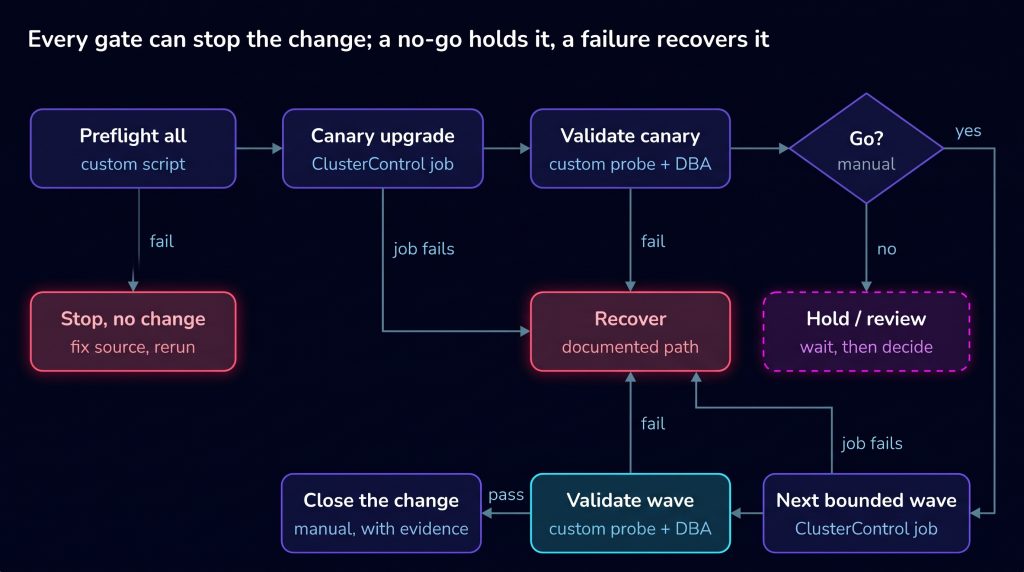
Each box in the figure names who does the work. ClusterControl runs the upgrade jobs; preflight, validation, ordering, and the go/no-go call are custom or manual in this setup. For wave 1, I used a short wrapper script. It’s a sequencing example, not a ready-to-run tool: preflight.sh and acceptance.sh are my own helpers, not part of ClusterControl, and aren’t included here. preflight.sh exits 0 only if every node can see the target version, completes the download-only dnf transaction and has enough free disk, and the replica is streaming within the lag limit. acceptance.sh exits 0 only if every node reports the target version, the replica is streaming and a test write on the primary succeeds:
#!/usr/bin/env bash
# run-wave.sh: custom sequencing around ClusterControl jobs. Stops on the first failure.
set -u
for cid in "$@"; do
  ./preflight.sh "$cid"  || { echo "STOP: preflight failed on cluster $cid"; exit 1; }
  s9s cluster --upgrade-cluster --cluster-id="$cid" --wait \
                         || { echo "STOP: upgrade job failed on cluster $cid"; exit 1; }
  ./acceptance.sh "$cid" || { echo "STOP: acceptance failed on cluster $cid"; exit 1; }
done
This sequencing example was not tested against a failed upgrade job. Before advancing to another cluster, verify the outcome of the specific upgrade job submitted as well as the post-change acceptance checks; do not rely on the CLI return code alone.
In the lab, both wave 1 clusters passed every gate, with six failed probe attempts each. The Scalable Controllers Pool helps once the estate grows, by spreading cluster ownership and jobs across CMON controllers, but the ordering across clusters and the approvals still come from your own process.
When Git owns the desired state
If PostgreSQL runs under a Kubernetes operator synced by Argo CD with an automated sync policy, the image tag in Git is the desired state. A manual edit to the live resource gets overwritten at the next sync, or straight away if self-heal is enabled; setups without automated sync behave differently, so check yours. In that setup, a merged pull request replaces the job, and because Argo CD won’t run its rollback operation on an application with automated sync enabled, going back means reverting the commit. That only reverts the desired configuration, not the database state, and moving back to an older minor needs exactly the recovery checks in the next section.
Recover without inventing a rollback
The ClusterControl documentation is upfront about it: there’s no upgrade rollback operation, and taking or restoring a backup isn’t part of the upgrade job. So recovery has to be in the change plan before you start, and it depends on where things stopped:
- Stopped at preflight. Nothing changed. Fix the cause and run the checks again.
- Failed on a node during the job. The job aborts and the node needs manual attention. If it fails on the primary’s host, writes stay down until the node is fixed or a replica is promoted.
- Completed, but acceptance fails. Fix forward if you understand the cause. Otherwise, reinstall the previous build or restore from backup.
Reinstalling the previous build is possible because minor releases share a storage format, but that alone doesn’t make it safe. The prerequisites I used were a release-note review for both versions, the previous packages still in the approved repository, automatic recovery disabled for the cluster during the work, and acceptance afterwards. And going back reintroduces whatever the update fixed.
I tested that path on pg-wave1-b. With automatic recovery disabled for the cluster, so ClusterControl wouldn’t restart a node I’d stopped on purpose, I downgraded the primary first, so no standby is ever older than its primary, then the replica:
# On each node in turn, primary first
sudo systemctl stop postgresql-18
sudo dnf downgrade -y postgresql18-18.4 postgresql18-server-18.4 \
  postgresql18-libs-18.4 postgresql18-contrib-18.4
sudo systemctl start postgresql-18
sudo -u postgres psql -Atc "SHOW server_version"
Measured by timestamps taken before and after the loop, the whole two-node downgrade took about three seconds, from 03:13:57 to 03:14:00. The probe recorded two failed attempts, the last at 03:13:58, and wrote again at 03:13:59. Acceptance passed on 18.4 once automatic recovery was back on. The release-note review is what made this reasonable here. The 18.6 notes ask for follow-up on indexes using btree_gist or ltree, tables with GIN indexes, logical decoding plugins, and pgcrypto settings. The lab’s data was pgbench tables and one probe table, with no logical decoding, so none of that applied and no extra migration or remediation steps were needed. Major upgrades are another story: once clients write to the new version, the clean way back is a restore or a preserved old cluster that never diverged.
Close the change with evidence and an owned exception
A job marked as successful is one line in the acceptance record, not the whole record. For me, a change is closed when someone can answer from stored evidence what changed, where, and whether the application was happy with it.
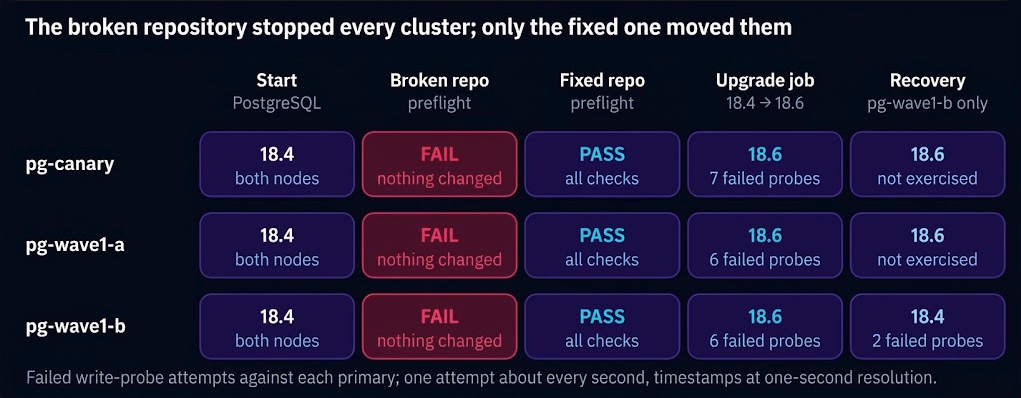
Here’s the closing record from the lab:
| Field | Value |
|---|---|
| Intended state | PostgreSQL 18.6 on all nodes of three clusters |
| Final inventory | pg-canary and pg-wave1-a: 18.6 on both nodes. pg-wave1-b: 18.4 on both nodes, after the recovery exercise |
| Stopped wave | First attempt halted at preflight on every cluster; no node changed |
| Canary result | Probe failed from 03:07:16 and wrote again at 03:07:23 (7 failed attempts); job returned at 03:08:05; acceptance passed at 03:08:46 |
| Application acceptance | Acceptance script and probe; in the lab one person acted as DBA and application owner |
| Exceptions | pg-wave1-b stays on 18.4, owned by the DBA team, with a rerun of the update as the next action |
| Evidence location | Preflight, acceptance, probe and job logs kept on the ClusterControl host |
Exceptions are normal, as long as someone owns them and there’s a next action. An exception nobody owns has a habit of turning into a cluster two minor versions behind a year later.
FAQ
- Is a canary the same as a backup? No. A canary limits how many clusters a bad change can reach. A backup is how you get the data back on a cluster it did reach, and it only counts if you’ve tested restoring it.
- Can every database upgrade be rolled back? No. A minor update can sometimes be reversed by reinstalling the previous build, after checking the release notes. A major upgrade generally can’t be reversed once clients have written to the new version, so recovery means a restore or a preserved old cluster. ClusterControl doesn’t offer an upgrade rollback operation.
- How do isolated networks affect maintenance waves? They turn the package source into a gate. A gap in your approved mirror becomes a failed upgrade on a stopped node, so group clusters by network profile, check every package with a download-only transaction first, and fix the mirror instead of opening egress.
Review how your team plans, executes, and validates database fleet changes.
Appendix: change-plan template
change_id: 		CHG-<number>
intended_state: 	PostgreSQL 18.<target> on all nodes of the listed clusters
target_group: 	<risk group name>
exclusions: 		<clusters out of scope, and why>
prerequisites: 	tested restore date, previous packages kept in approved repo
canary: 		<cluster> (represents: <what>; does not represent: <what>)
wave_order: 		canary -> wave 1 -> wave 2 ...
concurrency: 		<clusters at a time per wave>
stop_conditions: 	<numbered list, written before execution>
recovery_action: 	<per failure point: preflight / mid-job / post-acceptance>
approver: 		<role>
executor: 		ClusterControl job | custom script | GitOps merge | manual
application_acceptance: <probe or query, and the expected result>
evidence_location: 	<path to logs and results>