blog
ClickHouse Security, Compliance and Governance in Polyglot Environments
In our previous blog, we tackled monitoring with observability for ClickHouse. We also addressed hybrid OLTP/analytics database architecture, where data originates from MySQL and flows into ClickHouse. However, running ClickHouse in a hybrid environment also means you need to think about security and compliance. This blog covers the key practices you should have in place, along with a checklist to help you assess how far along you are toward a reliable, well-governed setup. We’ll also cover what you need to know to run ClickHouse securely, walking you through ClickHouse security fundamentals, hybrid environment governance, an operational checklist for support engineers, how a platform like ClusterControl fits into the picture, and a practical configuration example.
ClickHouse Security Fundamentals
Authentication and Authorization
ClickHouse has supported SQL-driven access control (RBAC) since version 20.1. Earlier deployments commonly relied on XML-based user configuration, whereas SQL-managed access control provides a more flexible way to manage users, roles, and permissions.
Using the old-fashioned style users.xml configuration does not possess true roles, and permissions are duplicated across users. Any modification requires a reload or restart to reflect changes. You have to configure and work with XML files which are workable but hard to audit and prone to drift. The current RBAC model is now the recommended approach, and it gives you the building blocks you would expect, i.e. users, roles, row policies, quotas, and settings profiles.
By default, a fresh ClickHouse installation has a single default user with no password and full access. That default needs to be locked down before the instance sees any production traffic. At minimum, the default user should have its network access restricted or its password set, and a separate admin account should be created with a strong password.
Role-Based Access Control
Unlike the legacy XML-based approach, ClickHouse’s SQL-driven RBAC allows access policies to be managed through roles and privileges, providing a more scalable, maintainable, and auditable way to enforce least-privilege access across the platform.
Privileges can be scoped at the database, table, column, or row level. Column-level access control is particularly useful in analytics contexts where the same table might contain PII alongside non-sensitive metrics.
Here is a practical example of setting up users and roles in ClickHouse. This covers a common pattern where you have read-only analysts, application service accounts, and an admin role.
-- Create roles
CREATE ROLE analytics_reader;
CREATE ROLE app_writer;
CREATE ROLE db_admin;

-- Grant privileges to roles
GRANT SELECT ON analytics.* TO analytics_reader;
GRANT INSERT, SELECT ON events.* TO app_writer;
GRANT ALL ON *.* TO db_admin WITH GRANT OPTION;

-- Create users
CREATE USER mys9s_client IDENTIFIED WITH sha256_password BY 'str0ngP@ssword!'
    HOST IP '192.168.40.0/16';

CREATE USER srv_app IDENTIFIED WITH sha256_password BY 'myR@ndomP@55!!'
    HOST IP '192.168.40.30';

CREATE USER admin_user IDENTIFIED WITH sha256_password BY 'Adm1nP@ssw0rd!'
    HOST LOCAL;

-- Assign roles to users
GRANT analytics_reader TO mys9s_client;
GRANT app_writer TO srv_app;
GRANT db_admin TO admin_user;

-- Set default roles (active on login without SET ROLE)
SET DEFAULT ROLE analytics_reader TO mys9s_client;
SET DEFAULT ROLE app_writer TO srv_app;
SET DEFAULT ROLE db_admin TO admin_user;

-- Example: row-level policy to restrict by tenant
CREATE ROW POLICY tenant_isolation ON events.user_events
    FOR SELECT USING tenant_id = currentUser()
    TO analytics_reader;

-- Verify role assignments
SHOW GRANTS FOR mys9s_client;
This simplified example assumes that each tenant identifier matches its ClickHouse login username; other identity models require an explicit tenant-to-user mapping.
Column-level restrictions follow a similar pattern. If you want to prevent a role from reading a particular column, you grant SELECT on specific columns rather than the whole table.
-- Grant SELECT only on non-sensitive columns
GRANT SELECT(event_id, event_type, created_at, region)
    ON events.user_events TO analytics_reader;
Encryption with ClickHouse: At Rest and In Transit
For self-managed ClickHouse, explicitly configure TLS on the interfaces your deployment uses and require clients to verify the server certificate. Do not assume that enabling a secure port disables the corresponding unencrypted interface.
ClickHouse supports TLS for all client-to-server and server-to-server communication. For a cluster running replication or distributed queries across shards, enabling TLS on interserver communication is just as important as enabling it on the client interface. Both are configured in /etc/clickhouse-server/config.xml.
The following partial configuration illustrates how to enable HTTPS, secure native TCP connections, and interserver TLS:
<https_port>8443</https_port>
<tcp_port_secure>9440</tcp_port_secure>

<openSSL>
    <server>
        <certificateFile>/etc/clickhouse-server/ssl/server.crt</certificateFile>
        <privateKeyFile>/etc/clickhouse-server/ssl/server.key</privateKeyFile>
        <caConfig>/etc/clickhouse-server/ssl/ca.crt</caConfig>
        <verificationMode>relaxed</verificationMode>
        <loadDefaultCAFile>true</loadDefaultCAFile>
        <cacheSessions>true</cacheSessions>
        <disableProtocols>sslv2,sslv3</disableProtocols>
        <preferServerCiphers>true</preferServerCiphers>
    </server>
    <client>
        <caConfig>/etc/clickhouse-server/ssl/ca.crt</caConfig>
    </client>
</openSSL>

<interserver_https_port>9010</interserver_https_port>
For encryption at rest, ClickHouse supports encrypted storage via its virtual file system layer. You configure this per disk in storage_configuration, which lets you encrypt specific data paths without encrypting the entire OS volume if that is not your preferred approach.
Audit Logs
ClickHouse writes query logs and part logs (logging events that are associated with MergeTree) to system tables system.query_log, system.query_thread_log, and system.part_log, among others. These tables are queryable and can be exported to external storage for long-term retention. For compliance use cases, system.query_log is the most relevant as it captures who ran what query, from which host, how long it took, and whether it succeeded.
A few configuration details matter here. The query_log is flushed periodically to the system table, and the interval can be configured. You should also configure retention according to your compliance requirements and export audit records to durable, centralized storage. Although query logs are persisted locally, retaining them exclusively on database nodes creates risks during node replacement, storage loss, or maintenance.
The following query retrieves successfully completed queries from the last 24 hours. To investigate query failures, include the relevant exception event types.
SELECT
    user,
    client_hostname,
    query_start_time,
    query,
    exception,
    read_rows,
    read_bytes
FROM system.query_log
WHERE type = 'QueryFinish'
  AND query_start_time >= now() - INTERVAL 24 HOUR
ORDER BY query_start_time DESC
LIMIT 100;
Governance in Hybrid and Multi-Database Stacks
The Consistency Problem
When ClickHouse is the only database in your stack, governance is relatively contained. You manage one access model, one audit log format, one set of policies. The moment ClickHouse sits alongside PostgreSQL, MySQL, MongoDB, etc., the governance picture changes substantially.
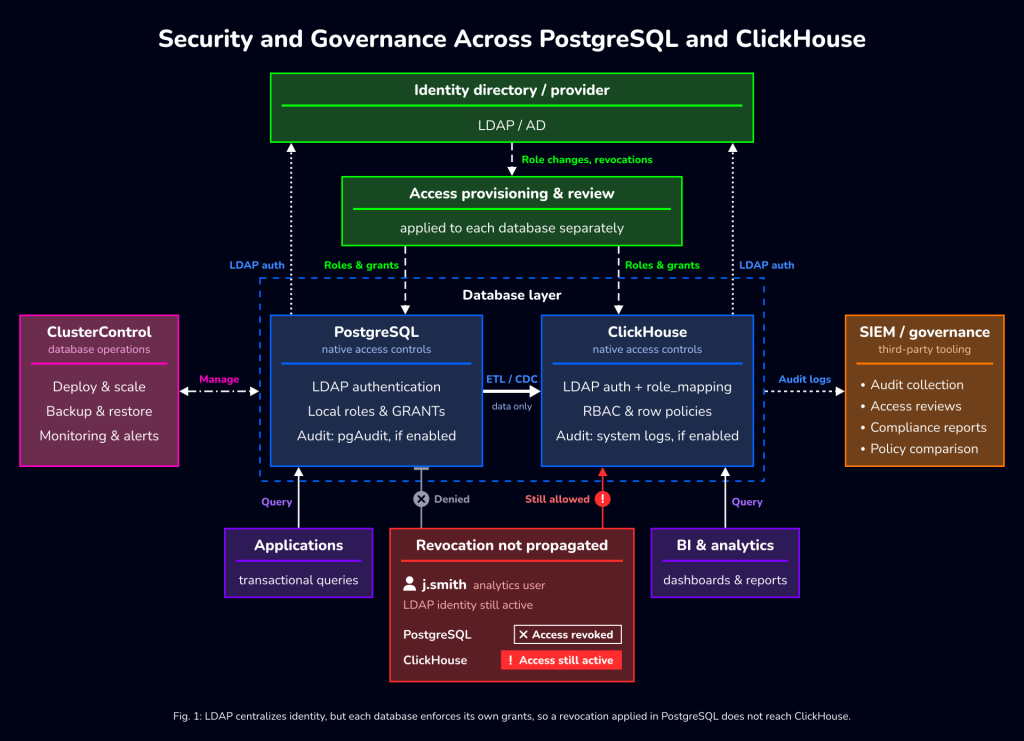
The access models differ. PostgreSQL uses roles and schemas. MySQL has its own privilege system. ClickHouse uses its RBAC model. MongoDB has yet another approach. None of them are directly compatible, and none of them automatically stay in sync. A user that is revoked from your PostgreSQL cluster does not automatically lose access to ClickHouse. If you are managing these systems independently, that kind of drift is almost guaranteed over time.
Consistent Policy Enforcement Across Engines
The practical answer to this problem is to centralise as much of the policy definition as possible outside of the individual database engines, and to treat each engine’s native access control as the enforcement layer rather than the definition layer.
In practice this means:
- Maintaining a canonical source for user and role definitions, whether that is an LDAP directory, an identity provider, or a configuration management system
- Automating the propagation of access changes to all affected database engines when a user’s role changes
- Running periodic access reviews that compare the actual state of each database against the canonical definitions, and flagging any drift
Data lineage is the other piece of this puzzle. When ClickHouse is ingesting data from OLTP sources, you need visibility into where that data came from, what transformations it went through, and who can access it at the destination. Tools like Apache Atlas, DataHub, or OpenMetadata can sit across your stack and provide that visibility. Without it, you are in a difficult position when a compliance team asks which systems contain data from a particular source table.
Governance Layer Diagram
The following diagram illustrates how a governance and access control layer fits across a stack that includes ClickHouse alongside OLTP databases.
Hybrid Environment Implications
Running ClickHouse across on-premises infrastructure and cloud environments introduces additional considerations. Network boundaries differ. Key management differs. The audit log pipeline that works fine on-premises may not have a direct equivalent in your cloud provider’s toolchain.
A few points worth thinking through for hybrid deployments:
Network segmentation. ClickHouse should not be reachable from the public internet. In cloud deployments, this means placing the cluster in a private subnet with no direct inbound rules from 0.0.0.0/0. Communication from application servers should go through defined security groups or firewall rules, not through open access.
Key management. If you are using encryption at rest, you need a plan for key storage and rotation that works consistently across environments. Cloud-managed key services (AWS KMS, Azure Key Vault, GCP Cloud KMS) work well in cloud deployments, but if the same cluster spans on-premises hardware, you need either a self-hosted KMS or a hybrid key management strategy.
Audit log centralisation. In hybrid environments, getting logs from on-premises ClickHouse nodes into the same pipeline as cloud-hosted nodes requires explicit plumbing. Using a log shipper like Fluentd or Vector to route system.query_log exports to a central SIEM is a solid approach.
Operational Checklist for Support Engineers
This checklist covers the security and governance tasks that should happen before a ClickHouse deployment goes into production, and the ongoing tasks that should be part of regular operations.
Pre-Deployment
Network and infrastructure baseline:
- ClickHouse nodes are in a private network segment with no public inbound access
- Firewall rules restrict access to ports 8123 (HTTP), 8443 (HTTPS), 9000 (TCP), 9440 (TCP TLS) to known application and management hosts only
- Interserver communication port (9009 or 9010 for TLS) is restricted to cluster node IPs only
- Zookeeper or ClickHouse Keeper nodes (if used for replication) are similarly restricted
Authentication and access:
- The
defaultuser is either disabled or has its password set and network access restricted - A dedicated admin account is created with a strong password and host restriction
- Service accounts are created for each application that writes to ClickHouse
- RBAC roles are defined following least-privilege principles
- LDAP integration is configured if your organisation uses a centralised directory
users.xmlis reviewed and any legacy XML-based users are migrated to RBAC
Encryption:
- TLS certificates are provisioned and configured for client interfaces (HTTPS and TCP TLS)
- Interserver TLS is enabled for cluster communication
- Encryption at rest is configured for data disks if required by your compliance framework
- Certificate expiry monitoring is in place
Audit and logging:
query_logandquery_thread_logare enabled and configured with appropriate retention- Log shipping to a centralised store is configured and tested
- A baseline query has been run against
system.query_logto confirm it is capturing expected data
Cloud and on-premises specific:
- For AWS: security groups are scoped, IAM roles are used for S3 backup access instead of static credentials
- For Azure: NSG rules are configured, Azure Key Vault integration is configured if using managed encryption keys
- For on-premises: storage encryption is handled at the OS or volume level if ClickHouse-native encryption is not used
Ongoing Operations
Access reviews:
- User and role assignments are reviewed quarterly against the canonical identity source
- Service account credentials are rotated on a defined schedule
- Any user who has left the organisation or changed roles is removed or updated within 24 hours
SHOW GRANTSoutput is compared against expected policy definitions periodically
Audit log monitoring:
- Alerts are configured for failed authentication attempts (type = ‘LoginFailure’ in system.session_log).
- Unusual access patterns (large data exports, queries from unexpected hosts) are flagged
- Audit logs are reviewed prior to each compliance audit cycle
- Retention policy compliance is confirmed: logs are available for the required period
Vulnerability and patch management:
- ClickHouse release notes are reviewed with each new version for security fixes
- A staging environment is available for testing version upgrades before production rollout
- OS-level security patches are applied on a regular schedule without waiting for a ClickHouse upgrade to trigger maintenance
- Dependency scanning covers the ClickHouse deployment as part of the broader infrastructure scan
Integration with Database Operations Tooling
The Multi-Engine Management Problem
Support and operations teams managing a polyglot database estate face a specific version of the governance problem: visibility. When your databases are spread across MySQL, PostgreSQL, MongoDB, and ClickHouse, each running across different environments, the security posture of any one system is often invisible to the people responsible for the others. Configuration drift happens quietly. A role that was created for a temporary project never gets removed. A user account tied to a contractor who left six months ago is still active.
A platform like ClusterControl addresses this by providing a unified management layer across multiple database engines. From a single interface, you can see the state of your clusters, manage users and roles, trigger maintenance operations, and view alerts across the whole estate.
What This Looks Like for ClickHouse Governance
Within a unified platform, the operational workflow for ClickHouse governance becomes much more tractable. Instead of SSH-ing into individual nodes to run SHOW GRANTS or tailing log files, you have a central view of access configuration, audit events, and security posture across engines.
Identifying configuration drift is an important part of this workflow. Roles may be modified directly on database nodes, user accounts may remain active after organisational changes, and security settings can become inconsistent across environments. Regularly comparing database configurations and permissions against a defined baseline helps teams identify these discrepancies. Centralized operational monitoring supports this process, while identity management, policy reconciliation, and audit collection require complementary controls and procedures.
For ClickHouse specifically, ClusterControl’s ClickHouse support covers cluster deployment, node management, and the operational visibility that keeps day-to-day governance manageable rather than a manual audit exercise.
Conclusion
ClickHouse brings real performance advantages to analytics workloads, but it also brings a new surface area to manage when it comes to security and governance. Its access controls, encryption options, and logging can support your organization’s security and compliance requirements when they are configured, tested, and maintained appropriately.
The challenge is maintaining consistent governance across a polyglot database estate. User lifecycle management, access reviews, and audit log aggregation need to work across ClickHouse and your OLTP systems together, not in parallel silos. That requires both a technical approach (centralised identity, automated policy propagation) and an operational discipline (regular access reviews, drift detection, vulnerability scanning on a predictable schedule).
The checklist and configuration examples in this post give your team a starting point for a structured approach. Whether you are deploying ClickHouse for the first time or hardening an existing deployment, working through those items systematically is more reliable than handling governance ad hoc as the cluster grows.
If your team is managing ClickHouse alongside other database engines, a unified operations platform like ClusterControl can help reduce the complexity of maintaining visibility across the estate. Combining centralised monitoring and supported management capabilities with consistent identity policies, audit collection, and periodic access reviews provides a more manageable foundation for database security and governance across hybrid environments.