
blog
ClusterControl 2.5.0 brings ClickHouse support to on-prem, cloud and hybrid environments

ClusterControl 2.5.0 is here, and it marks a milestone for the platform: ClickHouse joins the family of supported database engines — and with it, a capability no analytics vendor’s cloud can offer you.
Wherever you run ClusterControl — on-premises, in any cloud, or hybrid — you can now deploy ClickHouse either as a standalone OLAP workload or as the analytics tier of a comprehensive database stack, operated alongside your transactional databases under a single control plane. Your environment, your infrastructure, your data.
This release also delivers a major upgrade to PostgreSQL backup workflows, introduces built-in usage metering for consumption-based operations, and brings back a user-favorite capability from ClusterControl v1. Let’s dig in.
ClickHouse: analytics on your terms, in any environment
Analytical workloads aren’t nice-to-have anymore. Whether it’s real-time dashboards, log analytics, or feeding features to AI systems, the OLAP tier is becoming as operationally critical as the transactional tier — and it deserves the same automation, monitoring, and sovereignty guarantees. ClickHouse support means you can run that tier on your own infrastructure, under your own control, with full lifecycle automation.
But running ClickHouse yourself has meant either adopting a vendor’s cloud — with your analytical data leaving your environment — or hand-rolling deployment, monitoring, and operations. ClusterControl 2.5.0 gives you a third option: full lifecycle automation for ClickHouse on infrastructure you control, whether that’s a single analytics node or the OLAP tier of your entire database estate.
With 2.5.0 you can:
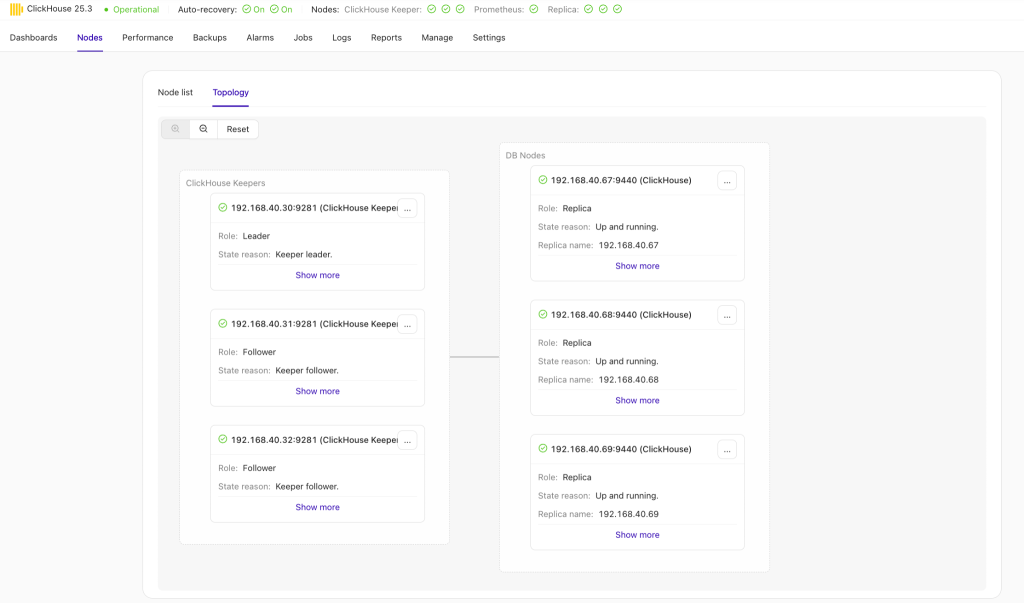
- Deploy automatically — single-node instances or replicated clusters with embedded Keeper, provisioned through the same workflow you already use for MySQL, PostgreSQL, MongoDB, and Redis
- Monitor and alert through ClusterControl’s unified dashboards — one pane of glass across your transactional and analytical estate
- Back up and restore your ClickHouse clusters
- Scale as analytical workloads grow
- Import existing ClickHouse clusters into ClusterControl management, and drive operations from the s9s CLI and API as well as the UI
- Secure inter-node communication — SSL-encrypted links between cluster nodes with per-node certificates
Run it standalone if analytics is all you need. Or run it as one tier of a comprehensive stack — ClickHouse for OLAP next to MySQL, PostgreSQL, MongoDB, and Redis for OLTP, with load balancers, backups, and access control managed the same way across all of them. Same workflow, same alerting, same operational muscle memory, in whatever environment your requirements dictate.
What’s next for ClickHouse in ClusterControl
This release is the foundation, and the roadmap builds directly on it. Planned improvements include:
- Replication from MySQL and PostgreSQL into ClickHouse — feed your analytics tier directly from your operational databases, targeted for the next release
- Sharded ClickHouse cluster deployments for horizontally scaled analytical workloads
- ClickHouse user and role management from the UI
PostgreSQL backups
Two significant improvements land for PostgreSQL in 2.5.0:
Streaming backups directly to S3. ClusterControl now streams pg_basebackup output straight to S3-compatible object storage — Amazon S3, MinIO, Google Cloud Storage (S3 mode), DigitalOcean Spaces, Wasabi, and others. No local disk staging, no oversized temp volumes on your database hosts, and a shorter backup-to-cloud pipeline overall.
Native incremental backups (PostgreSQL 17+). PostgreSQL 17 introduced incremental backup support in pg_basebackup, and ClusterControl 2.5.0 puts it to work — including S3 upload. For large databases, that means dramatically smaller and faster backups between full baselines.

Usage metering and operator billing (Pay-As-You-Go)
For operators, MSPs, and platform teams running database services on a consumption basis, 2.5.0 introduces built-in usage metering:
- Hourly usage snapshots collected per controller across your managed estate
- On-demand billing reports — estate-wide or filtered by tag or cluster — with cryptographic sealing and independent verification
- A dedicated operator billing page in the multi-controller UI, with JSON/CSV export
It’s the foundation for Pay-As-You-Go commercial models on infrastructure you control — a natural fit for Sovereign DBaaS operations. The feature is off by default and only surfaced when metering is enabled.
Cluster-wide configuration management is back
By popular demand from ClusterControl v1: change a database parameter across every node in a MySQL cluster in a single action. Dynamic parameters are applied at runtime — no per-node edit-and-restart cycle, and less downtime for routine configuration changes in production.
PostgreSQL database user management
Create and manage users and roles from the UI, with fine-grained privileges down to schema and table level, lock/disable/enable lifecycle operations, pg_hba.conf editing with tracked changes, and user search and filtering.
Other noteworthy improvements
- Scalable controllers pool hardening — UI-driven upgrades of remote pool members, automatic alarms on version mismatch, safer pool joins, and better resilience for large fleets.
- Enhanced Kubernetes database support — clusters and backup schedules can now be deployed through GitOps as reviewable Git pull requests, plus structured logging, metrics, and default dashboards for observability, more reliable cluster health reporting, and operator compatibility and security updates.
- Custom pg_hba configuration — define custom pg_hba.conf rules at deployment time, plus UI editing of entries — useful for multi-datacenter PostgreSQL topologies
- Audit log filtering and export in the UI.
- ProxySQL management promoted from a pop-up dialog to a dedicated page
- Faster database deployments — multithreaded installation provisions 4 nodes in parallel for PostgreSQL and MySQL clusters, with optional additional customization.
- Redis / Valkey Sentinel logs now included in error reports for easier failover debugging
- Content-Security-Policy headers in the web UI, and improved resilience for long-running backup jobs.
Get started today
Get ClusterControl v2.5.0 as a new user by signing up for a free 30-day trial or upgrade your CC deployment to practically deploy ClickHouse or bring your current deployment under ClusterControl’s management and access the other game-changing capabilities. In the meantime, full details can be found in the Release Notes.
Questions about running ClickHouse or any other engine with ClusterControl? Talk to us.
Install ClusterControl in 10-minutes!
Free 30-day Enterprise trial included
Script Installation Instructions
The installer script is the simplest way to get ClusterControl up and running. Run it on your chosen host, and it will take care of installing all required packages and dependencies.
Offline environments are supported as well. See the Offline Installation guide for more details.
On the ClusterControl server, run the following commands:
wget https://severalnines.com/downloads/cmon/install-cc
chmod +x install-cc
sudo ./install-cc     # omit sudo if you run as root
After the installation is complete, open a web browser, navigate to https://<ClusterControl_host>/, and create the first admin user by entering a username (note that “admin” is reserved) and a password on the welcome page. Once you’re in, you can deploy a new database cluster or import an existing one.
The installer script supports a range of environment variables for advanced setup. You can define them using export or by prefixing the install command.
See the list of supported variables and example use cases to tailor your installation.