
Is your Data Sovereign?
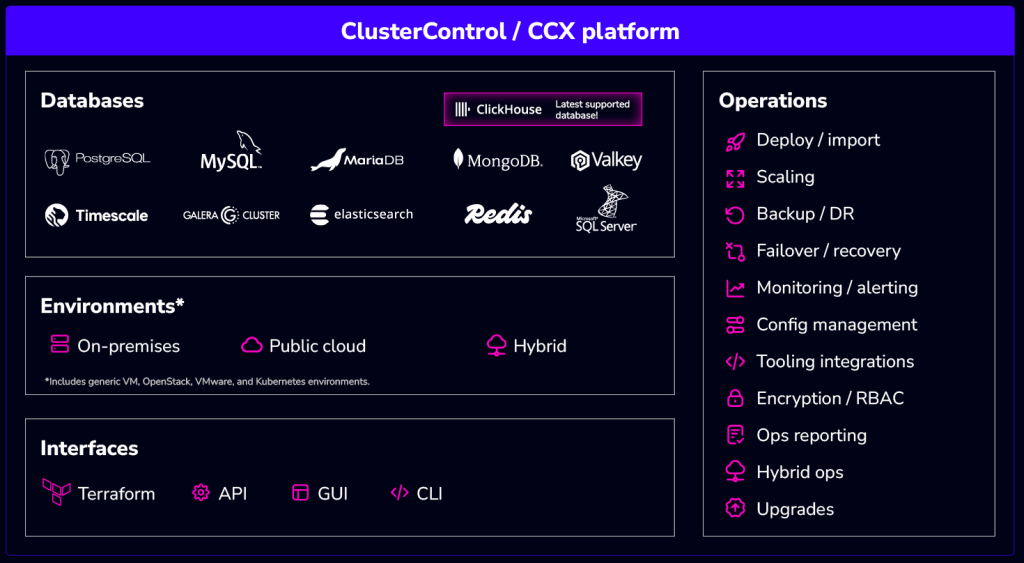
If your data stack isn’t, then no, it’s not. But, it can be — with Severalnines and ClusterControl. ClusterControl is a database automation platform that you can use to import, deploy and operate the open-source and source-available databases that store and deliver your most critical data in on-prem, hybrid, and cloud environments.

Your competitors’ data is sovereign because their data stack is sovereign
Your cohort is already better positioned against disruptions — what about you?






One control plane can automate your databases across on-prem, cloud, and hybrid
Place your databases in non-US clouds or go multi-cloud
Today’s proliferation of privacy regulations and local cloud providers, it’s essential to diversify your cloud infra. Here are the top three benefits:
• You will reduce business risks around EU and other privacy regulations
• Your customer data is not subject to US CLOUD Act or FISA
• Your stack will be shielded from geopolitical disruption
The above benefits aside, it is also a true diversification strategy that will ensure your key workloads are better protected from events outside of your control.
Move your databases back on-prem or across hybrid
It has never been easier thanks to new technology, models, such as the cloud operating model, and frameworks. Here are the top three benefits:
• You will reduce cost, lock-in, and privacy regulation risks
• You will have more flexibility over workload placement
• You will have more control over workload configuration
Even better, on-prem itself has taken on a whole new meaning — you have all manner of options from co-location providers, up to and including hosting services.
SPECIAL Money2020 OFFER: Get 40% off your first year
Build an internal DBaaS or automate single app databases with ONE platform
Enable your DevOps teams to efficiently deliver services or dev teams to easily automate database operations for specific applications — ANYWHERE
Choose the CC plan that fits your use case and preferred payment terms
Community
For deployment and monitoring
- Deployment and monitoring
- Performance advisors
- Community support
starts atFree
Advanced
self-serve
For small production deployments
- Includes all Advanced features
- Deploy up to 5 nodes
- Pay-as-you-go
starts at€250*per node, per month
Advanced
For production deployments
- Scaling and failover
- Deploy load balancers
- Business hours support
for pricingContact Us
Enterprise
For enterprise-grade deployments
- Operations Center and reporting
- Enhanced security features
- 24×7 support
for pricingContact Us
Install ClusterControl in 10-minutes!
Free 30-day Enterprise trial included
Welcome to ClusterControl!
You’re just a few steps away from setting up your deployment.
Script Installation Instructions
The installer script is the simplest way to get ClusterControl up and running. Run it on your chosen host, and it will take care of installing all required packages and dependencies.
Offline environments are supported as well. See the Offline Installation guide for more details.
On the ClusterControl server, run the following commands:
wget https://severalnines.com/downloads/cmon/install-cc
chmod +x install-cc
sudo ./install-cc     # omit sudo if you run as root
After the installation is complete, open a web browser, navigate to https://<ClusterControl_host>/, and create the first admin user by entering a username (note that “admin” is reserved) and a password on the welcome page. Once you’re in, you can deploy a new database cluster or import an existing one.
The installer script supports a range of environment variables for advanced setup. You can define them using export or by prefixing the install command.
See the list of supported variables and example use cases to tailor your installation.
Hardward (minimum):
Architecture: x86_64 only
RAM: >2 GB
CPU: >2
cores
Disk space: >40 GB
Supported OS:
Red Hat Enterprise Linux 8.x/9.x
Rocky Linux 8.x/9.x
AlmaLinux
8.x/9.x
Ubuntu 18.04/20.04/22.04/24.04 LTS
Debian 10.x/11.x/12.x
SUSE Linux Enterprise Server 15
SP3/15 SP4
For full details, check our documentation.
Want to deploy ClusterControl your way? Deploy it with your preferred automation tool:
Prefer to launch ClusterControl directly from the cloud? It’s available on these platforms:
• DigitalOcean Marketplace
• gridscale.io Marketplace
• Vultr Marketplace
• Linode Marketplace
• Google Cloud
Platform
Resources:
Need Help? Contact Support
Can I install ClusterControl on an Ubuntu VM even though my organizations standard is another Linux?
Yes. Install on any linux distribution wherever is convenient, on-premise or in the cloud.
Do I have to create a VM for ClusterControl?
You can also install ClusterControl into a Kubernetes cluster via our Helm chart.
When I import a production database into the console what happens?
You add ssh credentials in order to connect to the server (on-prem or cloud) and add the IP and port and user/password. ClusterControl doesn’t touch any installations and just gets the replication or cluster environment under control by sending alerts and events that you can act upon accordingly.