blog
Advanced Partitioning Strategies for PostgreSQL OLTP and Analytics Datasets at Scale

When PostgreSQL tables are still relatively small, most tasks seem straightforward. You can run queries without thinking too much about indexes, retention jobs are manageable, and even vacuum operations usually stay under control. But things change pretty quickly once tables start growing into hundreds of millions or billions of rows.
At that scale, even simple operational tasks like VACCUM become annoying, query plans become unpredictable and maintenance windows suddenly matter a lot more. There are cases where a simple DELETE for old data runs for hours and causes more operational stress than the original workload itself. This is usually the point where partitioning starts becoming less of an optimization feature and more of a survival strategy.
To be clear, partitioning is not some magical PostgreSQL switch that instantly fixes performance problems. If queries are poorly designed or indexes are missing, partitioning alone will not save the system. But when used properly, it helps make large datasets operationally manageable.
In this article, we’ll go through some practical partitioning strategies for PostgreSQL, discuss where each approach works well, and cover a few operational lessons that often only show up once systems hit production scale.
Why Partitioning Matters for PostgreSQL
As PostgreSQL deployments continue to grow into billions of rows, traditional single-table designs often become difficult to maintain and optimize. Large datasets can introduce challenges such as slower query execution, bloated indexes, expensive vacuum operations, and increasingly complex data retention management.
Partitioning addresses these issues by splitting a large logical table into smaller physical segments called partitions. Each partition stores a subset of the data based on a defined strategy such as range, list, or hash partitioning.
Modern PostgreSQL versions provide declarative partitioning, which significantly simplifies partition management compared to older inheritance-based approaches. Declarative partitioning enables PostgreSQL to automatically route data into appropriate partitions and optimize query execution using partition pruning.
For Database Administrators (DBAs) managing high throughput OLTP systems or analytics workloads, partitioning can provide:
- Faster query execution through reduced data scans
- Easier maintenance and vacuuming
- Improved archival and retention management
- Better operational scalability
- Simplified lifecycle handling for historical data
In environments where operational visibility and automation are important, tools such as ClusterControl can also help simplify monitoring and maintenance of partitioned databases.
PostgreSQL Partition Design
Choosing the right partitioning strategy is critical. A poorly designed partition layout can introduce unnecessary complexity and reduce the expected performance gains. PostgreSQL supports several partitioning methods:
Range Partitioning
Range partitioning is probably the most common strategy used in PostgreSQL production environments.
If your tables contain time-based data, there’s a very high chance you’ll eventually end up using range partitions. Range partitioning is especially useful for time-series and transactional workloads.
Example use cases:
- Financial transactions
- Logs and audit events
- IoT telemetry
- Order history
A common strategy is monthly or daily partitions based on a timestamp column; example:
CREATE TABLE orders (
    id BIGSERIAL,
    customer_id BIGINT,
    created_at TIMESTAMP NOT NULL,
    amount NUMERIC(12,2)
) PARTITION BY RANGE (created_at);
What makes range partitioning attractive is operational simplicity. Instead of deleting old rows one by one, DBAs can simply drop old partitions. That difference becomes huge once datasets grow large enough.
Benefits:
- Efficient retention management
- Fast archival operations
- Excellent partition pruning for date-based queries
Challenges:
- Requires proactive partition creation
- Uneven data distribution if workload spikes occur
List Partitioning
List partitioning divides data based on predefined values. Typical examples:
- Country-based separation
- Tenant isolation
- Business unit segmentation
Example:
CREATE TABLE customers (
    id BIGSERIAL,
    region TEXT,
    name TEXT
) PARTITION BY LIST (region);
Benefits:
- Strong logical separation
- Useful for multi-tenant environments
Challenges:
- Difficult to manage when value counts grow rapidly
- Requires manual handling for new values
Hash Partitioning
Hash partitioning is a bit different. Unlike range partitioning, the goal here is usually not retention management. Instead, hash partitioning focuses more on distributing workload evenly. Hash partitioning distributes data using a hashing algorithm. Common use cases:
- High-write OLTP systems
- Evenly distributed workloads
- Parallel processing optimization
Example:
CREATE TABLE sessions (
    id BIGSERIAL,
    user_id BIGINT,
    created_at TIMESTAMP
) PARTITION BY HASH (user_id);
Benefits:
- Balanced write distribution
- Reduces partition hotspots
Challenges:
- Less intuitive for data lifecycle management
- Not ideal for archival workflows
Indexing and Constraint Considerations
Partitioned tables introduce some important differences in how indexes behave compared to regular PostgreSQL tables.
One thing that often surprises engineers is that indexes in PostgreSQL partitioning are still local to each partition.
In other words, PostgreSQL does not currently maintain a single global index shared across all partitions. Each partition owns and manages its own separate index structure; for example:
CREATE INDEX idx_orders_created_at
ON orders (created_at);
At first glance, this looks like a single index created on the parent table. However, PostgreSQL actually creates individual indexes on every existing child partition underneath the partitioned table.
So if you have orders_2026_01, orders_2026_02, orders_2026_03, etc., each partition will have its own physical index — this behavior is important to understand because maintenance operations also happen independently per partition, meaning:
- VACUUM works per partition
- REINDEX works per partition
- Index bloat occurs per partition
- Statistics are collected per partition
Operationally, this is both a strength and a tradeoff. Smaller indexes are usually easier to maintain and can improve cache efficiency. However, environments with hundreds or thousands of partitions may also introduce additional planning overhead and catalog growth.
Do We Need to Create Indexes on Every Child Partition?
In most modern PostgreSQL versions, creating an index on the parent partitioned table automatically propagates the index definition to existing and future partitions.
For example:
CREATE INDEX idx_events_event_time
ON events (event_time);
PostgreSQL automatically creates corresponding indexes on all child partitions. Because of this, DBAs usually do not need to manually create indexes on every partition individually. However, there are still some cases where manual indexing per partition is useful:
- Different workloads per partition
- Historical partitions requiring different indexes
- Reducing storage usage on archive partitions
- Specialized indexing strategies for hot vs cold data
For example, recent partitions may require multiple indexes for OLTP queries, while older archive partitions may only need minimal indexing.
Unique Constraints and Partition Keys
Another important limitation is that PostgreSQL unique constraints on partitioned tables must include the partition key.
For example, while this may fail…
CREATE UNIQUE INDEX uniq_order_id
ON orders (order_id);
…this will work:
CREATE UNIQUE INDEX uniq_order_id_created_at
ON orders (order_id, created_at);
This limitation exists because PostgreSQL does not currently support true global unique indexes across all partitions. Without including the partition key, PostgreSQL cannot guarantee uniqueness between separate partitions.
Operational Considerations
As partition counts grow larger, DBAs should also monitor:
- Query planning time
- System catalog growth
- Autovacuum behavior
- Index maintenance overhead
- Partition pruning effectiveness
A common anti-pattern is over-partitioning — creating extremely small partitions, especially daily or hourly partitions for low-volume workloads, can actually hurt performance instead of helping it. In many cases, fewer well-sized partitions perform better than hundreds of tiny partitions.
Manual vs. ClusterControl
Managing partitions manually can work well in small environments, but automation becomes increasingly important as workloads scale.
Manual Partitioning
In many environments, partitioning starts with simple SQL scripts and scheduled cron jobs. At a smaller scale, manual partition management is manageable, giving teams complete flexibility over how partitions are created, archived, and maintained. Typical operational tasks include:
- Creating future partitions
- Dropping old partitions
- Running maintenance jobs
- Monitoring partition growth
- Managing retention policies
Advantages:
- Full control over naming conventions
- Flexible scheduling logic
- Custom operational workflows
- No dependency on external management tools
Disadvantages:
- Higher operational overhead
- Increased risk of missing partition creation windows
- Complex scripting requirements
- Difficult monitoring across large environments
- Greater operational inconsistency
One of the most common production mistakes happens when future partitions are not created on time. Suddenly, INSERT operations start failing, applications throw errors, and everyone realizes the partition scheduler stopped running days ago.
This is why proactive monitoring and automation become increasingly important as environments grow larger.
Using ClusterControl
While ClusterControl does not specifically provide native PostgreSQL partition management features, it can still help DBAs operate partitioned environments through broader database monitoring and operational visibility. For example:
- Monitoring PostgreSQL node health
- Tracking database performance metrics
- Observing storage growth trends
- Managing backups and failover operations
- Centralizing operational visibility across clusters
However, partition lifecycle operations themselves, such as creating future partitions, dropping expired partitions, or automating retention workflows, are typically still handled through SQL scripts, cron jobs, stored procedures, and utilizing external orchestration systems, such as the pg_partman extension.
Advantages:
- Better operational visibility for PostgreSQL environments
- Centralized monitoring across multiple clusters
- Easier infrastructure-level management
Considerations:
- No native partition automation feature
- Partition lifecycle logic still requires custom implementation
- Monitoring support does not replace proper partition design
For most PostgreSQL deployments, DBAs still need to build their own partition automation workflows even when using external management platforms.
Creating and Managing Partitioned Tables
Before implementing partitioning in production, it’s highly recommended to reproduce the setup in a small lab environment first.
A common mistake happens when teams jump directly into partitioning on production tables without properly testing things such as:
- query behavior
- partition pruning
- retention jobs
- index growth
- vacuum impact
- automation scripts
Even a simple local PostgreSQL instance is usually enough to understand how partitioning behaves operationally.
For this example, let’s simulate a basic event logging system.
Step 1 – Create the Main Partitioned Table
CREATE TABLE events (
   id BIGSERIAL,
   event_time TIMESTAMP NOT NULL,
   service_name TEXT,
   payload JSONB
) PARTITION BY RANGE (event_time);
At this stage, the parent table itself does not physically store rows yet. PostgreSQL expects child partitions to exist before inserts can happen.
Step 2 – Create Monthly Partitions
CREATE TABLE events_2026_01 PARTITION OF events
FOR VALUES FROM ('2026-01-01') TO ('2026-02-01');

CREATE TABLE events_2026_02 PARTITION OF events
FOR VALUES FROM ('2026-02-01') TO ('2026-03-01');
In production environments, this process is usually automated. Some teams create partitions monthly, while others maintain partitions several months ahead to reduce operational risk.
One of the most common operational mistakes happens when future partitions are not created in time, eventually causing INSERT failures once incoming data no longer matches an existing partition range.
Step 3 – Create Indexes
CREATE INDEX idx_events_2026_01_event_time
ON events_2026_01 (event_time);

CREATE INDEX idx_events_2026_02_event_time
ON events_2026_02 (event_time);
One important thing to remember is that PostgreSQL indexes remain local to each partition.
This means:
- each partition owns its own indexes
- vacuum operations happen independently
- statistics are collected independently
- index maintenance also happens independently
Unlike some other database systems, PostgreSQL currently does not support global indexes across partitions.
Step 4 – Insert Sample Data
INSERT INTO events (event_time, service_name, payload)
VALUES
('2026-01-15', 'payment-service', '{"status":"success"}'),
('2026-02-10', 'auth-service', '{"status":"failed"}');
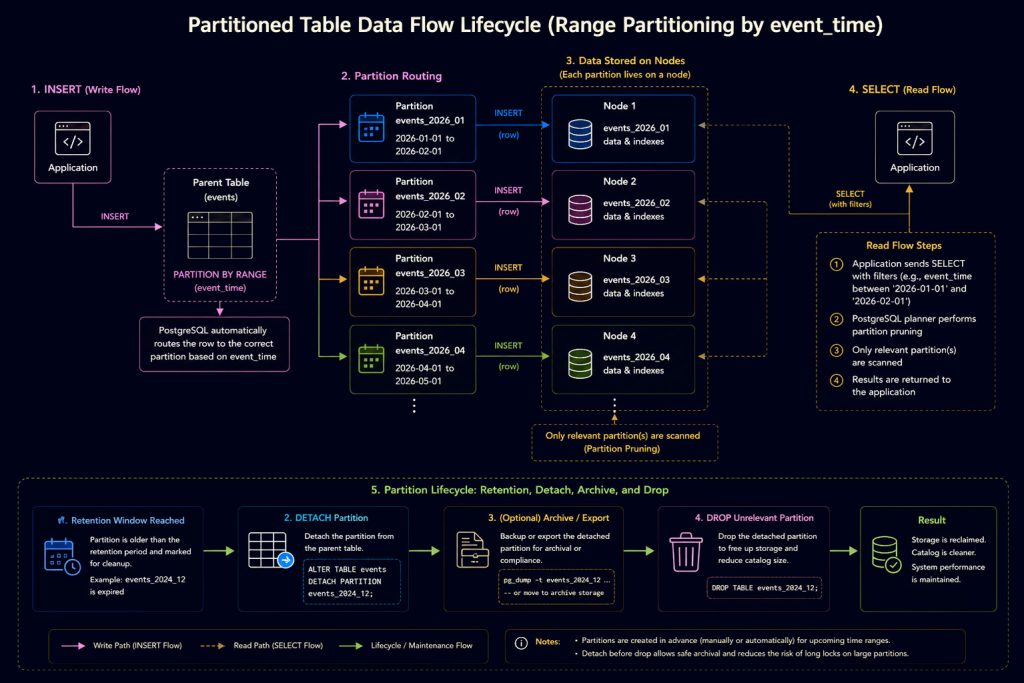
PostgreSQL automatically routes rows into the appropriate partition based on the partition key.
Step 5 – Verify Partition Pruning
Now let’s verify whether PostgreSQL scans only the required partition.
EXPLAIN ANALYZE
SELECT *
FROM events
WHERE event_time >= '2026-01-01'
 AND event_time < '2026-02-01';
If partition pruning works correctly, PostgreSQL should scan only the January partition.
This is one of the easiest ways to validate whether the partition strategy is behaving as expected.
Step 6 – Simulate Retention Cleanup
Instead of deleting millions of rows manually:
DELETE FROM events
WHERE event_time < '2025-01-01';
You can simply remove old partitions:
DROP TABLE events_2025_01;Operationally, this difference becomes huge once datasets start growing. In production, dropping partitions can significantly reduce:
- WAL generation
- vacuum pressure
- long-running transactions
- table bloat
Example Background Tasks for Partition Maintenance
Automating Partition Creation
In real production environments, partition creation is rarely handled manually forever. Many teams automate this process using:
- cron jobs
- pg_cron
- scheduled SQL procedures
- background workers
- external orchestration tools
- extensions such as pg_partman
Typical automation workflows usually include:
- detecting upcoming partition ranges
- proactively creating future partitions
- validating partition existence
- automatically creating indexes
- monitoring partition growth
- dropping expired partitions
Some organizations even maintain partitions several months ahead to avoid operational surprises.
Automatically Creating Future Partitions
One common approach is proactively creating partitions ahead of time. Example PL/pgSQL procedure:
CREATE OR REPLACE PROCEDURE create_future_partition(
   start_date DATE,
   end_date DATE
)
LANGUAGE plpgsql
AS $$
DECLARE
   partition_name TEXT;
BEGIN
   partition_name := format(
       'events_%s',
       to_char(start_date, 'YYYY_MM')
   );

   EXECUTE format(
       'CREATE TABLE IF NOT EXISTS %I PARTITION OF events
        FOR VALUES FROM (%L) TO (%L)',
       partition_name,
       start_date,
       end_date
   );
END;
$$;
Example execution:
CALL create_future_partition(
   '2026-03-01',
   '2026-04-01'
);
This type of procedure is commonly scheduled using:
- cron
- pg_cron
- external automation tools
- orchestration pipelines
Some organizations maintain partitions 3-6 months ahead to avoid unexpected INSERT failures.
Lifecycle Management
Partition lifecycle management is one of the strongest reasons to implement partitioning. Instead of deleting millions of rows individually, entire partitions can be archived or dropped instantly.
Detaching and Reattaching Old Partitions
Instead of immediately deleting historical data, some teams first detach partitions for archival purposes.
ALTER TABLE events
DETACH PARTITION events_2025_01;
After detaching:
- Backups can be taken separately
- Data can be exported
- Partitions can be moved to cheaper storage
- Maintenance can happen independently
This approach is often safer than directly dropping partitions immediately. Detached partitions can also be reattached later if needed.
ALTER TABLE events
ATTACH PARTITION events_2025_01
FOR VALUES FROM ('2025-01-01') TO ('2025-02-01');
This can be useful for:
- historical recovery
- restoring archived datasets
- temporary analytics workloads
Automatically Dropping Expired Partitions
Some teams fully automate retention cleanup.
DROP TABLE IF EXISTS events_2024_01;Compared to large DELETE operations, dropping partitions is significantly faster and generates much less WAL traffic.
Benefits include:
- Reduced WAL generation
- Faster maintenance operations
- Less table bloat
- Simpler retention enforcement
Reindexing Partitions
Large historical partitions may still require periodic maintenance.
Example:
REINDEX TABLE events_2025_06;DBAs should monitor:
Index bloat
Autovacuum behavior
Query execution patterns
Partition size distribution
In multi-node environments, partition lifecycle operations should also be coordinated with replication and backup strategies.
Monitoring Tasks
Partition-heavy environments also commonly include monitoring jobs such as:
- checking missing future partitions
- validating partition ranges
- monitoring partition size growth
- detecting index bloat
- monitoring autovacuum activity
- validating partition pruning effectiveness
This becomes increasingly important once environments grow into hundreds of partitions across multiple PostgreSQL nodes or clusters.
Performance Optimization
One factor often underestimated is how easy it is to misuse partitioning. Environments with hundreds of tiny partitions can experience worse query performance because planning overhead explodes. Partitioning helps, but only when the design stays practical. One important thing to remember is that partitioning is not a shortcut for poor query design.
It’s very common to see systems using partitioning incorrectly and expecting instant performance improvements. In reality, partitioning works best when combined with proper indexing, healthy query patterns, and good maintenance practices.
Partitioning alone does not guarantee optimal performance. Proper query design and operational tuning remain essential.
Partition Pruning
Partition pruning allows PostgreSQL to scan only relevant partitions. Example:
SELECT *
FROM events
WHERE event_time >= '2026-01-01'
  AND event_time < '2026-02-01';
If pruning is effective, PostgreSQL skips unrelated partitions entirely. DBAs should verify pruning behavior using:
EXPLAIN ANALYZEPoor query patterns may prevent pruning. Common issues include:
Non-negotiable conditions
Function-wrapped partition keys
Mismatched data types
Query Planning Considerations
As partition counts increase, planning overhead may also grow, negatively affecting performance.
Recommendations:
- Avoid excessive partition counts
- Use practical partition intervals
- Monitor planning time separately from execution time
- Keep statistics updated
Parallel Query Execution
Partitioned tables can enhance parallel query performance by enabling PostgreSQL to process multiple partitions concurrently. Analytics workloads particularly benefit from:
- Parallel sequential scans
- Partition-wise joins
- Partition-wise aggregation
However, DBAs should still benchmark workloads carefully before deploying partition strategies into production.
Conclusion
After working with large datasets for long enough, most DBAs eventually realize that partitioning is not only about performance. A lot of the value actually comes from operational simplicity. Being able to archive, detach, or drop data in smaller chunks fundamentally changes how manageable a PostgreSQL environment feels day to day. Tasks that previously took hours can sometimes be completed in seconds simply by managing partitions correctly.
At larger scale, partitioning often becomes less of a performance optimization and more of an operational survival strategy. That said, partitioning also introduces additional complexity. Poor partition design, excessive partition counts, missing automation, or weak monitoring can easily create new operational problems instead of solving existing ones. The key is keeping the design practical, predictable, and aligned with the actual workload.
Some important takeaways include:
- Choose partition strategies carefully based on workload patterns
- Automate partition lifecycle operations whenever possible
- Monitor partition pruning effectiveness
- Avoid excessive partition counts
- Combine partitioning with proper indexing and maintenance practices
In real production environments, successful partitioning is rarely only about SQL design alone. Operational visibility also becomes increasingly important as environments grow larger. Monitoring storage growth, replication health, backup operations, autovacuum behavior, and node performance all become part of managing partition-heavy PostgreSQL systems reliably.
This is where operational platforms such as ClusterControl can still provide value, especially for teams managing multiple PostgreSQL nodes or clusters. While partition lifecycle automation itself still typically relies on custom scripts, scheduled procedures, or external orchestration, centralized monitoring and infrastructure visibility can help reduce operational blind spots as systems scale.
As PostgreSQL continues evolving, declarative partitioning is becoming increasingly mature and production-ready for modern OLTP and analytics workloads. DBAs who invest time into proper partition architecture, automation, and operational monitoring can significantly improve both long-term scalability and day-to-day operational stability.