
blog
PostgreSQL 18 Upgrades for AI-Era Workloads and Operations

Today, we’re asking PostgreSQL to do more and more, like handling both transactions and analytics, powering huge SaaS platforms, managing event data, and even dipping into AI-related tasks like vector search. This intense pressure highlights some pain points: slow, unpredictable reads, rigid indexing, complex setups, and risky major upgrades.
PostgreSQL 18 directly addresses these real-world operational challenges, skipping flashy features for practical improvements like asynchronous I/O to speed up reads, safer upgrades from keeping optimizer stats, better multi-column indexes, UUIDv7 support, and useful enhancements to logical replication.
I’ll dive into these key operational changes, show how they fit your modern workflows, and explain how tools like ClusterControl can make adopting them smooth and painless.
PostgreSQL 18’s key features that improve core workload performance
PostgreSQL 18 isn’t about one big, new thing. Instead, it offers fixes for common headaches: slow storage, reads competing with new transactions, inconsistent performance post-upgrade, indexes that don’t quite hit the mark, messy authentication, and confusing replication errors — these fixes smooth out the rough operational edges. Let’s look at two key features that will have the greatest effect on production work.
Async I/O subsystem (AIO)
Slow storage often causes problems, not the computer itself. Older PostgreSQL waited for each storage request, which is safe but can slow things down, especially when your data is too big for the cache or when running big scans alongside regular transactions.
PostgreSQL 18 fixes this with Asynchronous I/O (AIO). Now, the system can ask for multiple data blocks and keep working instead of waiting for each one. This can significantly improve read-heavy scans and some maintenance operations under the right I/O conditions. New settings like io_method help you tune this — don’t just test AIO with a single query.
Its real power shows up under heavy, simultaneous load. To see the benefit, test your actual, read-heavy workload, focusing on P95/P99 latency improvements. Pay special attention to maintenance, since PG 18 specifically aims to reduce I/O slowdown during VACUUM.
TIP: A good test is to compare latency under pressure with and without AIO while background maintenance is running.
Skip-scan on B-tree indexes
In large systems, especially SaaS, we often use multi-column indexes. The problem is that queries don’t always filter by the index’s first column. For example, an index on (tenant_id, created_at) won’t help a query just filtering by created_at. This usually means creating extra, redundant indexes — PostgreSQL 18 adds skip-scan for multi-column B-tree indexes.
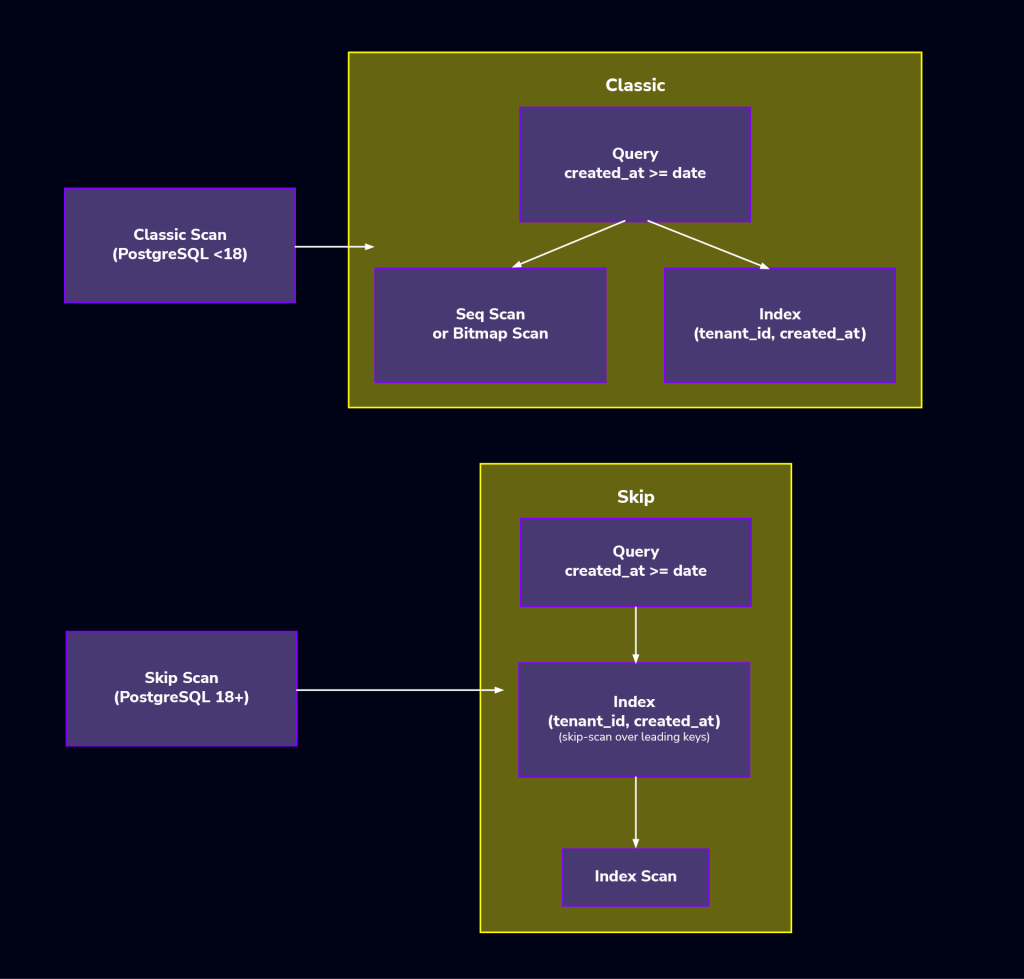
When the planner estimates it’s cheaper than scanning the table, it can iterate over the leading column’s distinct values and reuse the same index to satisfy predicates on the later columns, even if the leading column isn’t constrained. This is a big win because it means fewer extra indexes, making things cleaner, helping performance by reducing write overhead, and keeping VACUUM happy as your data inevitably scales.
How Postgres 18 features practically support modern workload patterns
PostgreSQL 18’s new stuff isn’t just random. It’s built around how people are actually using Postgres right now. Most setups mix transactions, reporting, search, and more AI stuff, with evolving replication.
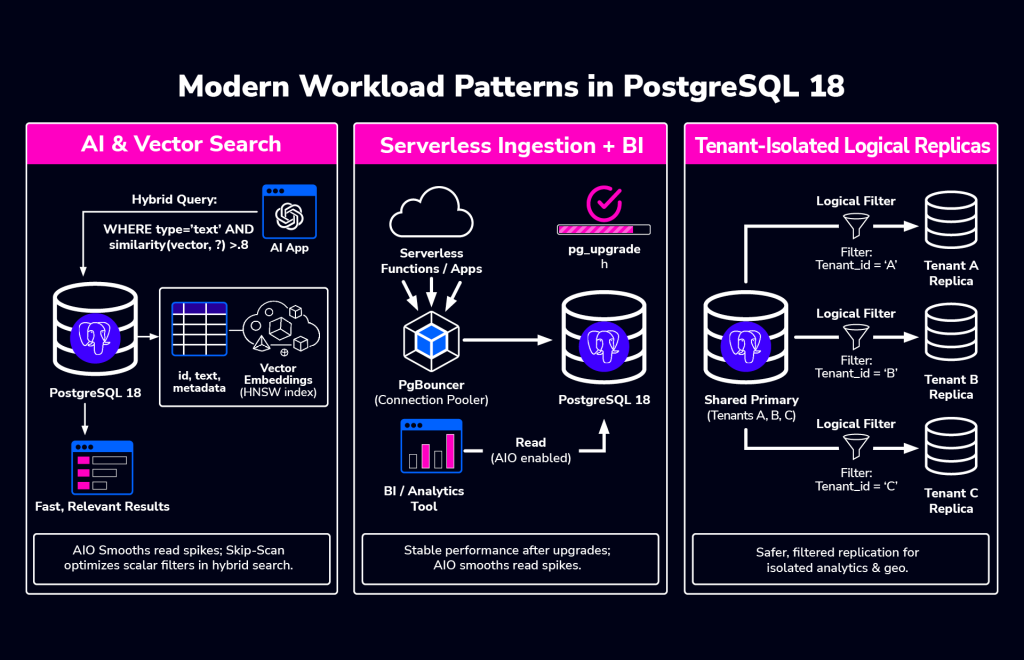
Looking at what users are doing makes the improvements way easier to understand how they benefit day-to-day operations than just seeing a list of new features.
AI & vector search
When people use AI with PostgreSQL, they usually don’t replace the database with a specialized vector engine. Instead, they keep PostgreSQL as the main system for transactional data and put AI-related data, like embeddings, right alongside it.
When running vector search and transactional workloads together, it’s best to keep those data embeddings right next to the data they describe. This means you need reliable performance: steady write speeds, predictable read times even when searches spike, and enough replicas to scale reads without bogging down the main database.
Query complexity grows, mixing things like finding similar items with standard filters on who, when, permissions, or categories. This often leads to heavy database scans, unpredictable read bursts, and competition between search / reporting tasks and regular writes — PostgreSQL 18’s features help smooth all of this out.
Asynchronous I/O helps with storage slowdowns during heavy reads, and skip-scan makes filtering around your similarity searches much faster by improving multicolumn indexes. You still need a smart strategy for your AI indexes, e.g. when to use HNSW, how to organize data, etc., but PG helps the whole system handle the pressure better. Adding ClusterControl to the mix creates a winning combination, as managing replicas, backups, and monitoring performance as you grow becomes much easier.
Serverless ingestion + BI
Many teams want applications to feel serverless and handle real-time data analysis, even when self-managing PostgreSQL or in a hybrid setup. Raw speed isn’t the priority; it’s how the system handles sudden spikes and recovers quickly, posing two hurdles:
First, when lots of people use it at once, things can get slow. Second, we have less and less time for maintenance and upgrades, and we need stability right away after an update.
PostgreSQL 18 fixes both. Better I/O helps with slow reads during busy times, and keeping performance stats after an upgrade means less post-update drama. Basically, PostgreSQL is becoming stronger for unpredictable loads, and when you can’t afford any downtime. ClusterControl makes upgrades and backups consistent across all your setups; that’s what makes the difference between a normal maintenance window and a full-blown incident.
Isolated replication for multi-tenant workloads
Multi-tenant systems often use replication to handle more reads, separate workloads, or serve different regions. This usually means having read replicas for regions, consumers for analytics or search, and moving tenants around as the system grows.
PostgreSQL 18 improves replication by better supporting generated columns and making conflicts much easier to see. This makes tenant-specific replication safer to run and easier to fix when problems occur. ClusterControl helps by setting up and monitoring these setups consistently, preventing hard-to-maintain, one-off replication configurations.
The result is fewer unexpected issues during replication, clearer insight when conflicts happen, and more confidence when changing how your replication is set up.
Postgres 18 features that reduce upgrade & migration workflow risks
Upgrading PostgreSQL is mostly about managing risk, not the specific steps. What teams truly care about is getting the system back to normal, predictable performance fast.
Tight maintenance windows, huge databases, and low tolerance for issues mean the period after the upgrade can be brutal. Slow query plans, unexpected slowdowns, or emergency tuning can quickly turn a successful upgrade into an on-call nightmare. Here are the design changes and features PostgreSQL 18 implements to tackle these specific problems.
Faster upgrades with retained statistics
Historically, PostgreSQL upgrades caused frustrating performance degradation because the query planner had to relearn all data statistics. PG 18’s pg_upgrade utility now transfers most optimizer statistics. This feature dramatically stabilizes performance much faster post-upgrade by immediately providing current data knowledge to the planner, eliminating the stressful, lengthy process of relearning statistics, especially for large databases.
Checksums enabled by default in initdb
PostgreSQL 18 changes a big default: new clusters now turn on data checksums automatically when you run initdb. Checksums are great for catching sneaky data corruption, though they use a tiny bit more CPU. Most teams already use them for better durability or compliance — you can still opt out with --no-data-checksums.
However, checksum settings must match exactly when you upgrade. If your old cluster didn’t have checksums, you can’t magically turn them on during the upgrade.
Think of the checksum setting as a contract for your cluster. Document it, keep it consistent everywhere, and test it during your upgrade dry runs. Don’t leave it as a last-minute decision, or you’ll find problems during the final cutover instead of in testing.
PG 18 enhancements that improve developer & SQL quality of life
Even though some PostgreSQL features seem like they are just for developers, they often impact how things run behind the scenes. Schema and SQL choices can unexpectedly influence storage, how much data is written, replication size, and index performance over time. Postgres 18 brings changes in this area that operators should really pay attention to.
Virtual generated columns (default)
PostgreSQL 18’s generated columns are usually virtual, meaning the value is calculated when you read the row, not saved on disk, unless you choose to store it.
Operationally, this is key. Virtual columns cut down on writes and storage, which is great for busy tables. But if you read the derived value a lot or need to index it predictably, stored columns might be better, as the calculation is done once on write, not on read; for example,
CREATE TABLE orders (
  id bigint GENERATED ALWAYS AS IDENTITY PRIMARY KEY,
  amount numeric(12,2) NOT NULL,
  amount_cents bigint GENERATED ALWAYS AS ((amount * 100)::bigint)
);
In PostgreSQL 18, amount_cents is virtual by default. If you want the value precomputed and stored, because it’s heavily queried or indexed, you can still do so explicitly:
amount_cents bigint GENERATED ALWAYS AS ((amount * 100)::bigint) STOREDN.B. This decision is crucial for replication. PG 18’s logical replication is better at publishing stored generated values.
UUIDv7 for time-ordered IDs
UUIDs are great because they’re unique everywhere and easy to make across different systems. The problem has been how they mess up B-tree indexes. Random UUIDs scatter new entries, causing slow index bloat and cache issues, especially on busy tables.
Recent PostgreSQL releases fixed this natively with uuidv7(), making it the operational standard for PostgreSQL 18 architectures. It generates UUIDs that are mostly time-ordered. This keeps your indexes much tidier while keeping the benefits of using UUIDs. For example:
CREATE TABLE sessions (
  id uuid PRIMARY KEY DEFAULT uuidv7(),
  created_at timestamptz NOT NULL DEFAULT now()
);
If you’ve been hesitant to use UUID primary keys on high-ingest tables because of index behavior, UUIDv7 makes that trade-off far more reasonable.
Temporal constraints for time-varying facts
Dealing with time-sensitive data, like pricing or subscriptions, usually means complex application code and tricky locking to avoid mistakes. Postgres 18 simplifies this with temporal constraints.
These let the database enforce rules, like primary and foreign keys, over time ranges. This moves the headache of correctness from your application logic into the database, making enforcement instant and reliable.
For operations teams, this means fewer weird errors, less data cleanup, and fewer 2 a.m. alerts caused by subtle concurrency issues.
OAuth authentication
PostgreSQL 18 now supports OAuth, which is a big deal for security. It gives you a path to reduce long-lived DB passwords by using short-lived tokens where it fits your identity stack. It won’t fix bad internal role design, but it massively cuts down on the headache of credential sprawl, especially where infrastructure is constantly spinning up and down. OAuth is just way easier to manage than traditional passwords in those dynamic setups.
How PostgreSQL 18 improves logical & streaming replication efficiency
Replication gets complicated fast. One replica is simple, but the more lag, conflicts, and strange failures you open yourself up to. PostgreSQL 18 doesn’t magically automate logical replication or make it DDL aware. What it does instead is provide practical improvements that make operating, monitoring, and managing your replicas much easier.
Generated column replication
Building on recent improvements, modern PostgreSQL lets you publish stored generated columns using the publish_generated_columns option. This is great for downstream systems that need the calculated value right away instead of having to recompute it. PostgreSQL sends the generated value and replicates it into a normal column on the subscriber.
N.B. You cannot replicate it into another generated column; that will fail.
Basically, this feature ships the finished, calculated results, not the formula or the generated column definition. Its best use is to simplify your consumers and avoid repeating work, without getting into complicated DDL replication. Let’s look at a simple logical replication setup to illustrate how Postgres 18 handles generated columns.
On the publisher:
CREATE TABLE orders (
  id bigint GENERATED ALWAYS AS IDENTITY PRIMARY KEY,
  amount numeric(12,2) NOT NULL,
  amount_cents bigint GENERATED ALWAYS AS ((amount * 100)::bigint) STORED
);

CREATE PUBLICATION orders_pub
FOR TABLE orders
WITH (publish_generated_columns = 'stored');
On the subscriber, the generated value is replicated into a regular column:
CREATE TABLE orders (
  id bigint PRIMARY KEY,
  amount numeric(12,2) NOT NULL,
  amount_cents bigint NOT NULL
);

CREATE SUBSCRIPTION orders_sub
  CONNECTION 'host=<publisher_host> port=5432 dbname=<db> user=<repl_user> password=<password>'
  PUBLICATION orders_pub;
This setup reflects how PostgreSQL 18 actually handles generated column replication: you publish the stored generated value and apply it to a normal column on the subscriber. It’s a practical, explicit approach that avoids surprises and stays within the supported model.
Streaming defaults and conflict logging
Logical subscriptions now use parallel streaming by default. This means faster throughput and less lag right out of the box, especially when things are busy or transactions are large.
Conflict handling is also much better. Modern PostgreSQL logs conflicts and shows conflict details in pg_stat_subscription_stats. While not brand new to 18, utilizing this view is a massive upgrade if you are coming from older major versions. Replication conflicts are usually a nightmare because you can’t see them as they happen. Better visibility means you can spot trends, link issues to workload changes, and write reliable troubleshooting guides without relying on guesswork.
Hygiene improvements for larger estates
When you have a lot of replication going on, keeping things tidy is as crucial as keeping them fast. PostgreSQL 18 adds a few safeguards to head off slow, hidden problems:
idle_replication_slot_timeout: Automatically invalidates idle replication slots that have been inactive for too long.max_active_replication_origins: Lets you limit the number of active replication origins, regardless of the number of existing slots.
If you’ve ever had an old, forgotten logical slot quietly hogging Write-Ahead Log (WAL) space for weeks, you’ll appreciate these. They don’t replace good monitoring, but they make it much harder for tiny mistakes to turn into massive cleanup projects later.
Manual vs. ClusterControl PostgreSQL 18 operations
Managing PostgreSQL by hand is fine until it isn’t. When you have just a couple of clusters, doing it yourself is easy. But once you have more than a few, those manual steps start wasting time and attention. That’s when the downsides really hit.
Manual PG 18 operations
Running PostgreSQL manually gives you total freedom, which is great for small setups. But not everything is good. Let’s see what we’re talking about.
Pros:
- You control everything about the setup.
- You can perfectly tune it for each task.
- Trying new things is easy in one environment.
Cons:
- Big upgrades are messy. Checksums, making sure plans stay stable, and planning for rollbacks are a headache.
- Replication slot cleanup is a long-term chore, especially as your setup changes.
- Backup plans often differ between clusters as you add or rebuild them.
- Monitoring is usually a bunch of tools cobbled together, leading to confusing alerts and nobody knowing who’s on point during a problem.
Trivial alone, critical cumulatively, these will chew up a ton of your team’s time as you grow.
Automated PG 18 ops with ClusterControl
ClusterControl really shines when you’re rolling PostgreSQL 18 because it saves you from having to figure out the same operational steps over and over again for every new cluster.
Pros:
- Centralized hybrid setup and management of all PostgreSQL clusters.
- Guided major version updates, ensuring you don’t miss crucial pre-checks.
- Easily and safely applied parameter changes, like AIO tuning, across the board.
- Turnkey streaming replication, including built-in HAProxy and PgBouncer support.
- Single view alerting and health checks, e.g. replication lag, node status, backups, etc.
- Backup policy enforcement using common tools, e.g. pgBackRest, pg_basebackup, etc.
Cons:
- It’s a platform, implying its own learning curve.
- You need to check that your rollout timing aligns with ClusterControl’s support for the PostgreSQL version you want to use.
For teams managing PostgreSQL at scale across many environments, this consistency is often more valuable than having total control over every single command, and easier.
Installing & setting up Postgres 18
When piloting PostgreSQL 18, set up your test environment to mimic your real deployment exactly. Use the same storage, replication setup, extensions, like pgvector, and a realistic, large enough dataset. Small, fake tests will just hide the real problems you need to find.
Installing PostgreSQL 18
The specific package names and repos differ based on your system, but here’s an example of a typical installation:
For Debian-Based OS:
sudo apt update
sudo apt install postgresql-18
For RedHat-Based OS:
sudo dnf install postgresql18-serverChecksums at initdb
Remember, PostgreSQL 18 enables checksums by default at initialization.
sudo /usr/pgsql-18/bin/postgresql-18-setup initdbBut, you can opt out:
sudo -u postgres /usr/pgsql-18/bin/initdb
--no-data-checksums -D /var/lib/pgsql/18/data
Don’t forget that pg_upgrade requires checksum settings to match between the source and target clusters. Treat checksum posture as an upgrade design decision and validate it during rehearsals, not during the cutover window.
Confirm AIO-related settings:
Once the cluster is up, confirm the effective I/O-related settings you’re running with:
SHOW io_method;
SHOW effective_io_concurrency;
SHOW maintenance_io_concurrency;
Exact behavior depends on platform and build options, but this gives you a baseline before you start tuning or running load tests.
Adding the PG 18 cluster to ClusterControl and initializing HA / replication
Once running, the next step is to bring the cluster into ClusterControl and establish a sane baseline topology. For many teams, a solid default looks like:
- 1 primary
- 1–2 replicas
- HAProxy for routing and HA
- PgBouncer for connection pooling (especially with spiky workloads)
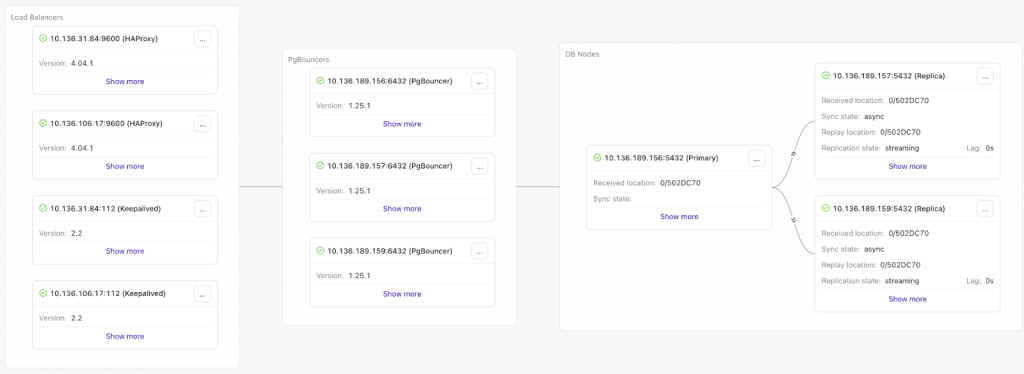
ClusterControl’s guided workflows can deploy PostgreSQL streaming replication and integrate HAProxy and PgBouncer as part of the setup, reducing the amount of manual wiring needed to reach a production-ready state.
PostgreSQL 18 operations & monitoring
PostgreSQL 18 offers better control and visibility. But that only matters if you use it to create reliable runbooks for when things go sideways. Don’t tweak every last setting; the real win is a predictable system under pressure, not the ability to see clearly when it isn’t.
Tune AIO safely
Asynchronous I/O (AIO) in PostgreSQL 18 is a big deal, especially for handling many tasks at once, but don’t rush it. It shines under heavy load, not in simple tests.
Start Simple:
- Pick the right io_method for your system.
- Test it with your actual, busy application, not just single queries.
- Then try adjusting
io_combine_limitandio_max_combine_limit.
What to Watch For:
- How long scans take, especially big ones.
- Storage delays when the system is busy.
- Your worst-case waiting times (P95/P99), not just the average.
- How VACUUM behaves while everything else is running.
How to tell if it is working: You’ll see fewer unexpected slowdowns when reading a lot of data and less fighting between maintenance tasks and user traffic.
Vacuum/Analyze delay reporting for SLOs
PostgreSQL 18 has better insight into maintenance throttling. If you enable track_cost_delay_timing, VACUUM and ANALYZE will tell you exactly how long they waited because of cost-based delays.
This is huge for troubleshooting. Are you falling behind on maintenance because you told the system to slow down, or because it’s genuinely struggling? Knowing the difference is key when figuring out why you missed an SLO or when planning your next capacity upgrade.
Logical replication visibility
PostgreSQL 18 makes using logical replication much easier by giving you better tools to see what’s happening.
Make pg_stat_subscription_stats a regular check-in:
- See conflict counts and when they happened.
- Monitor lag and how applies are working over time.
- Check that the default parallel streaming is what you want.
While better visibility doesn’t stop replication problems, it lets you move past the guesswork so you can actually understand the issues and automate fixes.
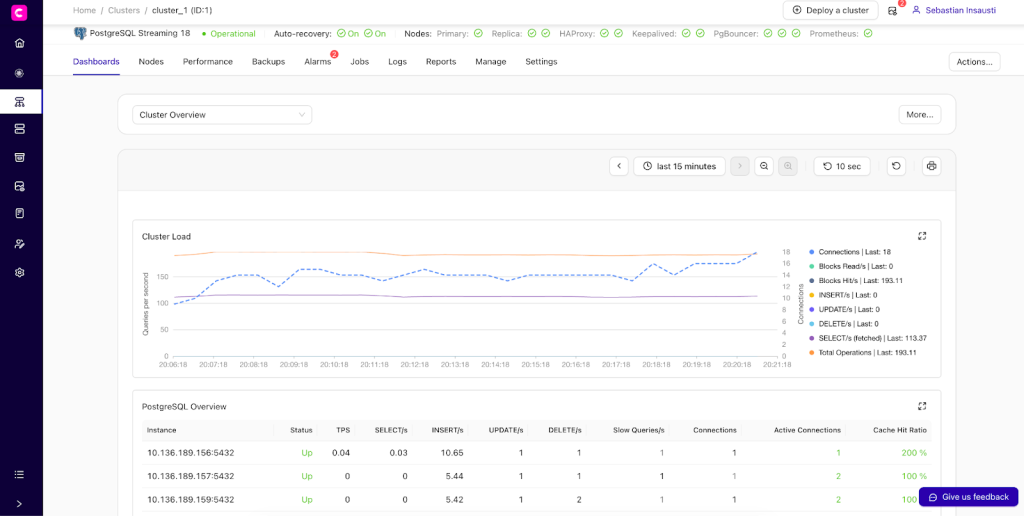
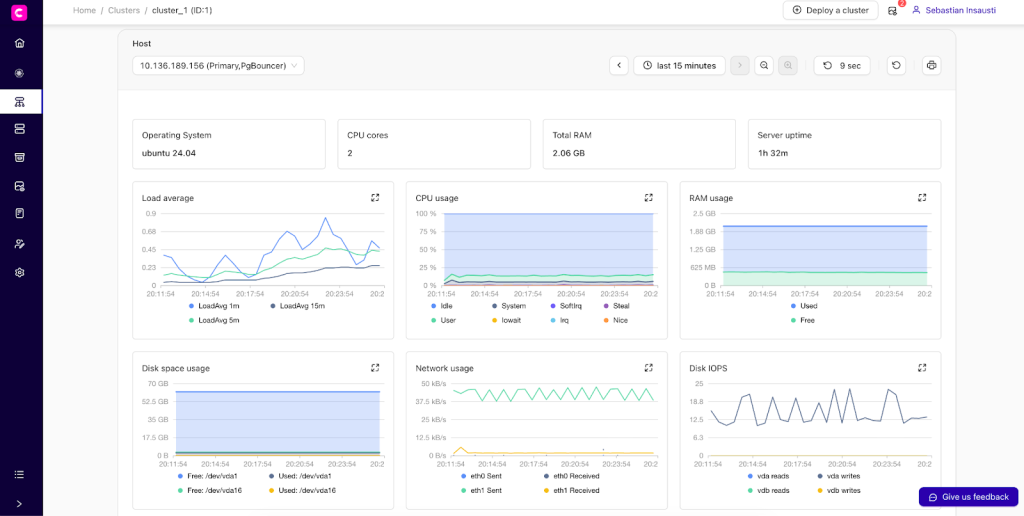
ClusterControl dashboards
ClusterControl simplifies managing your PostgreSQL clusters by giving you a clear, consistent view of the important stuff:
- Node health and resources
- Replication status and lag
- High availability and auto-recovery
- Backup posture, state, and compliance
Ready to move? PostgreSQL 18 upgrade planning checklist
Before jumping to PostgreSQL 18, just check these basics first:
- Backups: Take a full backup and make sure you can restore it.
- Checksums: See if your current cluster uses data checksums and plan for the new one.
- Extensions: Check that all your extensions (like
pgvectororPostGIS) are compatible with PostgreSQL 18.
Getting these things squared away now makes the whole upgrade process much smoother.
Conclusion
PostgreSQL 18 is all about better operations. It fixes common headaches like slow I/O (thanks to async I/O), keeps upgrades predictable by saving optimizer stats, makes multicolumn indexes smarter with skip-scan, adds modern OAuth authentication, improves index use for busy tables with UUIDv7, and simplifies logical replication.
If you’re thinking of upgrading, don’t rush. Test PostgreSQL 18 in your lower environments with real data and load first. Check your extensions, especially pgvector. Decide on checksums early, as they’re now on by default, and pg_upgrade needs them to match. And definitely test your replication setup, including conflict scenarios.
Taking the time for this careful rollout means fewer surprises and smoother changes in production. Ready to get started with PostgreSQL 18, regardless of where you run it?
Install ClusterControl in 10-minutes. Free 30-day Enterprise trial included!
Script Installation Instructions
The installer script is the simplest way to get ClusterControl up and running. Run it on your chosen host, and it will take care of installing all required packages and dependencies.
Offline environments are supported as well. See the Offline Installation guide for more details.
On the ClusterControl server, run the following commands:
wget https://severalnines.com/downloads/cmon/install-cc
chmod +x install-cc
With your install script ready, run the command below. Replace S9S_CMON_PASSWORD and S9S_ROOT_PASSWORD placeholders with your choice password, or remove the environment variables from the command to interactively set the passwords. If you have multiple network interface cards, assign one IP address for the HOST variable in the command using HOST=<ip_address>.
S9S_CMON_PASSWORD=<your_password> S9S_ROOT_PASSWORD=<your_password> HOST=<ip_address> ./install-cc # as root or sudo userAfter the installation is complete, open a web browser, navigate to https://<ClusterControl_host>/, and create the first admin user by entering a username (note that “admin” is reserved) and a password on the welcome page. Once you’re in, you can deploy a new database cluster or import an existing one.
The installer script supports a range of environment variables for advanced setup. You can define them using export or by prefixing the install command.
See the list of supported variables and example use cases to tailor your installation.
Other Installation Options
Helm Chart
Deploy ClusterControl on Kubernetes using our official Helm chart.
Ansible Role
Automate installation and configuration using our Ansible playbooks.
Puppet Module
Manage your ClusterControl deployment with the Puppet module.
ClusterControl on Marketplaces
Prefer to launch ClusterControl directly from the cloud? It’s available on these platforms: