
blog
Operational considerations for ClickHouse in hybrid environments
If you work in operations, you know that hybrid cloud is rarely a choice made for the sheer fun of it. It’s usually a necessity born of data gravity, compliance, or the need to balance the raw speed of bare metal with the elasticity of the cloud.
We all know ClickHouse as the speed demon of OLAP databases. It devours logs and analytical queries with incredible throughput. But ClickHouse was originally designed with a shared-nothing architecture on bare metal in mind. So, what happens when you stretch that architecture across a VPN or a Direct Connect link?
Transitioning ClickHouse from a single environment to a hybrid topology (on-prem + cloud) introduces physics into your query plans. Latency, bandwidth constraints, and storage consistency change from theoretical concerns to daily operational realities.
In this blog post, we’re going to look at the specific operational quirks, architectural patterns, and trade-offs you need to manage when running ClickHouse in a hybrid environment.
What Hybrid Really Means for ClickHouse
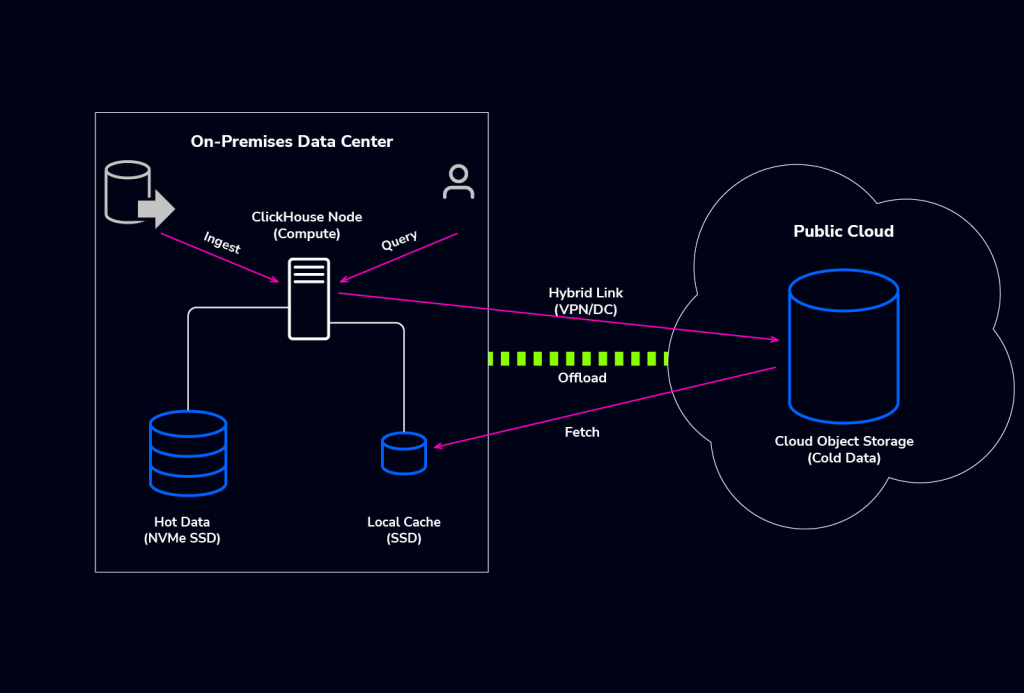
In the ClickHouse ecosystem, hybrid generally manifests in two specific topologies, each with its own set of headaches and rewards.
- Tiered Storage Hybrid (most common): You keep your compute nodes on-premise but offload older, cold partitions to Object Storage in the cloud (AWS S3, Google GCS, or Azure Blob). Here, the cloud acts purely as a bottomless hard drive.
- Distributed Compute Hybrid: You actually run ClickHouse nodes on-premise and separate nodes in the cloud, linked via a distributed table. This is often done for Cloud Bursting, spinning up cloud replicas during peak events, or strictly for Disaster Recovery (DR).
For Ops teams, this distinction matters. Tiered storage is mostly an I/O optimization challenge, while distributed compute is a networking and consistency challenge.
Key operational quirks of ClickHouse in hybrid setups
When you mix environments, standard ClickHouse behaviors can start to feel like bugs if you aren’t expecting them.
Running ClickHouse in hybrid mode doesn’t just change where your data lives, but how the database behaves under load, how it fails, and what actually slows it down. Beyond the obvious “S3 is slower than NVMe,” there are less intuitive quirks around remote I/O, workload scheduling, metadata growth, and Keeper topology that can quietly erode performance or stability. The points below call out the key behaviors you need to design and operationalize around before you scale a hybrid deployment into production.
Latency Penalty on Remote I/O
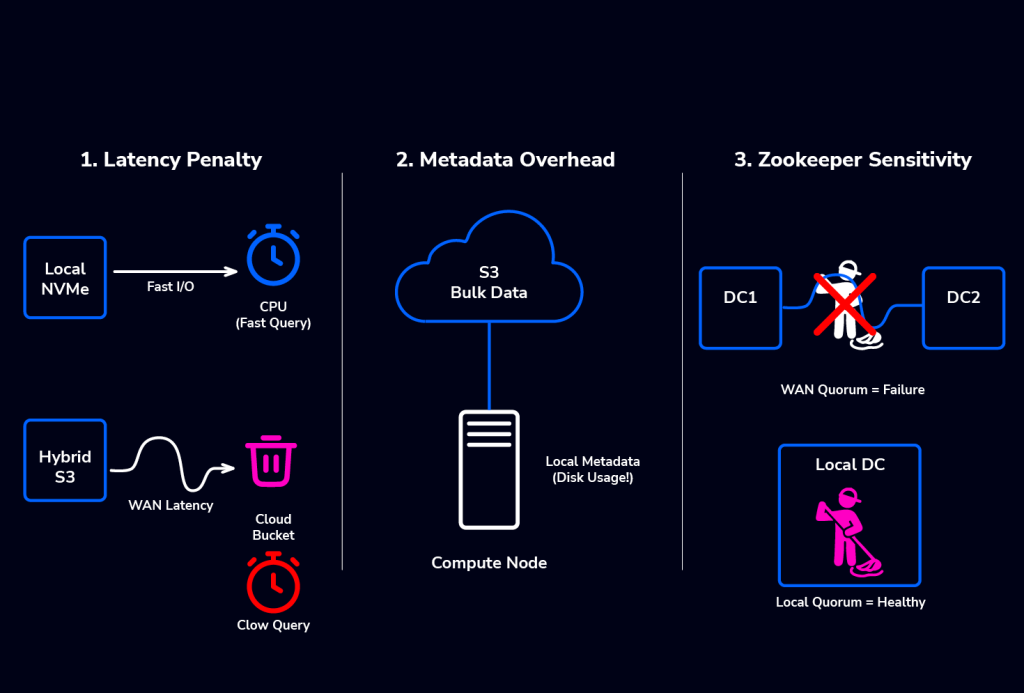
ClickHouse is optimized to read data as fast as the hardware allows, that’s gigabytes per second with on-prem NVMe. When you introduce S3-backed disks in a hybrid setup, network latency becomes your bottleneck. If your queries touch data stored in the cloud, the query duration is no longer CPU-bound but network-bound. You are at the mercy of your internet or Direct Connect bandwidth.
Workload Scheduling Across Nodes and Disks
In hybrid setups, ClickHouse’s Workload Scheduling is critical, moving from optional to essential. Heavy queries, those accessing S3, remote shards, or performing large merges, significantly increase costs and can overwhelm network links, potentially stalling dashboards. By isolating these workloads into dedicated classes with specific CPU, I/O, and concurrency limits, this feature prevents a single cold-data query or background merge from monopolizing resources or saturating the WAN link.
Metadata Overhead
Even if you store the bulk of your data in S3 using DiskObjectStorage, ClickHouse must store the file metadata locally on the node. If you have massive amounts of small parts in S3, your local on-prem disk usage will still creep up because of the metadata storage. Never assume that Cloud Storage means zero local disk usage.
Zookeeper / ClickHouse Keeper Sensitivity
ClickHouse relies heavily on Keeper for replication coordination and DDL execution. In a hybrid setup, never span a Keeper quorum across a high-latency WAN (if you can avoid it). If the link flutters, your cluster goes into read-only mode. The fix is to keep the Keeper quorum local to where the primary writes happen, or use a distinct Keeper cluster for each region and rely on asynchronous data replication mechanisms.
Best practices for hybrid ClickHouse deployment
In practice, you’re designing around three constraints: local hardware strong enough to mask remote latency, storage layouts that respect data temperature, and network links that won’t collapse under merges and fetches. The following best practices walk through how to size your nodes, separate compute and storage with tiering and TTL, shape bandwidth usage, and design sharding / replication so queries stay close to the data while still taking full advantage of cloud object storage.
- Sizing and Hardware Recommendations: Hybrid amplifies hardware requirements, not reduces them. Keep hot data on NVMe, allocate ample RAM for merges and aggregations, and ensure the local metadata volume has enough capacity and inodes for large numbers of parts. Size the cache disk to 20-30% of your working set, and ensure your WAN link (VPN or Direct Connect) offers real bandwidth (1 Gbps links bottleneck hybrid ClickHouse almost immediately). In hybrid mode, strong local hardware is what hides the latency of remote storage.
- Separation of Compute and Storage: In a pure cloud environment, you might use ClickHouse Cloud or specialized separation techniques. In a hybrid setup, you manually enforce this separation using TTL (Time To Live) moves. Configure your tables to automatically move data to the cold_volume after a set period. This keeps your operational hot set on-prem for dashboarding speed, while historical analysis hits the cloud buckets.
- Implement Tiered Storage with Local Cache: The most effective hybrid pattern uses the Composable Disks architecture. You define your S3 connection as a raw disk, and then wrap it in a separate Cache Disk that lives on your fast local NVMe. This allows ClickHouse to download parts once, store them in the cache wrapper, and serve subsequent queries instantly from local storage. The configuration should be something like this:
<clickhouse>
    <storage_configuration>
        <disks>
            <s3_raw>
                <type>s3</type>
                <endpoint>https://s3.us-east-1.amazonaws.com/my-bucket/data/</endpoint>
                <access_key_id>YOUR_ACCESS_KEY</access_key_id>
                <secret_access_key>YOUR_SECRET_KEY</secret_access_key>
                <metadata_path>/var/lib/clickhouse/disks/s3_raw/metadata/</metadata_path>
            </s3_raw>

            <s3_cached>
                <type>cache</type>
                <disk>s3_raw</disk>
                <path>/var/lib/clickhouse/disks/s3_cached/cache/</path>
                <max_size>10G</max_size>
            </s3_cached>
        </disks>

        <policies>
            <hybrid_tiering>
                <volumes>
                    <main>
                        <disk>default</disk>
                    </main>
                    <external>
                        <disk>s3_cached</disk>
                    </external>
                </volumes>
                <move_factor>0.2</move_factor>
            </hybrid_tiering>
        </policies>
    </storage_configuration>
</clickhouse>- Bandwidth Management: ClickHouse will try to saturate the link during a merge or a fetch. If your hybrid link is shared with other traffic, you must rate-limit ClickHouse. You can use the max_download_network_bandwidth setting to prevent ClickHouse from starving your other applications.
- Sharding and Replication Strategy: Hybrid sharding is primarily about data locality. Keep hot, frequently accessed shards on-prem, and push historical or archive shards to the cloud. Avoid cross-environment queries whenever possible, push compute to where the data lives. For replication, favor local synchronous replicas and asynchronous cross-region replication. Never stretch a Keeper quorum across the WAN; run independent Keeper clusters and replicate data, not coordination traffic.
Monitoring, Alerts, and Lifecycle Operations
Monitoring hybrid ClickHouse isn’t a question of more dashboards, it’s a different baseline altogether. Disk latency can now mean an API round-trip to Amazon, network spikes can silently turn into S3 throttling, and replication lag is often a function of the WAN, not the database. To keep a hybrid cluster healthy, you need to lean on ClickHouse’s own system tables and ProfileEvents, and treat lifecycle operations as first-class citizens.
Key ClickHouse metrics to monitor
In a hybrid ClickHouse deployment, traditional host-level monitoring isn’t enough. The real signals you need come from ClickHouse’s internal system tables.
- S3 / Object Storage Read Performance: Object storage becomes a critical performance dependency. The most important indicators are the ReadBufferFromS3* ProfileEvents, which track how often ClickHouse reads from S3, how long those reads take, and how much data is transferred. Sudden increases in read latency usually point to WAN congestion or S3 throttling.
- Network Volume: To understand data flow between regions, monitor the byte-level ProfileEvents, such as NetworkSendBytes and NetworkReceiveBytes. These are your best early warning system for cloud egress cost spikes.
- Replication Lag: There is no single global replication lag metric. The key indicator is absolute_delay in the system.replicas table. In hybrid environments, where replication crosses WAN links, this value naturally fluctuates more than in a LAN setup.
Integrating ClickHouse into a multi-database stack
ClickHouse rarely lives in a vacuum. In hybrid environments, it typically pulls data from on-prem OLTP systems (MySQL, PostgreSQL) through CDC or streaming layers.
Architecture matters here: place CDC agents, Debezium/Kafka, and ETL processors close to the OLTP source, not in the cloud. Shipping raw change streams across a WAN is slow, noisy, and failure-prone. Instead, push transformed batches or partitions across the hybrid link only when needed.
Also, be careful with external dictionaries or remote JOINs. If ClickHouse cloud nodes fetch dictionary data from an on-prem PostgreSQL server, every lookup becomes a WAN round trip. Keep dictionaries local to the ClickHouse nodes that need them, or cache them aggressively.
These cross-system interactions add real operational complexity. You’re coordinating OLTP ingestion on-prem, tiered storage in the cloud, and mixed workloads across regions. A unified management and orchestration layer like ClusterControl helps tie these pieces together by handling backups, scheduling, and failover without forcing you to hand-stitch a hybrid architecture together.
ClickHouse’s free space trap
We mentioned earlier that object storage requires local metadata. One common failure scenario in hybrid ops is inode exhaustion or disk space exhaustion on the local partition holding the /var/lib/clickhouse/disks/s3_cached/cache/ directory. Even if you have Petabytes free in S3, if your local cache disk fills up, ClickHouse stops writing. You must monitor the underlying disk space of your cache path.
Pre-Deployment Hybrid Readiness Checklist
Before you flip the switch on a hybrid deployment, run through this list:
- Network Bandwidth: Do you have at least 10Gbps dedicated to the link? S3 performance suffers significantly on 1Gbps links.
- Latency Check: Is the RTT (Round Trip Time) to the object storage endpoint under 20ms?
- Cache Disk: Have you provisioned a local SSD large enough to hold at least 20-30% of your hot working set?
- Firewalls: Are ports 8123 (HTTP) and 9000 (TCP) open bi-directionally across the VPN? Other relevant ports: 8443 (HTTP SSL/TLS), 9440 (Native SSL/TLS), 9009 (Inter-server replication), 9181 (ClickHouse Keeper), 9363 (Prometheus metrics), among others.
- Cost Analysis: Have you calculated the AWS/Cloud egress fees for data retrieval?
- Security Note: In a hybrid setup, never expose ports 8123 or 9000 directly to the public internet. Use 8443 and 9440 (TLS) if traffic must traverse public networks, but ideally, all traffic, especially 9009 (Replication), should stay inside a VPN or Direct Connect tunnel.
If you can confidently check these boxes, you’re no longer just hoping for the best, you are engineering a system that respects the physics of the network, ensuring your hybrid topology is robust rather than fragile.
Wrapping up
ClickHouse is incredibly adaptable. It can run on a laptop, a massive bare-metal cluster, or in a Docker container. Running it in a hybrid environment is fully supported and, for many organizations, is the most cost-effective way to scale.
However, treating a hybrid deployment exactly like a local deployment is a recipe for slow queries and pager fatigue. The key is tiering: keep your heavy lifting and hot data local where the I/O is free and fast, and treat the cloud as your infinite, cost-effective attic.
Aside from unique architectural considerations, it is key to implement a unified management and orchestration layer of your databases across environments to avoid operational hiccups. Due to popular demand, we will be adding ClickHouse as a supported database soon. Visit our ClickHouse page see what operations we’ll support and submit info about your use case.