
blog
Multi-tenant, multi-cloud logical and bi-directional replication deep dive

Before we dive deep into the fascinating world of PostgreSQL Logical and Bi-Directional Replication (BDR), let’s take a quick moment to look at multi-tenancy and multi-cloud strategies.
Setting the stage for today’s cloud operating model, it was common to administer and host databases in a multi-tenant setup, where a physical server is utilized by multiple users, offering tremendous cost and operational benefits. Today, multi-cloud strategies focus on enhancing resilience and mitigating vendor lock-in — both have their advantages and disadvantages.
Their disadvantages are essentially inversions of their strengths. Multi-tenancy is inherently more vulnerable to security isolation issues and data risk. Furthermore, considering you have a PostgreSQL cluster in this environment, this single-platform model often imposes limitations on database configuration, e.g. specific versions and extensions are constrained by the vendor’s setup.
Conversely, multi-cloud introduces massive operational complexity and a significantly higher total cost of ownership compared to the shared resource model of multi-tenancy. With this context now established, let’s dive into how PostgreSQL’s Logical and Bi-Directional Replication (BDR) is implemented and functions within these deployment strategies.
Why Logical & Bi-Directional Replication?
Logical replication was introduced in PostgreSQL 10. It is ideal for a multi-tenant, multi-cloud setup due to its high flexibility allowing for selective replication, e.g., per-table/per-tenant, and easier implementation of bi-directional setups across disparate environments.
Logical replication uses a method to replicate data objects and their changes based on a replication identity, like a primary key. Unlike traditional streaming replication, or physical replication, which works by transferring Write-Ahead Log (WAL) records to replicate the physical state of the data blocks, logical replication sends high-level specific changes, mostly DML statements (i.e. INSERT, DELETE, and UPDATE statements) to the subscriber.
Bi-Directional Replication or BDR in PostgreSQL was developed by 2ndQuadrant for multi-master replication in PostgreSQL. Version 1.x of BDR was open-source but has already reached EOL. Versions of BDR such as 2.x and 3.x are not open-source and are generally made available only for 2ndQuadrant (now EDB) customers under commercial terms.
Fundamentals of Logical Replication
Logical decoding was introduced in PostgreSQL 9.4 and is the foundation for logical replication, adding logical decoding APIs and output plugins. This allowed PostgreSQL database users to decode the WAL into human-readable SQL statements or logical changes, such as INSERT/UPDATE/DELETE — depending on the decoding used, e.g. test_decoding or pgoutput.
However, there was no full replication system until the release of PostgreSQL 10. Logical Replication is effectively modeled after the pglogical implementation, which uses publication / subscribe model. In turn, this is the basis for PostgreSQL BDR.
Logical Replication allows fine-grained customizable data replication between databases, allowing you to specify the database, the table, or the schema and table/s that you want to participate in logical replication using the PUBLICATION/SUBSCRIPTION mechanism.
For a multi-tenant setup, leveraging logical replication is ideal when combined with schema-based filtering. This combination allows you to scope out tables specific to users, ensuring isolation for their respective data. However, for a multi-cloud setup, this approach can be cumbersome, considering the limitations of native logical replication, such as a lack of DDL replication support and no inherent conflict resolution mechanism.
Bi-Directional Replication (BDR)
Bi-Directional Replication (BDR), often referred to as Postgres-BDR, is an open-source PostgreSQL extension developed by 2ndQuadrant (now part of EDB). BDR enables multi-master replication across distributed clusters. It was the first implementation of multi-master logical replication, using logical decoding internally and implemented as a patchset to PG 9.4/9.5.
While BDR existed, 2ndQuadrant also created pglogical, which is derived from BDR technology. It is essentially a simplified, single-master logical replication system built entirely as an extension not requiring a forked PostgreSQL. This means you have to load it through shared_preload_libraries parameter. pglogical became the model for Postgres 10’s built-in logical replication.
Using BDR in PostgreSQL allows multiple PostgreSQL nodes to act as writable primaries simultaneously, basically allowing you to implement mesh topology or ring topology where data changes can originate from any node and propagate to others.
Unlike traditional master-slave setups, BDR supports true bi-directional (or multi-directional) data flow, making it ideal for high-availability (HA) scenarios, geographic distribution, and workloads requiring low-latency writes across regions.
Implementing this on a multi-tenant setup can be very convenient. As with logical replication, you can implement isolation through your database, schema, or tables to that limitation only for specific data to be replicated. On the other hand, while in a multi-cloud environment, BDR is perfect for both environments since it has the mechanism to support consistency resolution without terminating the replication. Allowing you to have continuous replication streams between your active primaries or just your primary, if the other target node is for read, data retrieval or secondary and data recovery purposes.
Consistency Issues & Conflict Resolution
Basically, the core logical replication that is available in native PostgreSQL is not true bi-directional replication. You can use CREATE PUBLICATION and CREATE SUBSCRIPTION if you want to implement a chained or ring topology simulating master-master setup.
Leveraging the native logical replication simulating a master-master setup requires that you have at least PostgreSQL 10. However, if you expect that you will gain a true master-master setup, then you will be sorely disappointed. The built-in logical replication allows you to implement, as mentioned earlier, with the use of PUBLICATION/SUBSCRIPTION methods, whilst it can be a problem when it comes to handling and managing primary, unique keys, and constraints. It lacks the mechanism of the following:
- Conflict resolution
- DDL replication
- Global sequences
- Multi-master support
With logical replication, when you are dealing with CREATE TABLEs, you have to make sure that the table also exists on the other target node, or the subscriber node. In addition to that, since there’s no DDL support, it can be a struggle if you implement a multi-master setup allowing both primaries to accept writes as there’s no global sequences support, meaning you might have issues with using sequential keys in your table such as auto-increment columns. If such duplicate keys are detected, replication shall be terminated until you fix the problem. There’s no conflict resolution which can be tedious if your database encounters a consistency problem.
Whilst, with Bi-Directional Replication (Postgresql BDR), things get smoother. You simply assure you have set up your nodes properly by running setup commands. For example, nodes 192.168.40.50 and 192.168.40.51 will do a master-master setup,
PGPASSWORD='bdrPassw0rd' /usr/lib/edb-pge/17/bin/pgd node db1 setup   \
--dsn 'host=192.168.40.50 dbname=postgres user=bdruser password=bdrPassw0rd'  \
--pgdata /var/lib/edb-pge/17/main   --log-file /var/lib/edb-pge/17/pgd_log_db1.log  \
--group-name pgd_group

PGPASSWORD='bdrPassw0rd' /usr/lib/edb-pge/17/bin/pgd node db2 setup \
    --dsn 'host=192.168.40.51 dbname=postgres user=bdruser password=bdrPassw0rd' \
	--cluster-dsn 'host=192.168.40.50 dbname=postgres user=bdruser password=bdrPassw0rd' \
	--group-name pgd_group  \
	--pgdata /var/lib/edb-pge/17/main \
	--log-file /var/lib/edb-pge/17/pgd_log_db2.log
Once these two nodes are set up perfectly, creating the tables, i.e. issuing a DDL statement, is straightforward as you just have to run it in one of the primary nodes and it will be replicated. In case it detects duplicate keys, replication is not terminated and a new transaction will be processed next and executed and replicated once it runs without errors.
If your budget is tight, BDR is free and open-source until v2; otherwise, your option is to implement it via logical replication or pglogical. pglogical is the best choice as it handles conflict resolution better.
It offers this pglogical.conflict_resolution allowing you to set the resolution method for any detected conflicts between local data and incoming changes. This parameter has possible values you can use to set which are error, apply_remote, keep_local, last_update_wins, first_update_wins.
In most setups, default value points to error, which means it will have to stop on error once conflict is detected and requires manual action to resolve the problem. Ideally, using last_update_wins can be your desired value which means that the version of data with the latest commit timestamp will be kept.
Complimenting BDR with load balancing
Bi-Directional Replication alone does not offer you full high-availability and load balancing. Load balancing ensures that your traffic load is efficient, while high availability ensures the health and availability of your database in case one of your database nodes goes down, or even your load balancer nodes.
A sample diagram below would assure that you have full availability of your nodes while also ensuring that performance is horizontally balanced between your active-primary nodes.
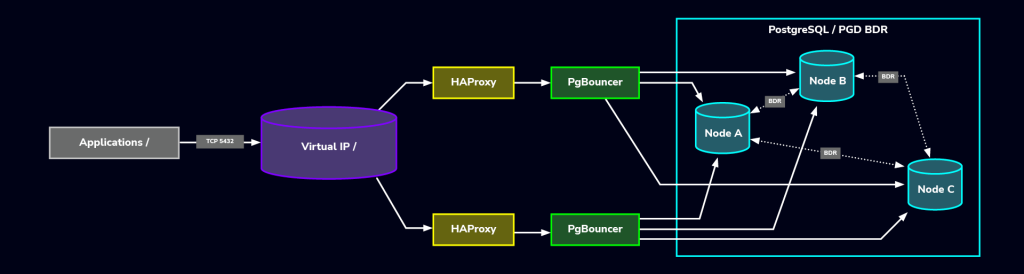
In this topology, the complementary capabilities include:
- Actively distributing both read and write load,
- Maintaining availability during node or network failures,
- Reducing conflict risks via intelligent routing,
- Maximizing efficiency through connection pooling.
Manual vs. ClusterControl-supported BDR: Pros & Cons
Manual BDR setup
Successfully implementing production-grade PG BDR environments meshed with high availability and load balancing requires deep understanding and high-level skills. Cost-wise, there are options you can take since PostgreSQL is purely an open-source database technology; pglogical can be a best option to set this up. There are limitations that you must be aware of but for a non-complex setup, pglogical can be enough for your multi-master setup for implementing bi-directional replication. However, it does not provide advanced features that make administering complex environments easy, like BDR’s conflict/transform trigger, which allows you to attach triggers for incoming changes to your records/rows in your database. It offers column strategy which you can set, for example:
SELECT bdr.bdr_set_conflict_resolver(
  set_name := 'default',
  conflict_type := 'update_update',
  per_column := '{"total_gross":"sum", "last_txn":"last_update_wins", "notes":"keep_local"}'
);
Going through a manual setup offers you freedom and avoids vendor lock-in. Depending on your documentation and implementation of your setup, as long as you provide the ground layer of your implementation, it will provide transparency and can set your custom requirements especially if you need complex setup amid the performance and optimization benefits that you can get.
But with all things, you have to consider the big picture, especially as your database grows complex and data storage becomes very challenging to scale and manage. Operational complexity and pressure can grow tremendously especially when disaster occurs and data recovery is required. Manual setup can be very challenging as doing things that you might not need, might eventually require the need of expert management that other third-party tools offer.
Lastly, with manual setup, it can be tedious to monitor the health of your database cluster. You might need third party tools to give you graphic-based metrics which would make it easier for you to determine common issues and pitfalls of your database. You also need alarms to throw when certain thresholds are met and this can be challenging and costly; because you need to hire devs or build your own tools to monitor and provide observability ambiance that third-party tools have integrated and can provide it for your convenience.
ClusterControl for PG BDR operations
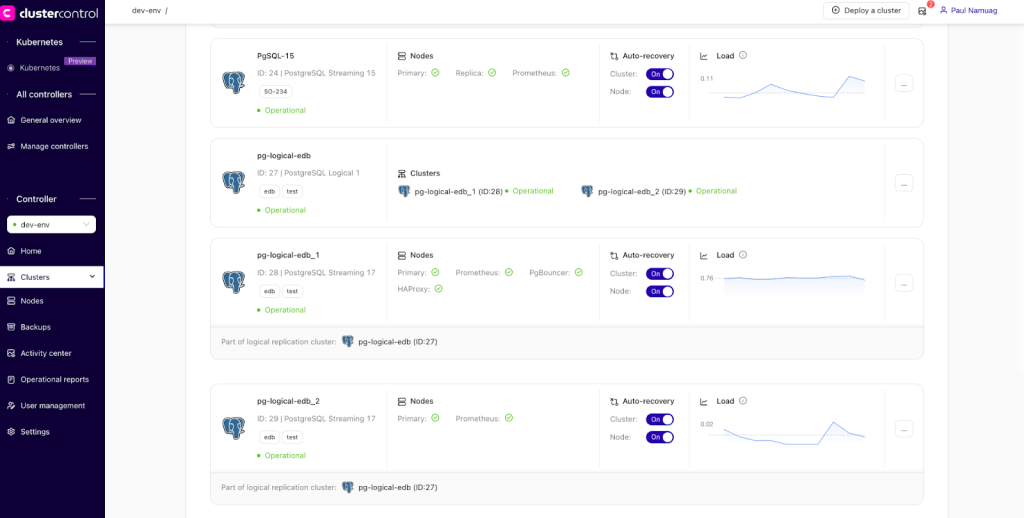
ClusterControl offers PostgreSQL deployment using streaming replication and logical replication. A sample screenshot of dashboards of the streaming and logical replication deployments that is readily available for ClusterControl management, is shown below:
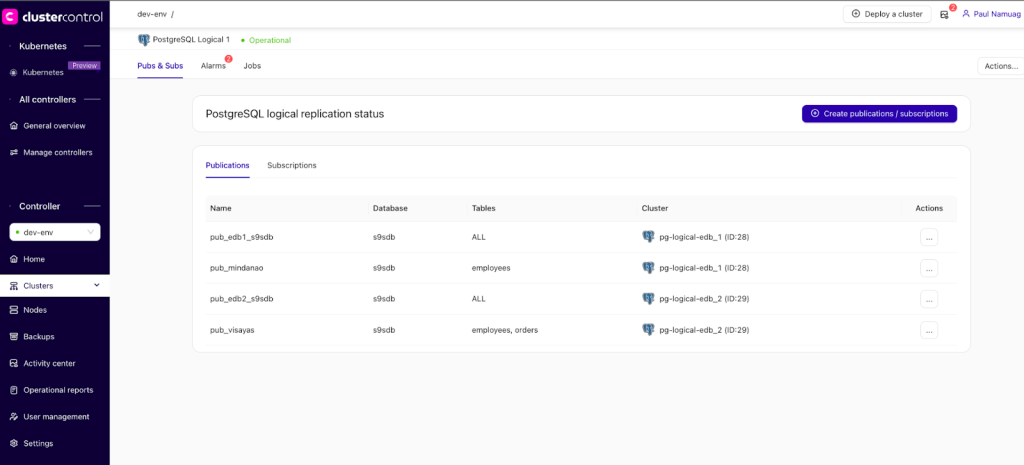
For logical replication deployments, using PUBLICATION/SUBSCRIPTION approach for implementing a multi-master deployment using Enterprise DB,, is shown below:
For Enterprise DB, make sure you have your EDB Token available as this shall be required during deployment through ClusterControl’s GUI.
For enterprise-grade environments, ClusterControl is tailored to do its job and provide the users sustainability and comfort when handling and managing their complex database clusters for PostgreSQL. Not limited to deployment, it offers backup management, disaster recovery support with automatic recovery option, observability with comprehensive metrics to offer. It has built-in alarms and alerts when certain thresholds are met allowing you to avoid such disaster before it shall happen.
This observability feature makes an ideal option for your environment as managing a complex database cluster can be tedious and you are looking for convenience and offers you technical support in case you need some technical advice and analysis for your environment and requirements as well. If you are looking for a BDR setup, ClusterControl supports deployment for the Enterprise DB (EDB) version of PostgreSQL.
Although it offers minimal support for its enterprise offering that EDB has, this means it allows you to set up on your own and do manual work on the ground. This might not be beneficial if you are looking for more management of complex features that BDR can offer that allows automatic setup for you or GUI-relevant support, but the ability to provide you the needs and wants that you are looking for such enterprise software, Severalnines’ ClusterControl is built on that and is tailored to that concept and principles that shall be beneficial for your enterprise-grade requirements.
Operational best practices
Learning the fundamentals of logical replication, terminology, and how to fix conflict resolution is highly advisable. PostgreSQL technology especially with these BDR, pglogical, and it native logical replication is not easy to deal with. It requires a high-level of understanding and how databases should work. If you are an experienced DBA, learning and operating PostgreSQL and its native replication and other third-party offerings such as BDR, Bucardo, pglogical, Slony, Spock, can still be tricky but eventually you will be able to manage these technologies integrated to your setup for implementing a multi-master or bi-directional replication.
Managing it for multi-tenant and multi-cloud setups requires that you at least need tools that are built to handle conflict resolutions, advanced features that support triggers and column strategies, verbose log-level, database partitioning, and load balancing; you don’t need to focus on implementing this from the ground up. Leverage third-party tools that are already available, and if cost is an issue, there are open-source technologies that are readily available to cater your needs.
Conclusion
Using enterprise-grade technologies for managing enterprise-level databases requires an enterprise layer. Nowadays, these principles are symbiotic and tightly coupled. ClusterControl’s enterprise level database management offers you the freedom to implement them where you would like, whether it’s in the cloud or on-prem, while giving you features deeply coupled to your needs when implementing logical replication either using Postgres community version or Enterprise DB for your database clusters.
With multi-tenant and multi-cloud setups, the manual approach and using community-based technologies can meet your initial needs. However, once it grows drastically, you will need deep understanding and experience with managing complex scenarios that the tool can handle. ClusterControl is designed to address these at a high-level enterprise layer.
Ready to make PostgreSQL management easier and more reliable in any environment?
Install ClusterControl in 10-minutes. Free 30-day Enterprise trial included!
Script Installation Instructions
The installer script is the simplest way to get ClusterControl up and running. Run it on your chosen host, and it will take care of installing all required packages and dependencies.
Offline environments are supported as well. See the Offline Installation guide for more details.
On the ClusterControl server, run the following commands:
wget https://severalnines.com/downloads/cmon/install-cc
chmod +x install-cc
With your install script ready, run the command below. Replace S9S_CMON_PASSWORD and S9S_ROOT_PASSWORD placeholders with your choice password, or remove the environment variables from the command to interactively set the passwords. If you have multiple network interface cards, assign one IP address for the HOST variable in the command using HOST=<ip_address>.
S9S_CMON_PASSWORD=<your_password> S9S_ROOT_PASSWORD=<your_password> HOST=<ip_address> ./install-cc # as root or sudo userAfter the installation is complete, open a web browser, navigate to https://<ClusterControl_host>/, and create the first admin user by entering a username (note that “admin” is reserved) and a password on the welcome page. Once you’re in, you can deploy a new database cluster or import an existing one.
The installer script supports a range of environment variables for advanced setup. You can define them using export or by prefixing the install command.
See the list of supported variables and example use cases to tailor your installation.
Other Installation Options
Helm Chart
Deploy ClusterControl on Kubernetes using our official Helm chart.
Ansible Role
Automate installation and configuration using our Ansible playbooks.
Puppet Module
Manage your ClusterControl deployment with the Puppet module.
ClusterControl on Marketplaces
Prefer to launch ClusterControl directly from the cloud? It’s available on these platforms: