
blog
Active-Active MySQL Group Replication Best Practices

In MySQL Group Replication (MGR) or Group Replication, an active-active configuration allows multiple group members to accept concurrent write transactions. These writes are coordinated through a consensus-based group communication system (GCS) and validated via write-set certification to preserve global transactional consistency as defined by the Group Replication protocol. active-active mode is designed for write scalability.
In this mode, all Group Replication nodes are in PRIMARY state, allowing them to accept read and write traffic. Data modifications or changes will be written to the intended node and replicated across the cluster. Transactions are replicated synchronously. When a transaction conflict is detected, by using certification for those conflicting transactions, it will be resolved automatically. Although powerful, this mode is not intended for unlimited write scalability.
Group Replication’s scalability is partially dependent on low write conflicts. High contention leads to rollback surge or saturation, ultimately leading to temporary system unavailability due to lock up. Fundamentally, this mode means no passive standby nodes, not;
- Unlimited write scalability
- Lock-free writes
- No coordination overhead
- No single-writer behavior internally
This blog post will explore what it means to run a Group Replication setup in production and the operational best practices that you need to follow to ensure its performance and stability.
Note on how MySQL Group Replication manages communication
Let’s first take a moment to understand how communication actually works within MySQL Group Replication. The communication layer is the Group Communication System (GCS), which serves as a high-level abstraction responsible for group membership management and total-order message delivery. Its engine is XCom, which implements a Paxos-based consensus protocol to ensure that all members of the group receive the same transactions in the same order. This separation of concerns allows MySQL Group Replication to evolve the underlying communication engine without changing the replication semantics exposed to the server layer.
Understanding how MySQL Group Replication enforces consistency, coordinates writes, and handles failures across the group, it’s easier to reason which use cases it is ideal for.
Ideal use cases for active-active MySQL Group Replication
- High Availability (HA) Systems: Critical applications that cannot afford the 10–30 seconds of downtime typically required for a leader election in single-primary modes.
- Low-Conflict Workloads: Applications that write to different parts of the database, especially those architectures that use shards. This performs best, as they avoid the “certification” failures that occur when two nodes try to update the same record.
- Geographically Distributed Reads: While writes are synchronous and can be slow over long distances, having multiple “active” nodes allows local users to perform reads and writes with lower initial connection latency.
Let’s now go over the best practices for a MySQL Group Replication deployment setup.
Active-active cluster best practices
Determining the number of database member nodes in the cluster
The number of instances should be determined by expected failure scenarios rather than capacity requirements. According to MySQL documentation, Group Replication requires a majority of members to commit transactions, making quorum size critical to availability.
Network partitions and node failures are inevitable. Using an odd number of instances ensures that a majority can still be formed during partial outages. Choosing an odd number of members improves write availability and aligns with MySQL Group Replication’s quorum model. For example, a five-node cluster can continue processing writes even if two nodes become unreachable, while an evenly sized cluster risks entering a write-blocked state during a symmetric split.
Splitting read and write traffic
In an active-active MySQL Group Replication setup, write operations place significantly more stress on the system than reads, especially when they result in heavy disk activity. Writes consume CPU, generate redo and binary logs, trigger replication traffic, and must be applied consistently across the group, amplifying their impact across the cluster.
Separating write traffic helps prevent sustained write workloads from overwhelming the cluster. By directing writes to nodes with sufficient capacity and lower contention while allowing others to focus on serving reads, the cluster maintains more stable performance, reduces write related bottlenecks, and scales read workloads more effectively.
Connection pooling
Frequent connection creation and teardown can quickly become a bottleneck and place unnecessary stress on the cluster. Maintaining a pool of reusable connections helps stabilize workload distribution and prevents spikes in CPU and memory usage caused by excessive connection overhead.
Using proxies such as MySQL Router or ProxySQL allows applications to reuse existing connections while intelligently routing traffic across group members, reducing connection overhead, improving response times, and helping the cluster handle fluctuating workloads more predictably.
Error handling
When using active-active MySQL Group Replication, applications must be prepared to handle transient failures. Network interruptions, node restarts, or membership changes can temporarily cause connection errors or transaction failures, even when the cluster itself is healthy.
Implementing controlled failback handling at the application layer allows temporary disruptions to resolve naturally before user impact. Likewise, well designed error handling improves application reliability, protects data consistency, and ensures that temporary replication events have the opportunity to resolve naturally before escalating to visible outages. Short-lived connection or transaction failures can often succeed once the system stabilizes, especially during membership changes or brief network interruptions.
Transaction size
Before deploying MySQL Group Replication in production, understand the transaction sizes generated by your application. MGR enforces a maximum transaction size using the group_replication_transaction_size_limit parameter, directly affecting replication latency and stability.
If you set a small transaction, then it’ll replicate efficiently making it suitable for OLTP workloads. Large batch operations usually increase memory usage, network traffic, and pressure on the replica when applying the transactions. However, setting the limit too low can cause valid transactions to fail, while setting it too high can lead to replication lag or resource exhaustion.
Instead of raising the limit on memory constrained instances, large data changes should be split into smaller batches. Take note, this setting must be consistent across all group members.
Strict consistency checks
MySQL Group Replication provides the group_replication_enforce_update_everywhere_checks variable, which is disabled by default. This system variable is a group-wide configuration setting. It must have the same value on all group members, cannot be changed while Group Replication is running, and requires a full reboot of the group (a bootstrap by a server with group_replication_bootstrap_group=ON) in order for the value change to take effect.
When disabled, applications must ensure that conflicting transactions are not executed concurrently on different nodes, which requires thorough testing and strict control over write paths, especially in schemas involving foreign keys, cascading operations, or concurrent modifications across tables. When enabled, statements are checked as follows to ensure their compatibility with multi-primary mode:
- If a transaction is executed under the SERIALIZABLE isolation level, then its commit fails when synchronizing itself with the group.
- If a transaction executes against a table that has foreign keys with cascading constraints, then the transaction fails to commit when synchronizing itself with the group.
In short, enable it when:
- You want strict consistency checks, AND
- You don’t rely on SERIALIZABLE isolation level
- Your tables do not rely on foreign key checks with cascading constraints
- You prefer failed transactions over application-managed conflict handling
- Correctness is more important than write flexibility
Disable it when:
- Your schema relies on cascading foreign key constraints
- Cascades are part of normal application behavior
- You accept responsibility for preventing conflicting writes
- Write paths are tightly controlled or serialized at the application level
Failure detection parameters
There are three failure detection parameters that you must adjust to define your application’s failure tolerance:
group_replication_member_expel_timeout: This variable controls how long a member is audited before it is expelled from the group. The latest version’s (8.4 as of this writing) default is 5 seconds. Therefore, Group Replication first detects a suspected failure after ~5 seconds (no messages), waiting xgroup_replication_member_expel_timeoutseconds more before expelling the member.
During the waiting period, the suspected node is listed as UNREACHABLE, but still part of the group view. If it resumes communication before expulsion, it rejoins without operator intervention. When you need to tune this variable depends on your needs.
When to tune: If you have intermittent network blips or slow links, it makes sense to increase the default value to avoid unnecessary expulsions. Decrease only if you prefer faster failure detection, e.g. frequent real outages and stable networks, setting it to 0 only for immediate post-detection expulsion.
group_replication_autorejoin_tries: Set this to the desired number of automatic rejoin attempts a member makes after being expelled or losing quorum. Set to 3 attempts (with roughly 5 minutes of waiting time between attempts) by default, the member will try to rejoin the group automatically after expulsion or network isolation. If all attempts fail, it stops and follows the exit action. During and between auto-rejoin attempts, a DB instance remains in read-only mode and does not accept writes, thereby increasing the likelihood of stale reads over time.
When to tune: Increase this variable for environments with frequently long, but temporary network partitions. Decrease if you want to restrict rejoin attempts, or expedite identifying DB instances that require manual intervention. Otherwise, set it to 0 if you want to handle rejoining manually or your applications cannot tolerate the possibility of stale reads for any period of time. Common practice in highly available clusters: keep several tries to allow network recovery without admin intervention.
group_replication_unreachable_majority_timeout: Timeout used when a member is in the minority (cannot reach a majority or establish a quorum) before declaring a lost quorum. Set to 0 by default, a member node enters a special unreachable majority state if it cannot contact a majority of the group. After this timeout expires, actions such as expulsion or exit actions are applied. Setting this value higher than 0 helps to prevent a minority partition from running indefinitely or making unsafe decisions.
Otherwise, when the defined timeout is reached, all pending transactions on the minority are rolled back, and the DB instances in the minority partition are moved to the ERROR state. From there, your application can perform error-handling as needed.
When to tune: Increase it for deployments where temporary connectivity loss to a majority is expected but resolves soon. Otherwise, decrease for faster detection of actual partition and to avoid split-brain risk.
group_replication_exit_state_action: Defines how a member behaves when the server leaves the group unintentionally, for example, after encountering an applier error, or in the case of a majority loss, or when another member expels it due to a suspicion time out. Note that an expelled group member does not know that it was expelled until it reconnects to the group, so the specified action is only taken if the member manages to reconnect, or if it raises a suspicion on itself and self-expels. Current values available for you to set are ABORT_SERVER, OFFLINE_MODE, and READ_ONLY.
When to tune: Tune if you need strict consistency, then choose shutdown on failure to avoid stale reads or split-brain risk. For read-heavy clusters where full availability matters, prefer read-only or offline modes.
Flow control
In MGR, a transaction is only finalized once a majority of members agree on its global order. In an active-active setup, this coordination is sensitive to uneven performance: fast writers can easily outrun slower members, causing replication lag and in-memory backlog.
Flow control is the mechanism that keeps the group balanced. It monitors how far members fall behind in both transaction certification and apply phases, and temporarily throttles write throughput across all primaries when predefined limits are exceeded. The key controls are group_replication_flow_control_certifier_threshold and group_replication_flow_control_applier_threshold, which define how much backlog the group is willing to tolerate before throttling.
Throughput recovery is governed by quota-based settings such as group_replication_flow_control_max_quota, which caps how quickly write capacity is restored once lag subsides. The overall behavior is enabled or disabled via group_replication_flow_control_mode, though disabling flow control is generally discouraged in production due to the increased risk of memory exhaustion and instability.
Rather than turning flow control off, a better strategy is to tune these thresholds alongside sufficient parallel applier capacity, so throttling only occurs under real pressure. Continuous monitoring of replication lag and backlog is essential, as optimal values depend heavily on transaction size, write bursts, and workload patterns in active-active environments.
Transaction consistency
MySQL Group Replication provides a parameter group_replication_consistency on which you can set values of the following options: EVENTUAL, BEFORE, AFTER, and BEFORE_AND_AFTER.
BEFORE leads to a sweet spot which offers strong enough consistency for correctness and light enough synchronization for performance and is usually the best balance for production environments. Before executing a transaction, every member has to wait until it has applied all transactions that were already globally ordered, ensuring reads and writes are based on a reasonably current view of the group, which then helps prevent obvious stale reads, reduces write-write conflicts, avoids unnecessary waiting on future transactions, and keeps latency acceptable under normal load.
It is also highly recommended to monitor the replication status of your MGR cluster nodes. You might use performance_schema tables to monitor the health of your active-active cluster.
- performance_schema.replication_group_members: Provides the status of each DB instance that is part of the cluster.
- performance_schema.replication_group_member_stats: Provides cluster-level information related to certification, as well as statistics for the transactions received and originated by each DB instance in the cluster.
- performance_schema.replication_connection_status: Provides the current status of the replication I/O thread that handles the replica’s connection to the source DB instance.
Deploying a MySQL Group Replication using ClusterControl
By default, deploying through ClusterControl will setup an active MySQL Group Replication cluster. This means that all nodes in the cluster are available to receive write requests. Below are the steps to deploy using ClusterControl.
First, login to your ClusterControl with your administrator username/password credentials. Once you are able to login, click the Deploy a cluster button in the right corner of the UI. This will launch the deployment wizard, starting with a create / import cluster prompt.
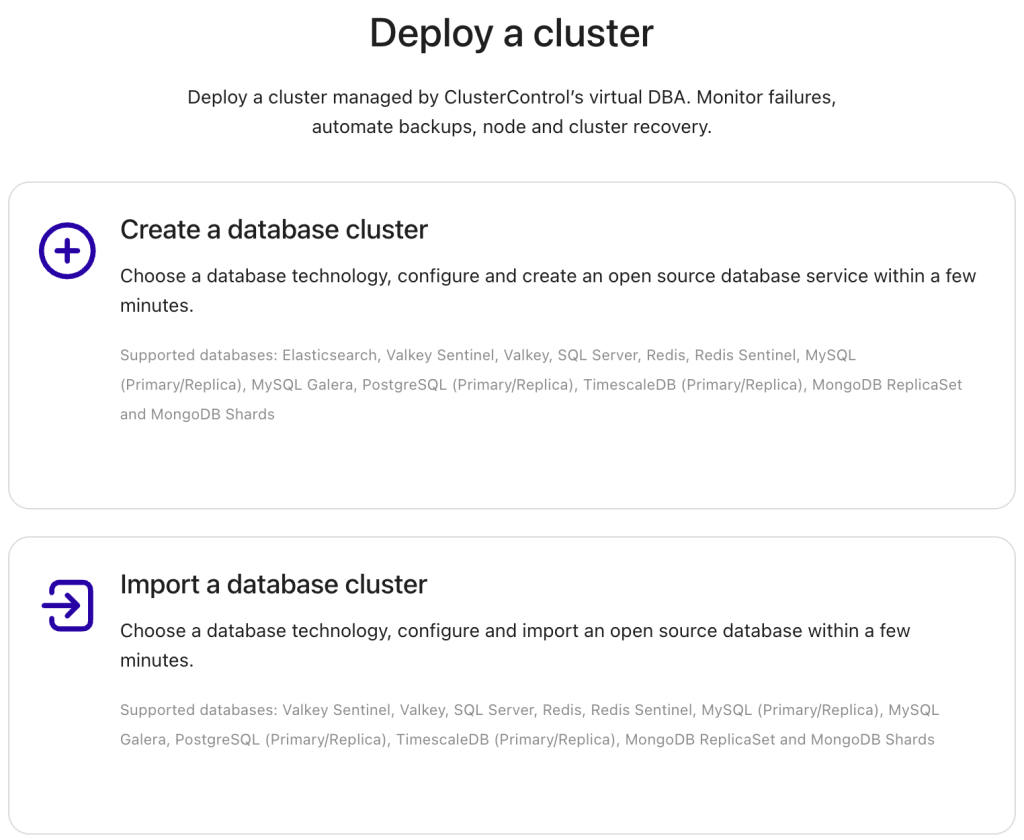
Choose Create a database cluster. Next, you will choose which cluster to deploy. Select MySQL Group Replication in the database drop-down section. As of this writing, Oracle is the only supported vendor and versions 8.0 and 8.4 — see the screenshot below:
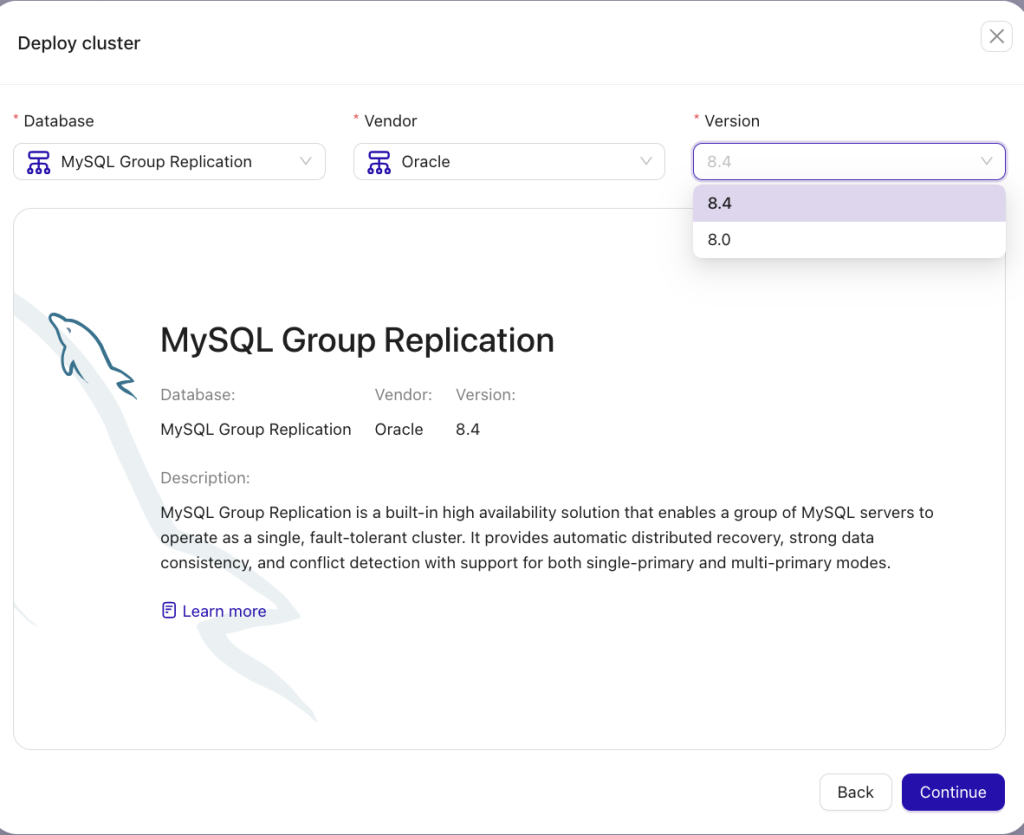
After you hit the Continue button, you will start the straightforward deployment workflow in earnest. You can also follow our user guide based on our documentation by clicking here.
The final step is to review your deployment configuration as illustrated below; if all looks good, hit the Finish button to initiate the deployment and ClusterControl will do the rest.
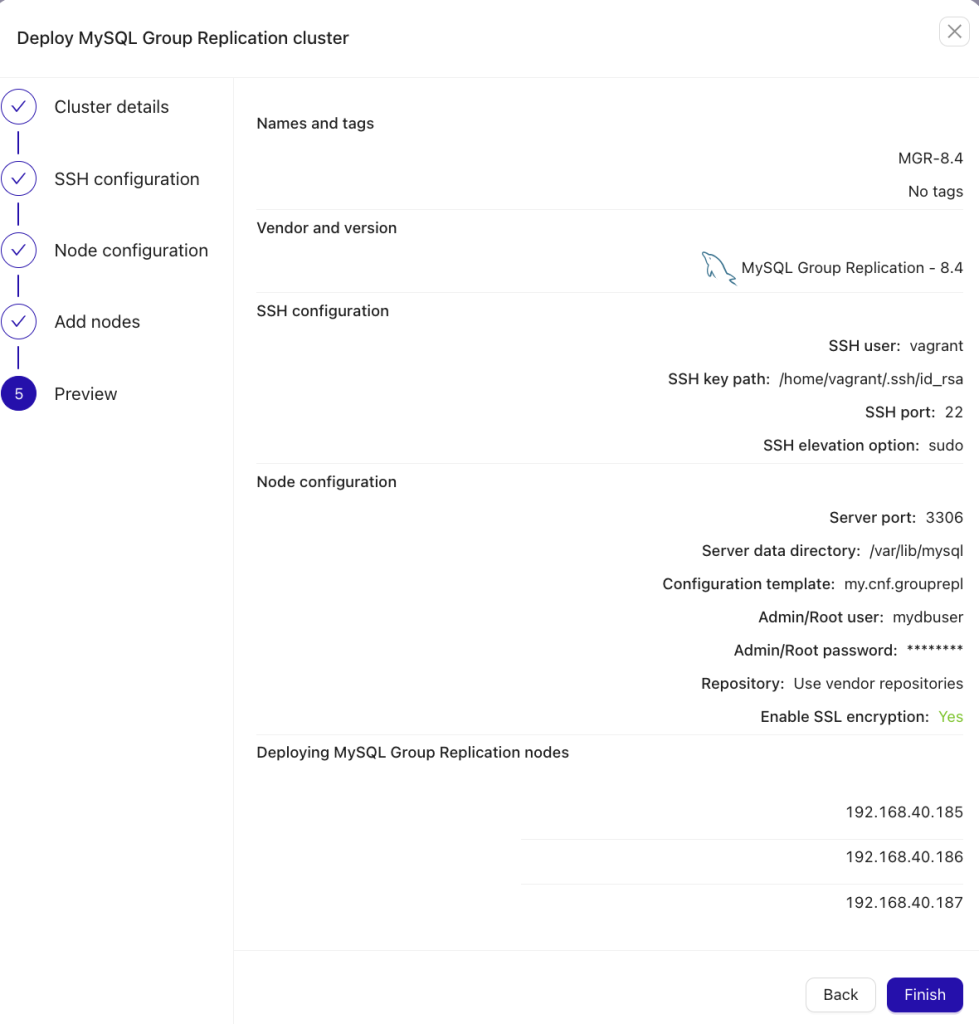
Once started, you can view the stepwise deployment process logs as illustrated below:
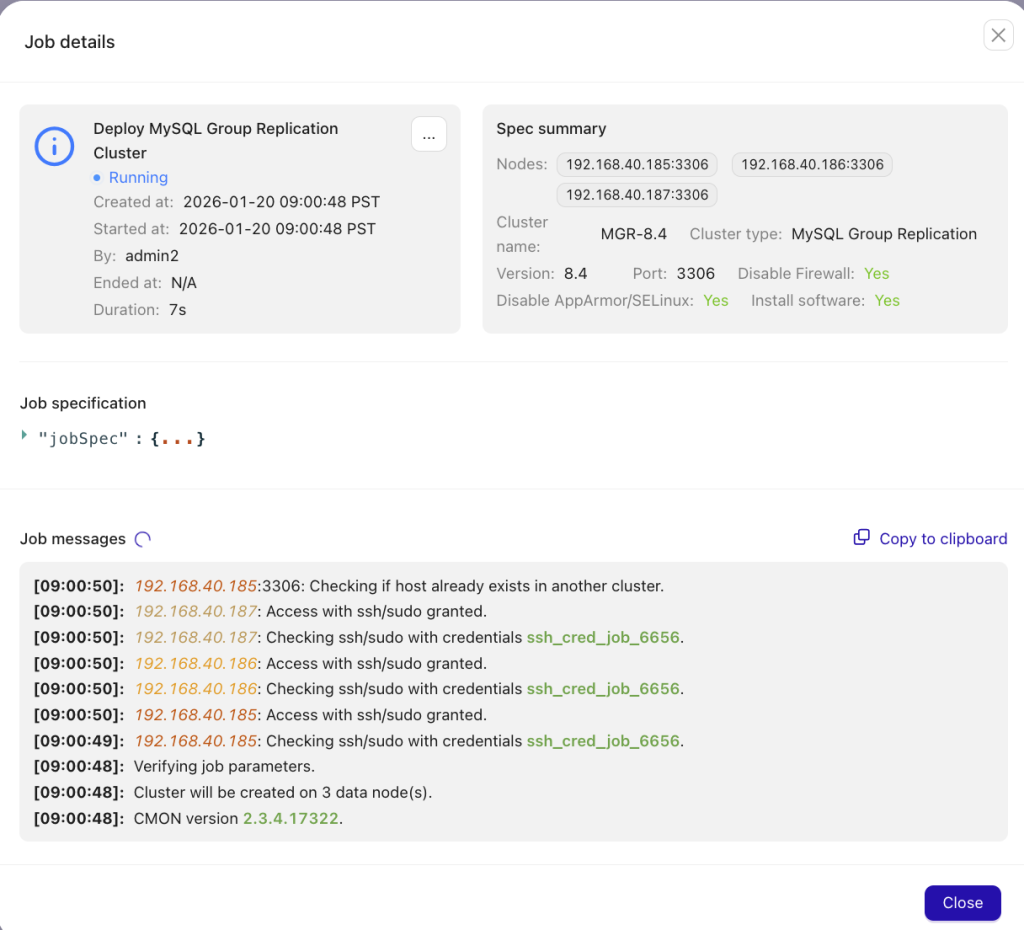
Otherwise, you can view the deployment process’s progress bar in the UI’s foreground:

When the deployment workflow finishes, the cluster will be shown within your Clusters tab — clicking the cluster’s name, you can view its dashboards, topology, node list, performance graphs, backups, logs, and more. Monitoring your cluster using dashboards and other ClusterControl features will render analyzing and inspecting your cluster’s health trivial.
Conclusion
MySQL Group Replication is a strong choice for high availability and multi-writer flexibility, but it is not a path to unlimited write scalability. It replaces the simplicity of a single-writer model with the complexity of distributed coordination.
A successful active/active deployment depends on deliberate design, how familiar you are with Group Replication, as well as your application’s behavior, data access patterns, and operational practices and underlying distributed systems.
It may be best to start with Single-Primary Group Replication then move to active-active once you have a full understanding of the write patterns, the application’s setup and design for conflict handling, and have tested failure and conflict scenarios extensively. When applied to the right use cases and deliberately run, active-active MySQL Group Replication delivers resilient, predictable production performance.
Ready to implement an active-active MGR cluster efficiently and reliably in any environment?
Install ClusterControl in 10-minutes. Free 30-day Enterprise trial included!
Script installation instructions
The installer script is the simplest way to get ClusterControl up and running. Run it on your chosen host, and it will take care of installing all required packages and dependencies.
Offline environments are supported as well. See the Offline Installation guide for more details.
On the ClusterControl server, run the following commands:
wget https://severalnines.com/downloads/cmon/install-cc
chmod +x install-cc
With your install script ready, run the command below. Replace S9S_CMON_PASSWORD and S9S_ROOT_PASSWORD placeholders with your choice password, or remove the environment variables from the command to interactively set the passwords. If you have multiple network interface cards, assign one IP address for the HOST variable in the command using HOST=<ip_address>.
S9S_CMON_PASSWORD=<your_password> S9S_ROOT_PASSWORD=<your_password> HOST=<ip_address> ./install-cc # as root or sudo userAfter the installation is complete, open a web browser, navigate to https://<ClusterControl_host>/, and create the first admin user by entering a username (note that “admin” is reserved) and a password on the welcome page. Once you’re in, you can deploy a new database cluster or import an existing one.
The installer script supports a range of environment variables for advanced setup. You can define them using export or by prefixing the install command.
See the list of supported variables and example use cases to tailor your installation.
Other installation options
Helm Chart
Deploy ClusterControl on Kubernetes using our official Helm chart.
Ansible Role
Automate installation and configuration using our Ansible playbooks.
Puppet Module
Manage your ClusterControl deployment with the Puppet module.
ClusterControl on marketplaces
Prefer to launch ClusterControl directly from the cloud? It’s available on these platforms: