
blog
ClickHouse Scaling and Sharding Best Practices

ClickHouse now supported — deploy and manage in anywhere

ANNOUNCEMENT: PRODUCT UPDATE
ClickHouse is a core engine for real-time analytics, powering critical functions like event ingestion, observability, customer analytics, and large-scale dashboards.
However, scaling a ClickHouse cluster predictably while ensuring high availability, peak performance, and efficient resource utilization is challenging as workloads increase. Scaling involves complex planning beyond just adding nodes, and covers replication, sharding, storage, partitioning, and operational workflows. Without proper processes, clusters risk performance regressions, replication lag, uneven merges, and data hotspots.
This post offers practical, ops-focused guidance for scaling ClickHouse clusters in any environment, from bare metal to cloud instances. We will use a two-node replica topology as a starting point to explore scaling, replication, and sharding.
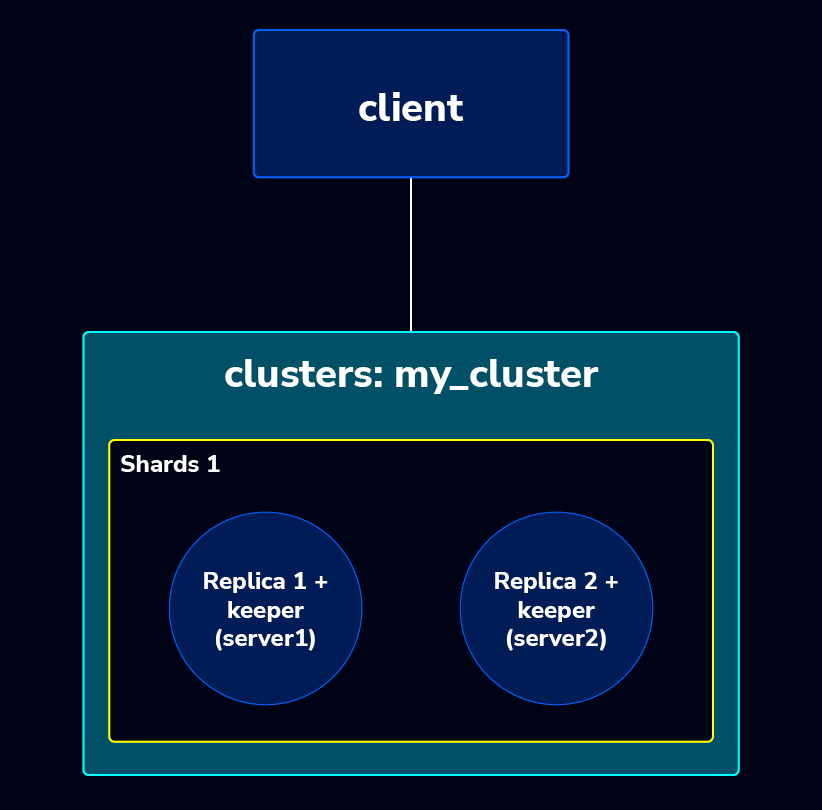
Topology IP detail,
$ cat /etc/hosts

10.10.10.101 rndsvr1 # replica 1
10.10.10.102 rndsvr2 # replica 2
The ClickHouse cluster is currently running with 1 shard and 2 replicas. We’ll beef this up to a 2-shard setup, and maintain a 1:1 shard to replica ratio . The new cluster topology will look like this:
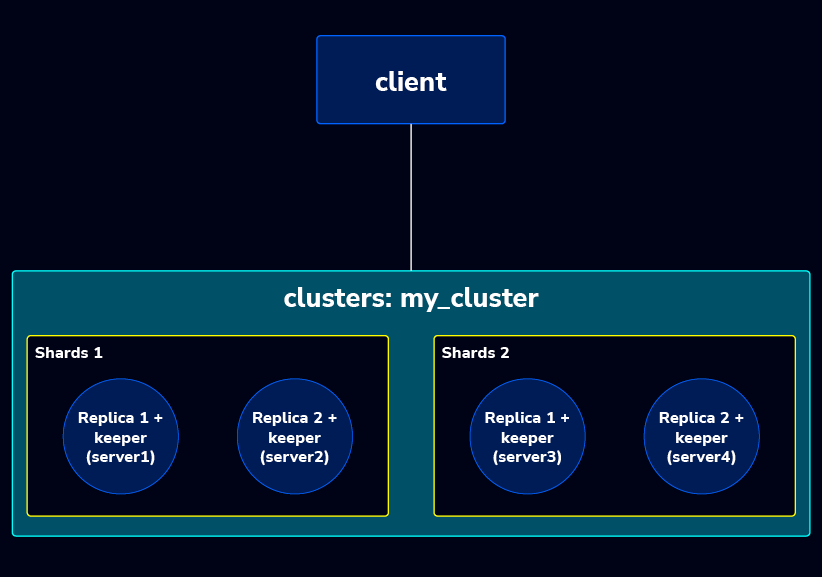
Sharding and replication in ClickHouse
Before we continue, let’s figure out what shards and replicas are, and how distributed tables work in ClickHouse. Understanding these core concepts is crucial for designing a performant, fault-tolerant, and scalable analytical infrastructure.
In Clickhouse a Sharding is essentially slicing or partitioning the overall dataset into smaller pieces. Instead of storing the entire dataset on a single server (vertical scaling), sharding involves distributing different subsets of the data across multiple, independent servers (horizontal scaling). Meanwhile, Replication is the process of creating and maintaining identical copies of data across multiple servers. It directly addresses the challenges of fault tolerance and high availability.
| Sharding | Replication | |
| Purpose | To handle datasets that are too large to fit on a single server, to improve write performance by distributing the load, and to increase query throughput by allowing parallel execution. | To ensure that the system remains operational even if one server fails (fault tolerance), to maintain continuous data access (high availability), and to improve read performance by distributing read queries across multiple copies. |
| Mechanism | Data is partitioned based on a chosen shard key (e.g., customer ID, geographical region, or a hash of a primary key). This key determines which specific subset of the total data resides on which server. | An entire shard’s data is copied to one or more other servers, creating a set of replica servers for that specific shard. Changes made to the primary copy are asynchronously or synchronously propagated to all replica copies. |
| Outcome | The entire dataset is logically divided into different, smaller subsets, and each server (shard) holds a unique portion of the total data. | Each server designated as a replica holds an exact, redundant copy of the data present on its corresponding primary shard. |
ClickHouse uses Distributed tables to provide a unified view over sharded and replicated data. Acting as a logical entry point, they
- Route INSERT operations to the correct shard,
- Parallelize SELECT queries across replicas, and
- Offer transparent read failover.
- This allows applications to interact with the cluster as if it were a single database while improving performance and enabling future scale out. Even in single shard deployments, Distributed tables increase resiliency and reduce query latency.
To understand how ClickHouse exposes a unified view of data in a sharded and replicated cluster, consider the following example. We define a local replicated table on each node and a Distributed table that provides a global entry point for queries across the cluster.
-- Local replicated table on each shard/replica
CREATE TABLE IF NOT EXISTS test_log.log_local ON CLUSTER my_cluster
(
    date Date,
    town LowCardinality(String),
    street LowCardinality(String),
    price UInt32
)
ENGINE = ReplicatedMergeTree('/clickhouse/tables/{shard}/log_local', '{replica}')
PARTITION BY toYYYYMM(date)
ORDER BY (town, street, date);

-- Distributed table providing global view
CREATE TABLE IF NOT EXISTS test_log.log_distributed
  ON CLUSTER my_cluster
  AS test_log.log_local
ENGINE = Distributed('my_cluster', 'test_log', 'log_local', rand());
Logical Relationship Between Local and Distributed Tables
In this example, log_local represents the actual physical storage table on each node. This table uses the ReplicatedMergeTree engine, meaning the data is replicated across the replicas of the same shard through ClickHouse Keeper or ZooKeeper. Every node stores its own part of the dataset, and replication ensures consistency among replicas inside the same shard.
The log_distributed table, on the other hand, is a logical routing layer. It does not store any data by itself. Instead, it forwards queries to all log_local tables across the cluster and aggregates the results before returning them to the client. In other words, the Distributed table acts as a cluster-wide “global view,” while the local tables remain the actual storage layer.
You can think of it like this:
- Local perspective:
log_local→ stores data physically - Cluster perspective:
log_distributed→ routes and merges queries across the cluster
Both tables represent the same dataset but at different operational layers.
Where Reads and Writes Should Go
A common pattern in ClickHouse clusters is:
Writes (INSERT)
Applications typically insert data into the Distributed table:
INSERT INTO test_log.log_distributed (...) VALUES (...);
The Distributed engine decides which shard should receive the row based on the sharding key and then forwards it to the appropriate log_local table. From there, ReplicatedMergeTree handles replication across replicas of that shard.
Reads (SELECT)
For cluster-wide analytics or any query requiring a global dataset, the query is executed against the Distributed table:
SELECT town, sum(price) FROM test_log.log_distributed GROUP BY town;
If you want to debug a specific node or inspect local data, you can query log_local directly.
In simple terms:
- log_distributed → cluster entry point
- log_local → actual storage on each node
Understanding the {shard} and {replica} Macros
In this example, the local table uses:
ENGINE = ReplicatedMergeTree('/clickhouse/tables/{shard}/log_local', '{replica}')This pattern is essential in multi-shard clusters because:
{shard}separates the data directory for each shard{replica}identifies the replica inside that shard
If you define a table without {shard}, such as:
ENGINE = ReplicatedMergeTree('/clickhouse/tables/log_local', '{replica}')It will still work but only if you have one shard. As soon as you expand the cluster and introduce additional shards, this layout will cause conflicts because all shards would try to use the same storage path.
N.B. Using {shard} is therefore considered best practice for scalable clusters.
How ON CLUSTER Works in the DDL
In the second DDL, we used:
CREATE TABLE test_log.log_distributed ON CLUSTER my_cluster AS test_log.log_local ...This means the statement is executed on every node in my_cluster, and on each node ClickHouse will:
- Look for the existing
test_log.log_localtable - Create a
log_distributedtable that references the local table
For a clean cluster wide deployment, the recommended pattern is:
- Create the local replicated table on all nodes:
CREATE TABLE test_log.log_local ... ON CLUSTER my_cluster;- Then create the distributed table:
CREATE TABLE test_log.log_distributed ON CLUSTER my_cluster AS test_log.log_local ENGINE = Distributed(...);This ensures consistent table structure and metadata across all nodes in the cluster.
Scaling Out: Adding a New Shard + Replicas to my_cluster
Scaling out by adding a shard in ClickHouse is more complex than adding a replica. This is because a shard represents a horizontal data partition, meaning data locality changes when a new shard is introduced. Consequently, scaling at the shard level requires modifications to both the cluster configuration and the table layout. This post will detail the traditional steps for adding or scaling out shards and replicas.
Below are the required steps.
- Prepare /etc/hosts on ALL nodes to avoid cluster issues caused by DNS mismatches. Add new nodes rndsvr3 and rndsvr4 to the
/etc/hostsfile on every node..
$ cat /etc/hosts

10.10.10.101	rndsvr1
10.10.10.102	rndsvr2
10.10.10.103	rndsvr3
10.10.10.104 rndsvr4- Install ClickHouse on the new nodes (rndsvr3 & rndsvr4) On both new nodes and make sure the new node.
- The required port must be open :
- 9000 : ClickHouse ↔ ClickHouse; clients ↔ ClickHouse
- 9009 : ClickHouse ↔ ClickHouse
- 9181 : ClickHouse ↔ Keeper
- 9234 : Keeper ↔ Keeper
- Uses the same ClickHouse version as the existing cluster,
- Has proper time synchronization,
- Runs on the same filesystem.
- User permissions (
clickhouse:clickhouse)
- The required port must be open :
- Set shard & replica macros on each node and you must define
shardandreplicaid macros per node on/etc/clickhouse-server/config.d/macros.xml.
-- rndsvr3
<clickhouse>
    <macros>
        <shard>2</shard>
        <replica>replica1</replica>
    </macros>
</clickhouse>

-- rndsvr4
<clickhouse>
    <macros>
        <shard>2</shard>
        <replica>replica2</replica>
    </macros>
</clickhouse>- Extend the
my_clusterdefinition (remote_servers) on all nodes, update yourremote_serversconfig (e.g.config.d/clusters.xml) to include the new shard.
<clickhouse>
    <remote_servers>
        <my_cluster>
            <shard>
                <internal_replication>true</internal_replication>
                <replica>
                    <host>rndsvr1</host>
                    <port>9000</port>
                </replica>
                <replica>
                    <host>rndsvr2</host>
                    <port>9000</port>
                </replica>
            </shard>

            <shard>
                <internal_replication>true</internal_replication>
                <replica>
                    <host>rndsvr3</host>
                    <port>9000</port>
                </replica>
                <replica>
                    <host>rndsvr4</host>
                    <port>9000</port>
                </replica>
            </shard>

        </my_cluster>
    </remote_servers>
</clickhouse>- Extend the clickhouse keeper on each replica to make it have quorum (minimal 3 replicas) since the previous setup only had 2 replicas.
<keeper_server>
            <tcp_port>9181</tcp_port>
            <server_id>101</server_id>
            <log_storage_path>/var/lib/clickhouse/coordination/logs</log_storage_path>
            <snapshot_storage_path>/var/lib/clickhouse/coordination/snapshots</snapshot_storage_path>

            <coordination_settings>
                <operation_timeout_ms>10000</operation_timeout_ms>
                <min_session_timeout_ms>10000</min_session_timeout_ms>
                <session_timeout_ms>100000</session_timeout_ms>
                <raft_logs_level>information</raft_logs_level>
                <compress_logs>false</compress_logs>
            </coordination_settings>
            <hostname_checks_enabled>true</hostname_checks_enabled>
            <raft_configuration>
                <server>
                    <id>101</id>
                    <hostname>rndsvr1</hostname>
                    <port>9234</port>
                </server>
                <server>
                    <id>102</id>
                    <hostname>rndsvr2</hostname>
                    <port>9234</port>
                </server>
                <server>
                    <id>103</id>
                    <hostname>rndsvr3</hostname>
                    <port>9234</port>
                </server>
                <server>
                    <id>104</id>
                    <hostname>rndsvr4</hostname>
                    <port>9234</port>
                </server>

            </raft_configuration>
</keeper_server>- Recreate the local replicated table and Distributed table. You can show the creation script of the tables (replicated and distributed) by using
show create table table_namethen you can recreate by using the same script but don’t forget to addIF NOT EXISTSwhile recreate it. - Validate the new shard and replicas
-- verify replicated tables and distributed tables
SELECT hostName(), name, engine
  FROM system.tables
WHERE database = 'test_log'
  AND name IN ('log_local','log_distributed')
ORDER BY hostName(), name;

-- verify count data every shard.
SELECT hostName(), count(*)
  FROM test_log.log_local
GROUP BY hostName()
ORDER BY hostName();- One important note: data rebalancing
Adding a new shard does not automatically move old data.
- All new INSERTs will be distributed according to your sharding key.
- Existing data remains on shard 1 unless you manually rebalance e.g.
INSERT SELECTthrough the Distributed table into a new cluster, or using shard-migration tools(discussed later).
Operational nuances for self-managed ClickHouse
Scaling ClickHouse across hybrid environments mixing on-premise servers with cloud instances introduces operational nuances that engineers must evaluate before expanding the cluster. The following considerations help ensure stable replication, predictable performance, and consistent behavior across diverse infrastructure types; let’s start with node management:
- Cluster membership
- Traditionally, you list every shard/replica in
remote_servers:
- Traditionally, you list every shard/replica in
<remote_servers>
    <cluster_name>
        <shard>
            <replica>
                <host>node1</host>
                <port>9000</port>
            </replica>
            ...
        </shard>
    </cluster_name>
</remote_servers>- Cluster discovery config
With Cluster Discovery, nodes auto register via Keeper / ZooKeeper under a path; adding / removing a node is done by starting/stopping a ClickHouse server that registers under that path. The cluster view updates without config changes or restarts.
- Data vs cluster config
- Cluster Discovery only changes the cluster topology (what nodes are visible in
system.clusters), not where data actually lives. - If you add a 4th node to a 3‑node cluster, existing replicated tables are still only on the original 3 nodes unless you explicitly create/attach them on the new node (or use a Replicated database engine to manage this).
- Cluster Discovery only changes the cluster topology (what nodes are visible in
- Replication behavior
- Replicated tables use Keeper to coordinate inserts and merges; new nodes can catch up by copying state from an existing node or replaying logs, with configurable trade‑offs between CPU and network.
- Separate storage & compute
You can approximate ClickHouse Cloud’s model by using S3 / GCS backed MergeTree: data in object storage, only metadata on nodes. Then adding / removing compute nodes is mostly about metadata replication, making scaling easier.
High availability and failover
While sharding is meant for scale and load distribution, ClickHouse leverages replication for high availability (HA):
- Sharding for scale and load distribution.
- Replication for availability and data integrity. Each shard can have multiple replicas, implemented via
ReplicatedMergeTreeengines coordinated by ClickHouse Keeper (Raft).
Replica health & automated failover patterns
Replication characteristics:
- Asynchronous multi‑master: writes can go to any replica; other replicas pull data in the background.
- Eventual consistency by default; stronger guarantees (quorum / sequential consistency) are possible but have performance cost. Health and failover mechanisms mentioned:
- Replica health endpoint:
- Configure
max_replica_delay_for_distributed_queries. - Use HTTP
/replicas_status: returns200 OKif replica is available and not delayed; returns503with delay info if it is lagging. - Automatic recovery: replicas track table state via parts and checksums; if local state diverges, a replica downloads missing/broken parts from others and quarantines unexpected data.
- Configure
- Leader election for merges: multiple replicas can be leaders; leaders schedule merges, ensuring byte‑identical parts across replicas.
Multi‑region / cloud region considerations
Multi‑region replication is supported, but:
- Recommended to keep inter‑region latency in the two‑digit millisecond range; otherwise write performance suffers due to consensus overhead.
- Replication between US coasts is likely fine; US – Europe is discouraged for synchronous‑style patterns.
- Configuration is the same as single‑region deployments; you just place replicas in different locations.
Support Team Monitoring and Operations
Monitoring health and availability
- Built‑in observability dashboard at
$HOST:$PORT/dashboard:- Shows QPS, CPU, merges, IO, memory, parts, etc.
- System tables:
system.metrics,system.events,system.asynchronous_metrics, andsystem.asynchronous_metric_logfor resource and server metrics.
- External monitoring integrations:
- Export metrics to Graphite or Prometheus via server config.
- Liveness checks:
/pingHTTP endpoint returns200 OKif server is up.
- Replica health:
/replicas_status+max_replica_delay_for_distributed_queriesto detect lagging replicas and drive routing/failover decisions.
Operationally, support teams need to:
- Watch replica lag and availability to avoid routing queries to stale or unhealthy replicas.
- Monitor merges, parts count, and resource utilization to prevent degraded performance that can look like availability issues.
- Manage Keeper (or ZooKeeper) health, since replication and cluster coordination depend on it.
Performance optimisation when scaling
As ClickHouse clusters expand with more shards, replicas or data, their performance characteristics change. While scaling enhances parallelism and capacity, it also makes the system more susceptible to issues related to data distribution, merge efficiency, storage latency, and background workload. Achieving optimal performance in a scaled-out ClickHouse environment necessitates identifying where bottlenecks occur and proactively mitigating problems like hotspots, replication lag, or merge backlogs that can degrade cluster performance.
The following sections highlight key operational practices for maintaining performance in modern ClickHouse versions.
Avoiding Hotspots and Balancing Shards
Hotspots occur when a sharding key causes a disproportionate amount of data or query load to be directed to a single shard. This leads to uneven resource utilization, making the overloaded shard a bottleneck for the entire cluster.
Strategies for Avoiding Hotspots
- Choose an Effective Sharding Key: The quality of the sharding key is the single most important factor for balancing load.
- High Cardinality: The key should have a large number of unique values (e.g., UUID, User ID, Session ID). Keys with low cardinality (e.g., date, city, event type) will group too many records onto a single shard.
- Even Distribution: The distribution of the key’s values should be uniform. If a few keys account for most of the data (e.g., a few super-users in a user ID key), the cluster will still be unbalanced.
- Common Techniques:
rand(): Usingrand()as the sharding key provides perfect, uniform distribution but severely limits shard-local queries, as related data might be spread across all shards.sipHash64(key): Hashing a high-cardinality key (like a user ID) is often the best compromise, providing even distribution while ensuring all data for a specific entity resides on one shard.
- Evaluate and Adjust the Sharding Expression: When defining the Distributed table, the sharding key is specified in the
rand()position of the engine definition.
| Current Sharding Expression (Uniform but Query-Inefficient) | ENGINE = Distributed('my_cluster', 'test_log', 'log_local', rand()); |
| Improved Sharding Expression (Entity-local & Distributed) | ENGINE = Distributed('my_cluster', 'test_log', 'log_local', sipHash64(user_id)); |
- Monitor Shard Balance: Regularly check the data distribution and query load across shards using system tables.
| Metric | Query |
|---|---|
| Data Size Balance | SELECT hostName(), sum(bytes_on_disk) AS total_disk_usage, formatReadableSize(total_disk_usage) FROM system.parts GROUP BY hostName() ORDER BY total_disk_usage DESC; |
| Row Count Balance | SELECT hostName(), count() FROM test_log.log_local GROUP BY hostName(); |
| Query Load Balance | SELECT hostName(), count() FROM system.query_log WHERE query_start_time >= now() - INTERVAL 1 HOUR GROUP BY hostName(); |
Post-Deployment Data Rebalancing
As noted previously, adding a new shard does not automatically rebalance existing data. If monitoring shows significant imbalance after scaling out, you must manually rebalance the historical data.
- INSERT INTO SELECT (The Traditional Method): The most common method is to perform a cluster-wide re-ingestion.
- Create a new set of distributed and local tables (e.g.,
log_local_v2,log_distributed_v2) using the optimal sharding key/expression. - Execute an
INSERT INTO SELECTstatement from the old distributed table into the new one. Since the new Distributed table is aware of all shards (including the new one), the data will be re-sharded and inserted according to the new logic.
| Rebalancing Command | INSERT INTO test_log.log_distributed_v2 SELECT * FROM test_log.log_distributed; |
| Considerations | This is resource-intensive and requires significant free storage space and downtime or maintenance windows. |
Storage Concerns: Free Space and Merge Behavior
When scaling a ClickHouse cluster, managing storage efficiently and ensuring proper merge behavior are critical operational responsibilities, particularly for the MergeTree family of tables (including ReplicatedMergeTree).
Managing Free Space and Part Merges
The MergeTree engine stores data in immutable “parts.” Background processes constantly merge smaller parts into larger ones to optimize read performance and reduce file count. This merge process temporarily requires significant free space.
- Free Space Requirement: A common rule of thumb is that a node should have at least 2x to 3x the size of the largest unmerged data part available as free space on the disk where ClickHouse stores data.
- If insufficient space is available, merges will stall, leading to a large number of small data parts.
- The Problem of Too Many Parts: A high number of small parts (part explosion) dramatically degrades query performance because ClickHouse must open and scan many files. It also increases metadata overhead.
- Monitoring: Use the
system.partstable to monitor the number of parts and the size of the largest parts.
| Metric | Query |
|---|---|
| Parts Count | SELECT count() FROM system.parts WHERE active; |
| Parts per Table | SELECT database, table, count() AS parts FROM system.parts WHERE active GROUP BY database, table ORDER BY parts DESC; |
| Disk Space Available | SELECT name, path, formatReadableSize(free_space) FROM system.disks; |
Optimizing Merge Strategy
ClickHouse attempts to merge parts efficiently, but high write throughput or uneven data distribution can overwhelm the merge scheduler.
- Prioritizing Merges: You can influence the merge process using settings, although ClickHouse’s default scheduling is usually robust.
background_pool_size:Controls the number of threads available for background tasks (merges, fetches, mutations). Increasing this can speed up merges if CPU/IO is the bottleneck.
- Mitigating Part Explosion:
- Tune Write Frequency: Try to batch inserts into larger chunks to reduce the number of initial small parts.
- Set
max_parts_in_total: This setting defines the maximum number of parts allowed in a single partition before ClickHouse will aggressively block future inserts to force merges. This acts as a protective mechanism against part explosion.
Separate Storage (Volume Configuration)
For servers with heterogeneous storage (e.g., fast SSDs for hot data, slower HDDs for cold archives), ClickHouse allows defining multiple storage volumes.
- Configuration: You define volumes and policies in the server configuration (e.g.,
storage_configuration). - Tiered Storage: Using policies, you can automatically move older, colder data parts from fast storage (e.g., d
efaultvolume) to slower, cheaper storage (e.g., cold volume) based on part age. This optimizes the utilization of expensive, high-speed disks for active data while maintaining the total capacity of the cluster.
| Policy Parameter | Description |
|---|---|
move_factor | The disk usage ratio at which data migration to the next volume in the policy will begin. |
prefer_not_to_merge | If set to 1, merges will not occur on parts stored in this volume (useful for archival/cold storage). |
Integrating into a unified ops flow
As ClickHouse clusters grow with more shards, replicas, and storage layers, the daily burden intensifies. Routine tasks like provisioning, configuration, schema sync, operational replication monitoring, and failure handling become more complex. To reduce overhead and ensure reliability, ClickHouse should be integrated into a unified operational workflow. This provides consistent management across environments (on-prem, cloud, hybrid), offers cross-database visibility, and enables automated maintenance.
A unified operations flow is essential for ensuring predictable scaling, reproducible cluster changes, and consistent operational standards.
How a Multi-Database Operations Platform Fits In
Managing distributed databases, such as ClickHouse, manually with CLI commands and adhoc automation can be complex. A dedicated platform provides a centralized management layer, allowing operators to execute, monitor, and audit critical lifecycle operations from a single control plane. This approach significantly reduces human error and streamlines repetitive tasks, especially as database clusters scale in size and complexity.
Key Value Propositions of a Management Platform:
- Simplified Operations: Provides a consistent operational interface that reduces complexity.
- Automated Lifecycle Management:
- Deployment & Scaling: Simplifies adding new nodes, whether expanding an existing shard or creating a new one.
- Failure Handling and Repair: Automates fixes for desynced replicas, lost parts, or corrupted tables.
- Cluster Consistency & Awareness:
- Topology-aware Management: Automatically understands the cluster structure, including shards, replicas, Keeper nodes, and distributed table configurations.
- Configuration Enforcement: Ensures consistency for macros,
remote_serversdefinitions, storage paths, and replication settings across all nodes.
- Comprehensive Visibility:
- Observability & Alerting: Tracks key metrics like replication lag, merge queue size, disk usage, and background pool pressure.
- Cross-database Management: Offers a unified workflow for operators managing heterogeneous databases (e.g., MySQL, PostgreSQL, MongoDB, or ClickHouse).
Automating Node Addition, Rebalancing, and Scaling Tasks
Manually scaling ClickHouse requires a multi-step process, encompassing preparing new nodes, updating cluster configurations, creating replicas, provisioning tables, validating ClickHouse Keeper connectivity, and verifying replication health. Automating these steps is key to achieving greater consistency, minimizing risks, and speeding up deployment cycles.
Automating Node Provisioning and Cluster Discovery
Automation can be used to:
- Pre-configure OS dependencies and sysctl parameters
- Install ClickHouse packages
- Deploy macros (
shard,replica) - Generate and distribute configuration files
- Register new nodes into
remote_serversdefinitions
Automating Schema Propagation
As clusters grow, keeping schemas consistent across nodes becomes more important:
- Distributed tables must reflect updated cluster topology
- Schema drift becomes more likely as cluster size grows
Automation ensures:
CREATE DATABASE … ON CLUSTERandCREATE TABLE … ON CLUSTERcommands run reliably- All nodes remain synchronized when introducing schema changes
- Distributed tables update correctly after adding new shards
Automating Rebalancing Operations
ClickHouse does not automatically redistribute old data after scaling out. Automation helps plan and execute controlled rebalancing:
- Selectively moving partitions
- Rebuilding parts by using
INSERT INTO … SELECT - Tiering cold partitions into object storage automatically
- Scheduling rebalancing at off-peak hours
Platforms can track rebalancing progress, ensuring minimal performance impact.
Automating Scaling and Background Maintenance
Tasks that are ideal candidates for automation:
- Auto-recovering replicas with missing or corrupted parts
- Scaling read replicas for analytics workloads
- Refreshing Keeper/Zookeeper configuration
Automation ensures the cluster stays healthy without constant operator intervention.
Conclusion
Scaling ClickHouse from a single shard to a robust, multi-shard, replicated cluster is complex but necessary for growing analytical needs.
The process requires configuration changes updating the server (network,storage), deploying shard/replica macros, extending the remote_servers cluster definition, and expanding the ClickHouse Keeper ensemble.
Maintaining performance requires proactive strategies:
- Sharding Optimization: Use a high-cardinality sharding key (e.g.,
sipHash64(user_id))to prevent hotspots. - Storage Management: Monitor disk space and manage merges carefully to avoid “part explosion,” which degrades query performance.
- High Availability: Fault tolerance in self-managed environments relies on replication (Cloud abstracts this).
- Automation: Integrate ClickHouse with an operational platform for automated scaling, configuration management, schema consistency, and data rebalancing to ensure reliability as clusters grow.
Meticulous planning and robust operations ensure the ClickHouse infrastructure remains performant, predictable, and scalable despite increasing data ingestion.
Try ClickHouse yourself free for 30 days, install ClusterControl now!
Script Installation Instructions
The installer script is the simplest way to get ClusterControl up and running. Run it on your chosen host, and it will take care of installing all required packages and dependencies.
Offline environments are supported as well. See the Offline Installation guide for more details.
On the ClusterControl server, run the following commands:
wget https://severalnines.com/downloads/cmon/install-cc
chmod +x install-cc
sudo ./install-cc     # omit sudo if you run as root
After the installation is complete, open a web browser, navigate to https://<ClusterControl_host>/, and create the first admin user by entering a username (note that “admin” is reserved) and a password on the welcome page. Once you’re in, you can deploy a new database cluster or import an existing one.
The installer script supports a range of environment variables for advanced setup. You can define them using export or by prefixing the install command.
See the list of supported variables and example use cases to tailor your installation.