
blog
ClusterControl Kubernetes Database Operator Management now GA
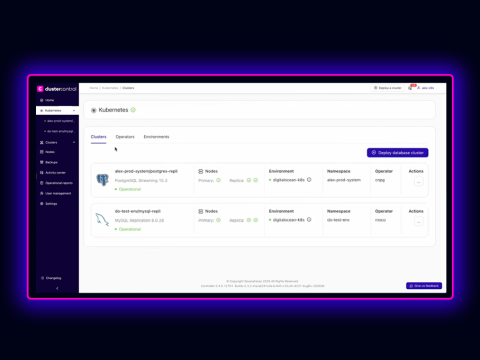
Standardize operator-driven database ops with GitOps while keeping Kubernetes and traditional environments under one roof.
Kubernetes database operators are maturing, becoming the default way to run databases in-cluster. They bring automation, self-healing patterns, and declarative lifecycle management, but they also introduce new complexity: operator-specific CRDs, dependencies, and “one-off” ways of doing the same Day-2 tasks across PostgreSQL, MySQL, and more.
N.B. check out the K8s database operator documentation for detailed setup instructions.
ClusterControl’s Kubernetes Database Operator management is built to make that complexity feel manageable. It gives DevOps and platform teams a single, consistent workflow to deploy operators, roll out database clusters, and run essential Day-2 operations while still supporting the mixed reality most teams live in today: Kubernetes plus traditional environments.
Finally, a unified way to work with database operators
Instead of stitching together bespoke scripts and runbooks per operator, ClusterControl provides a consistent experience across the lifecycle:
- Connect Kubernetes environments and manage them centrally
- Enable GitOps so changes flow through Git and pull requests
- Deploy CNPG and MOCO operators and their clusters via standardized templates
- Configure scheduled backups to S3 and S3-compatible storage
- Search and filter logs per instance / container for faster troubleshooting
That consistency provides teams a solid foundation; but, the real value shows up when you experience how it changes your day-to-day operations.
Why it’s important for DevOps and platform teams
Less operator sprawl, more repeatability
Operators are powerful, but each has its own conventions. ClusterControl helps teams reduce cognitive load by unifying how operators and database clusters are rolled out so you’re not reinventing processes every time you switch engines or teams.
And once your workflows are repeatable, the next step is ensuring they’re also reviewable and auditable.
GitOps-friendly by design
If Git is your source-of-truth, database infrastructure should follow the same discipline as application delivery. With GitOps enabled, ClusterControl can drive changes via pull requests making updates easier to review, track, and roll back.
Governance is essential, but making database delivery faster without sacrificing standards is too.
Faster database delivery with templates and guardrails
ClusterControl supports configuration and resource templates so teams can standardize sizing and defaults. That means faster deployments, fewer snowflakes, and a clearer platform contract for application teams provisioning databases.
Of course, delivering databases is only half the job; operating them reliably is where platforms prove themselves.
Day-2 essentials built in: backups and troubleshooting
ClusterControl includes operational must-haves like scheduled backups to S3 and S3-compatible storage with retention policies, plus log access with filtering and search across instances and containers so teams can move from “it’s deployed” to “it’s operable” with less glue code.
And finally, it’s hard to overstate the advantage of doing all of this without fragmenting your tooling.
One platform for Kubernetes and traditional environments
Most teams aren’t “Kubernetes-only.” ClusterControl is designed for hybrid estates so you can manage operator-based Kubernetes databases alongside traditional environments from a single platform, keeping operations coherent as you modernize at your own pace.
Wrapping up
If you’re adopting database operators and want a clearer, more standardized way to manage deployments and Day-2 operations without adding another silo, ClusterControl Kubernetes Database Operator management is built to help.
Already a ClusterControl user? Test it out by following the installation instructions in docs.
Not a ClusterControl user? Follow the instructions below to install and try it free for 30-days:
ClusterControl script installation instructions
The installer script is the simplest way to get ClusterControl up and running. Run it on your chosen host, and it will take care of installing all required packages and dependencies.
Offline environments are supported as well. See the Offline Installation guide for more details.
On the ClusterControl server, run the following commands:
wget https://severalnines.com/downloads/cmon/install-cc
chmod +x install-cc
With your install script ready, run the command below. Replace S9S_CMON_PASSWORD and S9S_ROOT_PASSWORD placeholders with your choice password, or remove the environment variables from the command to interactively set the passwords. If you have multiple network interface cards, assign one IP address for the HOST variable in the command using HOST=<ip_address>.
S9S_CMON_PASSWORD=<your_password> S9S_ROOT_PASSWORD=<your_password> HOST=<ip_address> ./install-cc # as root or sudo userAfter the installation is complete, open a web browser, navigate to https://<ClusterControl_host>/, and create the first admin user by entering a username (note that “admin” is reserved) and a password on the welcome page. Once you’re in, you can deploy a new database cluster or import an existing one.
The installer script supports a range of environment variables for advanced setup. You can define them using export or by prefixing the install command.
See the list of supported variables and example use cases to tailor your installation.
Other Installation Options
Helm Chart
Deploy ClusterControl on Kubernetes using our official Helm chart.
Ansible Role
Automate installation and configuration using our Ansible playbooks.
Puppet Module
Manage your ClusterControl deployment with the Puppet module.
ClusterControl on Marketplaces
Prefer to launch ClusterControl directly from the cloud? It’s available on these platforms: